Most people think of FSM as a scheduling tool. That's only part of the story. Its real impact shows up in numbers business owners already track: first-time fix rates, technician utilization, and how often a customer calls back for another job. This article breaks down those measurable benefits, not just a feature list.
Key Takeaways
- Centralizes scheduling, dispatching, work orders, and customer communication in one platform
- Optimized routing and real-time visibility cut fuel costs and reduce truck rolls
- Without FSM, businesses face double-booking, delayed invoicing, and rising per-job costs
- Pairing FSM with vehicle-level GPS tracking extends these gains fleet-wide
What Is Field Service Management Software?
FSM software coordinates scheduling, dispatching, work orders, invoicing, and communication for any team that performs work at a customer's location instead of a fixed office.
You'll find it running the back office for:
- HVAC, plumbing, and electrical contractors
- Construction and utility crews
- Telecom and pest control technicians
- Waste management and towing operations
The software matters only because of what it delivers: fewer wasted trips, faster response times, and customers who trust you'll show up when you say you will.
Key Advantages of Field Service Management Software
The advantages below tie to metrics businesses actually track — cost per job, technician utilization, first-time fix rate, and customer retention. They're not abstract "efficiency" claims. Each advantage compounds when office-based scheduling data and field-based location data work together instead of living in separate systems.
Optimized Scheduling, Dispatching, and Route Efficiency
FSM software matches the right technician, by skill and proximity, to the right job automatically. That replaces the manual back-and-forth of a dispatcher scrolling through a spreadsheet or calling technicians one by one to check availability.
The result is less windshield time and less idle time between jobs, which means more service calls per technician per day.
Konica Minolta saw this play out directly. After deploying an automated scheduling and optimization platform, the company reported 20% to 25% higher productivity, 17% more closed incidents per technician, and 25% more jobs completed daily, according to IFS's customer case study.
Pairing that scheduling data with real-time vehicle tracking sharpens routing even further. Azuga's high-frequency tracking, for example, updates vehicle location every 30 seconds instead of the longer intervals many basic GPS systems use.
Dispatchers get a live, accurate picture of where every truck sits, not a location from two minutes ago. That matters when you're rerouting a technician mid-day to handle an emergency call.
KPIs impacted:
- Jobs completed per technician per day
- Average travel time between stops
- Fuel cost per route
This advantage matters most for businesses with high call volume, multiple technicians, or service areas that span wide geographies where a few extra miles per job add up fast.
Real-Time Data Visibility and Faster Decision-Making
Instead of waiting for an end-of-day paper update, office staff and technicians get live access to job status, inventory levels, and customer history the moment it changes. That visibility lets managers reroute a technician, approve a parts order, or step in on a customer escalation while the job is still happening, not after the truck has already left.
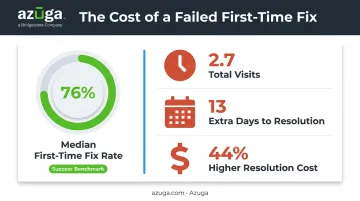
This matters because failed first visits are expensive. A 2024 benchmark analyzing 24 million work orders across 145 organizations found the median first-time fix rate sits at 76%, per the 2024 Field Service Benchmark Report.
Every failed visit adds an average of 2.7 total visits, 13 extra days to resolution, and pushes total resolution cost 44% above the standard cost per work order.
Real-time access to service history and parts availability is what closes that gap. A technician who can see the equipment's full repair record before knocking on the door is far less likely to show up without the right part.
KPIs impacted:
- First-time fix rate
- Average job completion time
- Data entry errors
This benefit compounds for businesses running multiple crews simultaneously across different sites, or anyone managing warranty and compliance documentation that needs to be accurate the first time.
Stronger Customer Experience and Revenue Growth
Customers judge a service business almost entirely on communication. Arrival windows, status updates, and digital invoicing eliminate the "no-show" perception that plagues field service industries, even when the technician actually did show up on time.
There's real money attached to getting this right. A Housecall Pro survey of 1,040 U.S. homeowners found that 73% would refer a contractor after an excellent experience and 68% would rehire the same company. Even more telling, 70% said they'd pay more for a provider with a stronger service reputation, according to the Home Service Customer Service Report.
There's also an upsell angle. When a technician can pull up a customer's full service history on a tablet mid-call, spotting a maintenance contract opportunity or an aging unit that needs replacing becomes part of the visit instead of an afterthought.
KPIs impacted:
- Customer satisfaction score
- Repeat business rate
- Average revenue per service call
This advantage carries the most weight in competitive local markets, think HVAC, plumbing, and electrical trades, where referrals and repeat customers directly drive growth.
What Happens When FSM Software Is Missing or Ignored
Skip the software, and the cracks show up fast. Manual, spreadsheet-based operations tend to produce the same set of problems regardless of industry:
- Double bookings and missed appointments because no one has a centralized view of who's scheduled where
- Higher first-visit failure rates since technicians lack job history or parts data before arriving
- Delayed invoicing and cash flow gaps from paperwork that sits on a desk until someone gets around to it
- Scaling problems as the owner tries to delegate dispatch decisions to a growing team without a shared system
- Rising fuel and labor costs from reactive, unoptimized routing
None of these problems show up as a single dramatic failure. They add up one missed appointment or one extra truck roll at a time, showing up first as overtime hours, then as customer complaints, and eventually as technicians who quit over the chaos.
How to Get the Most Value from FSM Software
Buying the software is the easy part. Getting the return depends on how you use it week to week.
- Review scheduling data weekly. Look for patterns, like which technicians consistently run long or which routes eat more fuel than expected, instead of letting the dashboard sit unused.
- Integrate with your accounting software. Connecting FSM data to tools like QuickBooks eliminates the manual re-entry that causes invoicing delays and errors.
- Layer in fleet-level visibility. Job scheduling tells you what work is planned. GPS fleet tracking tells you where the vehicles actually are, how they're driving, and when maintenance is due.
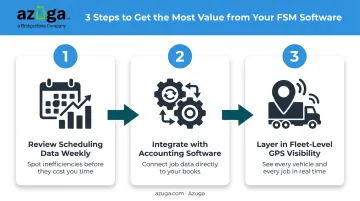
That third point matters more than it might seem. A business managing both technicians and vehicles gets the fullest picture by combining job-level FSM data with vehicle-level tracking.
Azuga's platform, for instance, overlays real-time vehicle location directly on tools like the ServiceTitan dispatch board, so dispatchers see technician location without switching screens. Add driver safety scoring and fuel cost reporting on top, and you're managing the job and the vehicle that gets it done from the same operational view.
Conclusion
The value of FSM software comes down to visibility and speed across scheduling, communication, and billing. None of it happens on day one. These advantages compound as data accumulates and your team actually adopts the system instead of working around it.
Treat FSM software as an ongoing operational practice, not a one-time purchase. For businesses running vehicles alongside technicians, pairing it with GPS fleet tracking, like Azuga's platform, closes the remaining gap between where a job is scheduled and where your trucks actually are.
Frequently Asked Questions
What are the benefits of field service management software?
FSM software improves scheduling efficiency, gives office staff and technicians real-time visibility into jobs and inventory, and strengthens customer retention through proactive communication. Together, these reduce cost per job while increasing revenue per technician.
What does field service management software do?
It centralizes scheduling, dispatching, work orders, invoicing, and technician communication into a single platform. This replaces manual spreadsheets and phone-based coordination with one shared system.
Why is field service management important?
It directly connects to faster response times, lower operational costs, and stronger customer retention. Without it, businesses tend to face scheduling chaos and inconsistent service quality as they grow.
What are the key components of field service management software?
Core components include scheduling and dispatch, mobile access for field technicians, inventory and asset tracking, and reporting on job and customer-interaction KPIs.
What industries benefit most from field service management software?
HVAC, plumbing, electrical, construction, utilities, and telecom businesses see the most value, along with pest control, waste management, and towing operations that dispatch crews to customer locations daily.
How does field service management software reduce operational costs?
It cuts travel time through optimized routing, reduces repeat visits by giving technicians job history and parts data upfront, and automates administrative work like invoicing that would otherwise eat into billable hours.