Introduction
A homeowner waits for their HVAC technician, promised within a 12-2 PM window. It's now 2:45, and nobody has called. They dial the office, only to learn the dispatcher has no idea where the technician is either.
This scene plays out thousands of times a day across service fleets and delivery operations. The last mile, that final stretch between dispatch and the customer's door, is the most visible and most expensive part of any delivery or service journey. Yet many businesses still track it with phone calls, guesswork, and driver memory.
Consumers have noticed. Real-time tracking has become the baseline expectation, not a bonus feature.
This guide breaks down what last mile tracking actually means, how it works behind the scenes, the real benefits it delivers, the challenges fleets run into, and the best practices that separate businesses with true visibility from those still flying blind.
Key Takeaways
- Last mile tracking gives real-time visibility from dispatch to the customer's doorstep
- It relies on GPS, route optimization, driver mobile apps, and customer-facing tracking links
- Effective tracking cuts "where is my order/technician" calls and reduces operational costs
- 64% of European consumers now expect real-time tracking with every delivery, according to a 2023 Bettermile-sponsored study
What Is Last Mile Tracking?
The "last mile" is the final leg of a delivery or service journey, the stretch from a distribution hub, warehouse, or dispatch office to the customer's exact location. It's the shortest distance in the supply chain, but it's also the most unpredictable and costly, thanks to traffic, missed windows, and address issues.
Last mile tracking is the technology layer that makes this final leg visible. Using GPS, telematics, and software, it gives both the business and the customer real-time answers to one question: where is my delivery or technician right now?
Two related terms often get confused
- Last mile delivery/fulfillment is the physical process, moving the item or dispatching the technician
- Last mile tracking is the visibility layer sitting on top of that process, showing status, location, and ETA
Business-Side (Internal) Tracking
Dispatchers and fleet managers rely on internal tracking to run their day. Three data streams keep them ahead of problems
- GPS data shows where every vehicle sits on the map right now
- Telematics feeds report driver status, whether they're en route, on-site, or delayed
- Job status updates flow in from mobile apps, flagging stops that are about to run late
A manager can reroute before the customer even calls.
Customer-Side (External) Tracking
On the customer side, tracking looks different but serves the same purpose. Customers get a branded tracking link by SMS or email showing a live map, an estimated arrival window, and automated status updates as the driver progresses. No phone call required.
Core Technologies That Power Last Mile Tracking
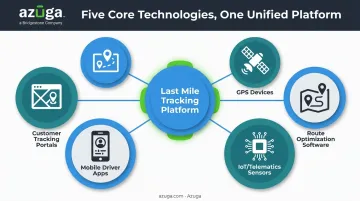
A few pieces of technology work together to make this possible
- GPS devices: hardware installed in vehicles that reports precise location data
- Route optimization software: calculates the fastest, most efficient path across multiple stops
- IoT/telematics sensors: capture vehicle diagnostics, driver behavior, and trip data
- Mobile driver apps: enable digital proof of delivery or service completion, replacing paper
- Customer tracking portals: translate raw location data into a simple, live map for the end customer
Benefits of Last Mile Tracking
Business Benefits
Route optimization pays off at scale. UPS's ORION system, one of the largest deployments of its kind, had already saved the company more than $320 million by December 2015, according to INFORMS.
Full rollout is projected to save $300-400 million annually and roughly 10 million gallons of fuel a year. That's a large-enterprise case study, not a guaranteed outcome for every fleet, but it shows the ceiling on what optimized routing can achieve.
Support costs drop when customers can track orders themselves. Every WISMO ("Where Is My Order") call costs money to resolve, and tracking visibility cuts that volume directly, freeing customer service teams to handle actual problems instead of location updates.
Drivers also behave differently when they know they're being tracked. Azuga's own fleet data shows customers using its GPS tracking platform see accidents decrease by 38% on average and speeding citations drop by 57%, driven by the same visibility that powers last mile tracking. Digital proof of service and audit trails also mean fewer disputes over whether a job actually happened.
Customer Benefits
Customers care about this more than most businesses realize. 81% of US online adults say delivery-status tracking is an important feature for retailers and brands to offer, according to a Forrester study.
What customers get in return
- Accurate ETAs that remove the guesswork of "sometime today"
- Self-service rescheduling instead of a phone tag
- Higher trust in the brand, since transparency builds loyalty even when things run late
Challenges in Last Mile Tracking
Tracking isn't plug-and-play for every business. Common roadblocks include
- Upfront costs – hardware, software licensing, and driver device rollout add up fast for small and mid-sized fleets
- Integration gaps – when GPS, dispatch, warehouse, and customer-facing systems don't talk to each other, blind spots appear right at handoff points
- Data privacy concerns – precise location data demands proper consent, retention, and security practices, especially with regulators like the FTC penalizing companies over geolocation mishandling
None of these are dealbreakers. They're planning items. Budget for integration work up front, not just hardware.
Last Mile Tracking Best Practices
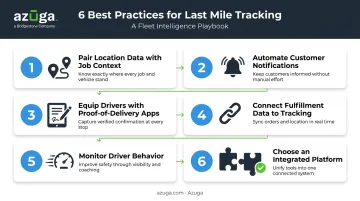
- Pair location data with job context. A dot on a map means nothing without knowing which stop it's tied to and whether that stop is at risk of running late.
- Automate customer notifications. Trigger SMS or email updates at dispatched, en route, and arrived milestones. This alone cuts a large share of inbound status calls.
- Equip drivers with mobile proof-of-delivery apps. Digital signatures and photos replace paperwork and settle disputes fast.
- Connect fulfillment and scheduling data directly to the tracking platform. Manual re-entry between systems is where visibility gaps start.
- Monitor driver behavior alongside location. Speeding, harsh braking, and idle time matter as much as where the truck is. High-frequency tracking, updating every 30 seconds instead of every few minutes, gives dispatchers accurate data to act on.
- Choose an integrated tracking platform. Select software that connects to your existing dispatch, ELD, or fuel card systems instead of adding another disconnected data silo.
How Azuga Simplifies Last Mile Tracking for Service Fleets
Azuga built its platform for fleets without an in-house IT department. The Azuga Tracker is a plug-and-play OBD-II GPS device that self-installs in minutes, with no mechanic or downtime required.
For HVAC, plumbing, electrical, landscaping, and pest control businesses, that plug-and-play setup is often the entry point into last-mile visibility they didn't have before.
Once installed, Azuga delivers
- Real-time location tracking every 30 seconds, far more frequent than legacy telematics pings, giving dispatchers and customers accurate position data instead of stale updates
- Video-backed accountability through SafetyCam AI with Collision Reconstruction, useful for disputes over deliveries, parking incidents, or accidents during a service call
- Workflow integrations with Towbook for towing and roadside dispatch and fraud protection, plus UpKeep for maintenance workflows tied to vehicle diagnostics
Azuga also connects into the tools fleets already run, including a Towbook integration used by towing and roadside businesses for dispatch and fraud protection, and UpKeep for maintenance workflows tied to vehicle diagnostics.
These capabilities match packages to fleet needs quoted on fleet size and selected features, scaling through CompleteFleet for advanced options like collision reconstruction and a dedicated Customer Success Manager.
Every tier includes 24/7 phone, email, and web support, so fleets modernizing last-mile operations aren't left waiting on a callback when something breaks at 6 AM.
Frequently Asked Questions
What does "last mile" mean in last mile tracking?
The last mile is the final leg of a shipment or service journey, from a hub, warehouse, or dispatch point to the customer's exact door. It's distinct from the first mile (origin pickup) and middle mile (long-haul transport).
How do I use last mile tracking to track my delivery?
Customers typically receive a tracking link by SMS or email showing the driver's live location, current status, and an estimated arrival time. No app download or account is usually required.
Is last mile tracking reliable?
Reliability depends on the technology behind it, including GPS accuracy, update frequency, and system integration. Modern platforms that ping GPS locations every 30 seconds, rather than every few minutes, combined with job and route data, deliver highly accurate tracking.
Who handles last mile delivery?
Depending on the business model, last mile delivery is handled by in-house fleets, third-party couriers, gig-economy drivers, or service technicians.
What's the difference between last-mile tracking and last-mile delivery?
Last-mile delivery is the physical process of getting a good or service to the customer. Last-mile tracking is the technology layer that shows visibility into that process in real time.
How can businesses improve their last mile tracking?
Quick wins include automating customer notifications, integrating fulfillment and dispatch data with the tracking platform, and adopting GPS-based tracking with 30-second location updates instead of infrequent pings.