Service Automation (FSA) replaces that scramble with a connected system. It turns reactive, phone-driven operations into a proactive workflow where scheduling, dispatch, and reporting happen with minimal manual input.
This guide breaks down what FSA actually is, the benefits it delivers, its core components, and how to pick the right solution for a field-based business.
Key Takeaways
- FSA combines software, mobile apps, and AI/GPS/IoT tech to automate dispatching and reporting
- Construction, HVAC, plumbing, and utility trades rely on FSA to cut costs and boost technician output
- Businesses see lower costs, faster response times, higher productivity, and stronger customer satisfaction
- Scheduling, mobile apps, GPS tracking, inventory management, invoicing, and analytics complete the core toolkit
What Is Service Automation?
Service Automation is the use of software and connected technology to automate scheduling, dispatching, tracking, and documenting field work, replacing phone-tag and paper forms with digital workflows.
FSA goes beyond swapping a clipboard for a tablet. It reshapes the entire service lifecycle, from the moment a customer request comes in to the moment the invoice gets paid.
Mobile workers lose real time to non-billable work. According to Salesforce's State of Service report, they spend 18% of their working hours, more than seven hours in a standard week, on administrative tasks like filling out forms and hunting for information. That's nearly a full workday lost to paperwork instead of billable jobs.
How Does Service Automation Work?
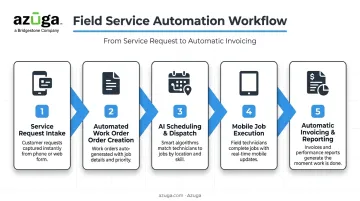
A typical FSA workflow runs through five stages
- Service request intake - A customer call, web form, or connected sensor triggers a request
- Automated work order creation - The system generates a work order with job details, location, and required parts
- AI-based scheduling and dispatch - Software matches the job to the best available technician based on skill, location, and availability
- Mobile job execution - The technician receives job details, customer history, and checklists on a mobile device
- Automatic invoicing and reporting - Completing the job triggers an invoice and updates performance dashboards
The system only works this smoothly when it's connected. Integration with CRM, ERP, and GPS/fleet platforms lets data flow between the field and the back office automatically, without anyone re-keying information twice.
Examples of Service Automation
FSA shows up in daily operations more than most teams realize
- Automated technician dispatch that assigns jobs based on skill set and proximity, not whoever picks up the phone first
- GPS-based route optimization that recalculates the fastest path as traffic or job order changes
- IoT sensors that trigger predictive maintenance alerts before equipment fails
- Automated appointment notifications that text customers a real-time arrival window
For businesses running mobile crews, GPS fleet tracking of technician vehicles is one of the most practical, everyday examples of FSA in action. It's often the first automation layer companies add because it delivers visible results fast.
Benefits of Service Automation
Enhanced Efficiency
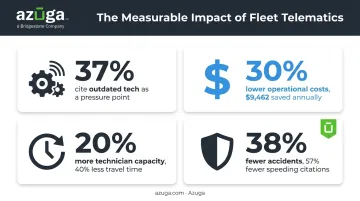
Automating scheduling, routing, and data entry frees technicians and managers to focus on the work that actually generates revenue. This matters because outdated technology is a real drag on operations: 37% of service fleets organizations cite outdated or insufficient technology as an ongoing operational pressure, according to IFS's 2023 State of Service research. Every manual workaround adds friction that automation removes.
Reduced Operational Costs
Automated inventory tracking, smarter routing, and less overtime all chip away at operational spend. Azuga fleet customers have reported reducing operational costs by roughly 30% and saving an average of $9,462 annually through better fleet cost management. Route optimization alone cuts wasted mileage, idle time, and unnecessary fuel burn across a fleet.
Higher Productivity Levels
Less time on admin work means more jobs completed per technician, per day. McKinsey's analysis of dynamic dispatch optimization found it can free up 20% of technician capacity and cut travel time by 40% in field operations contexts. That's capacity a business can redeploy toward additional service calls instead of windshield time.
Faster Response Times
Dynamic dispatch and route optimization get the right technician to the right job quicker. When scheduling accounts for real-time location and skill matching rather than a static calendar, response windows shrink and technicians arrive better prepared, improving the odds of resolving the issue on the first visit.
Improved Customer Satisfaction and Safety
Real-time visibility and proactive communication build trust. Customers who get an accurate ETA text instead of a four-hour window stop calling to ask "where's my technician."
Safety matters here too. GPS fleet tracking and driver safety scoring, like the tools built into Azuga's platform, help fleets reduce accidents and unsafe driving. Azuga customers have seen accident rates drop by an average of 38% and speeding citations fall by 57%, protecting both technicians and the customers they visit.
Key Components of Service Automation
A complete FSA setup typically includes six building blocks
Scheduling and dispatch — AI-based tools assign the right technician to the right job by matching skill level and current location, factoring in availability too, instead of relying on a dispatcher's memory.
Mobile service fleets apps — Technicians pull up job details, customer history, and digital checklists from a phone or tablet in real time. Azuga's Fleet Mobile app, for example, gives field techs route details, job assignments, and even location-sharing tools so customers can track arrival status.
GPS and fleet/vehicle tracking — For any business running vehicles, real-time GPS tracking is foundational, providing location visibility, route optimization, and driver safety monitoring.
Platforms like Azuga offer self-install OBD-II devices that plug in within minutes and deliver location updates at roughly 30-second intervals, so managers always know where a vehicle is without waiting on a check-in call.
Inventory and asset management — Automated tracking of parts and equipment reduces stockouts and ensures technicians show up with what they need. Azuga's asset management tools extend this to construction equipment and trailers, using geofencing to flag unauthorized movement.
Automated invoicing and billing — Invoices generate directly from completed work orders, cutting the lag between job completion and getting paid.
Analytics and reporting — Dashboards turn raw service data into insight on technician performance, first-time fix rates, helping managers spot operational problems before they escalate.
| Component | Primary Function |
|---|---|
| Scheduling/Dispatch | Matches technicians to jobs |
| Mobile Apps | Delivers job data in the field |
| GPS/Fleet Tracking | Provides location and safety visibility |
| Asset Management | Tracks parts, equipment, tools |
| Invoicing | Speeds up billing and cash flow |
| Analytics | Turns data into decisions |
How to Choose the Right Service Automation Solution
Business Size and Growth
Pick a platform that scales with technician headcount, service regions, and job volume. A tool that works fine for 10 vehicles can buckle at 100 if it wasn't built to scale.
Integration Capabilities
The solution should connect with your existing CRM, ERP, and GPS/fleet tracking systems. Without integration, data silos form. The office system and the field system don't talk to each other, so someone has to manually reconcile the two.
Ease of Adoption and Cost
User-friendly mobile tools and responsive vendor support matter as much as feature lists. If technicians find the app confusing, adoption stalls no matter how powerful the backend is.
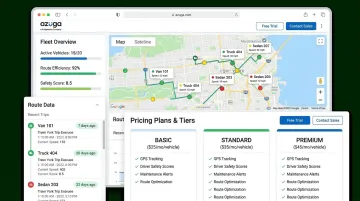
Cost matters just as much, especially for businesses easing into automation. For vehicle-based operations, pairing a scheduling and dispatch platform with an affordable, easy-to-install GPS fleet tracking solution extends automation into route optimization and driver safety without a heavy upfront investment.
Azuga matches packaging to fleet size and the features you select, making it accessible for smaller fleets testing the waters before committing to a full platform rollout.
Frequently Asked Questions
What is the difference between CRM and fleet management?
CRM manages customer relationships and sales history. Fleet management goes further, coordinating technician dispatch and on-site job tracking, often pulling customer data from a connected CRM.
What industries benefit most from service automation?
HVAC, plumbing, electrical, construction, utilities, telecom, and waste management all rely heavily on mobile technicians and vehicle fleets, making them prime candidates for FSA adoption.
Is GPS fleet tracking considered part of service automation?
Yes. GPS tracking is a core FSA component for any vehicle-based field team. It enables route optimization and real-time location visibility, while also supporting driver safety monitoring.
How much does service automation software typically cost?
Weigh any quote against your expected operational savings, including implementation costs across tiers.
How do small businesses get started with service automation?
Start small: pick one or two high-impact components, such as scheduling software or GPS fleet tracking, before investing in a full platform. This approach proves ROI before scaling automation further.