Introduction
A single fatal truck crash costs an average of $3.6 million, according to FMCSA's Unit Costs of Medium and Heavy Truck Crashes report. Even a routine property-damage crash runs over $15,000. Numbers like these explain why so many fleets have added in-cab cameras and dash cams to their trucks over the past few years.
But the rollout is rarely smooth. Drivers see a lens pointed at their face and think surveillance. Safety teams see the same lens and think liability protection. Both are right, which is exactly the tension fleet managers have to navigate.
This guide breaks down what these cameras actually are, how they really record, whether they're legal to use, what they deliver in hard dollars, and how to introduce them without a driver revolt.
Key Takeaways
- In-cab cameras are legal in all 50 states, though consent and biometric rules vary by state
- Most systems use rolling buffers, saving footage only for specific events, not 24/7 surveillance
- Camera footage exonerates drivers as often as it implicates them in disputed claims
- Clear policy, driver involvement, and transparency turn cameras into protection, not punishment
What Are In-Cab Cameras and Dash Cams?
Commercial fleets typically choose from three camera configurations
- Forward/road-facing dash cams: mounted to capture what's happening on the road ahead, including traffic, weather, and other drivers' actions
- Driver-facing (in-cab) cameras: pointed at the driver to monitor behavior, fatigue signs, and phone use
- Dual-facing/360° systems: combine both views in a single unit, giving fleets the full picture of an incident from both inside and outside the cab
Most fleets land on dual-facing systems because a road view alone can't explain why a driver braked hard, and a driver view alone can't show what was actually in front of the truck.
AI Has Changed What These Cameras Can Do
Older dash cams just recorded footage and left the interpretation to a human. Modern AI-powered units use computer vision and neural networks to flag distraction, drowsiness, phone use, and tailgating as they happen, catching risk factors before they cause a crash.
Azuga's dual-facing SafetyCam system, for example, pairs a 155-degree road-facing view recorded in 1080p HD with an in-cab lens. Driver-facing footage runs through an AI neural learning network that automatically tags likely distraction events.
These Cameras Rarely Work Alone
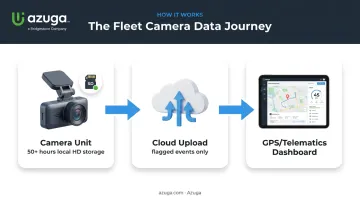
An in-cab camera by itself is just a recorder. Its real value shows up when it's tied to a broader telematics setup
- A camera unit with local SD card storage (Azuga's holds 50+ hours of HD footage)
- Cloud upload for flagged clips
- Connection to a GPS/telematics dashboard, so a flagged event shows up alongside vehicle speed, location, and route history instead of sitting as an isolated video file
How In-Cab Cameras Actually Record (Do They Record All the Time?)
This is the question that causes the most driver anxiety, and the honest answer surprises most people: no one is watching a live feed all day.
Most in-cab cameras use continuous loop recording on a rolling buffer, typically somewhere in the 30-60 second range. The camera constantly records and overwrites itself, and only saves a permanent clip when something triggers it, such as:
- Hard braking or sudden acceleration
- A collision-level G-force spike
- Swerving or aggressive cornering
- AI-detected distraction or a manual panic-button press
Azuga's system works this way: footage saves to an on-board SD card continuously, but a clip only uploads to the cloud server when a risky event fires. That clip is typically viewable within seconds, not hours.
Fleet Managers Review Clips, Not Hours of Video
Nobody has time to watch 10 hours of empty highway footage per driver, per day. In practice, safety teams review a short list of flagged clips each morning — usually a handful per driver, not a live surveillance feed.
Fleets generally have some control over the setup, including
- Switching between continuous and event-only recording modes
- Toggling audio capture on or off
- Setting sensitivity thresholds for what counts as a "hard" brake or turn
Are In-Cab Cameras and Dash Cams Legal?
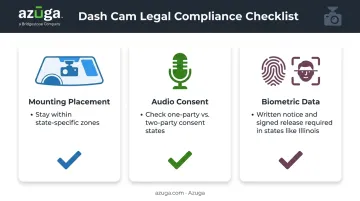
Yes — dash cams and in-cab cameras are legal in commercial vehicles in all 50 states. No federal law bans or requires them, and FMCSA guidance treats video systems as a legitimate part of a carrier's safety program. That said, "legal" doesn't mean "no rules apply." Three areas trip up fleets most often: mounting placement, audio consent, and biometric data handling.
Windshield Mounting and Placement Rules
Federal rule 49 CFR 393.60(e) allows safety technology on the windshield, provided it sits within specific zones relative to the wiper-swept area and doesn't block the driver's sightline.
States can layer on additional restrictions. California is the most cited example, with Vehicle Code 26708 limiting camera placement to
- A 7-inch square in one lower corner of the windshield
- A 5-inch square in the other lower corner
- A 5-inch square at the top center
Mount it outside those zones and a driver can be cited, even though the device exists for safety.
If you run trucks across multiple states, check current mounting requirements for every state you operate in before installing hardware fleet-wide. A compliant mount in Texas isn't automatically compliant in California.
Audio Recording and Two-Party Consent States
Video-only recording is far less legally sensitive than audio. States split into two camps
| Consent Type | What It Means | Example States |
|---|---|---|
| One-party consent | Only one person in the conversation needs to agree to recording | Most US states |
| All-party (two-party) consent | Everyone being recorded must consent | California, Illinois, Pennsylvania, and roughly a dozen others |
California, Illinois, and Pennsylvania each have statutes covering this, though the details matter: they generally apply to conversations where someone has a reasonable expectation of privacy, not every audible sound in a cab.
Practical recommendation: disable audio recording unless it serves a specific coaching or incident-review purpose, and use written consent forms in states that require them. It removes a compliance headache you don't need.
Biometric Data and AI Monitoring Laws
AI cameras that analyze facial geometry to detect drowsiness or identify a driver can trigger biometric privacy laws, most notably Illinois's Biometric Information Privacy Act (BIPA). Under BIPA, a face-geometry scan generally requires
- A publicly available written policy with a retention and destruction schedule
- Written notice to the driver before collection, including the purpose and duration
- A signed written release (which can be part of an employment agreement)
A plain photo doesn't trigger BIPA. A derived facial template used for identification purposes might. Fleets running AI driver-monitoring in Illinois, or hiring drivers who live there, should build these consent steps into onboarding paperwork.
Is Dash Cam Footage Admissible in Court?
Once footage is properly collected and stored, fleets often want to know if it holds up in court. Generally, yes: courts don't require a special rule for dash cam footage, evaluating it like any other digital evidence under Federal Rule of Evidence 901, which just requires proof the recording is what it claims to be.
Footage holds up better in disputes when it includes
- An accurate timestamp
- A documented chain of custody (who accessed it, when, and how)
- Secure storage that shows the file wasn't altered
Key Benefits of In-Cab Cameras for Commercial Fleets
Exoneration and Lower Insurance Costs
Camera footage exists to protect drivers as much as fleets. According to an FHWA analysis of fatal car-truck crashes, the truck driver alone was found at fault in only 16% of cases, while car drivers were solely at fault in 70%.
Azuga cites a similar figure, noting that roughly 70% of commercial accidents aren't the truck driver's fault. That statistic forms the basis for its SafetyCam AI Collision Reconstruction feature, which pulls driver-facing video to help resolve disputed claims quickly.
Documented video evidence also gives fleets exactly what insurers want: verifiable proof instead of conflicting testimony. Given that a single nonfatal injury crash can run into six figures, avoiding even one drawn-out liability dispute can offset years of camera program costs. Diamond Engineering, an Azuga customer, secured a more than 10% discount on its insurance premium after presenting driver behavior data to its carrier.
Coaching Over Discipline
Flagged events, such as harsh braking, distraction, and tailgating, work best as training material for skill-building conversations. This distinction matters for adoption. In fact, ATRI found that driver approval of camera programs jumped 87% when carriers used footage specifically for proactive coaching rather than punitive write-ups.
The Numbers Behind One Real-World System
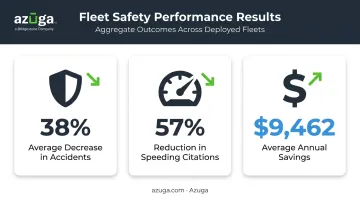
Azuga's own reported results from fleets running SafetyCam AI include
- 38% average decrease in accidents
- 57% reduction in speeding citations
- $9,462 average annual savings from more effective fleet cost management
Combining video with GPS tracking is what drives that last figure. A camera alone documents an incident; pairing it with fleet-wide location and behavior data lets managers catch costly patterns, such as idling, hard-brake clusters, and speeding routes, before they turn into claims.
Best Practices: Introducing Dash Cams to Drivers and Choosing the Right System
How to Introduce Dash Cams Without Driver Pushback
Drivers, especially those in sleeper cabs, often treat their truck like a second home. A camera feels invasive unless it's introduced the right way.
Steps that reduce resistance
- Involve drivers before installation: ask for input rather than announcing a mandate
- Post clear in-cab signage noting the vehicle is monitored
- Put camera use in writing: employment agreements or a signed acknowledgment, not just a verbal mention
- Share real exoneration stories, not disciplinary ones: drivers who were cleared of fault because footage backed them up are your best advocates
Reframing matters more than any policy document. Fleets that talk about cameras as protection tools consistently see faster buy-in than those that lead with monitoring language. Once drivers are on board, the next decision is choosing the right hardware.
What to Look for in a Dash Cam or In-Cab Camera System
Not every system fits every fleet. Prioritize
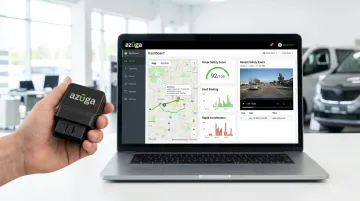
- Installation simplicity: plug-and-play OBD-II devices install in minutes without a mechanic; hardwired systems take longer and cost more upfront
- Platform compatibility: the camera should feed the same dashboard as your GPS and driver-behavior data, not sit in a separate app
- AI capability: distraction and fatigue detection turn a passive recorder into an active safety tool
- Privacy controls: audio toggles, biometric consent settings, and configurable recording modes
Azuga's setup covers most of this checklist out of the box: a self-install OBD-II device, plans with packages matched to fleet needs, an optional dual-facing AI SafetyCam add-on, and 24/7 phone, email, and web support. It's a reasonable starting point whether you're running five trucks or five hundred.
Frequently Asked Questions
What is the in-cab camera for trucks?
An in-cab camera is a driver-facing device installed in a commercial truck's cab to monitor driver behavior, detect distraction or fatigue, and provide video evidence for safety and liability purposes.
Do in-cab cameras record all the time?
Most systems use event-triggered recording on a rolling loop. They only save and upload clips tied to incidents like hard braking or collisions, rather than streaming continuous live video.
Are cameras in trucks legal?
Yes, dash cams and in-cab cameras are legal in commercial vehicles in all 50 states. Mounting placement and audio consent rules vary by state, so check local requirements.
Can a company legally record employees while driving a company vehicle?
Generally, yes. Employers can record in company-owned vehicles for safety purposes, provided drivers are notified through written policy or a signed consent agreement.
Do drivers need to consent to being recorded by a dash cam?
Video-only recording typically doesn't require explicit consent. Audio recording in two-party consent states, like California or Illinois, requires agreement from everyone being recorded.
Can dash cam footage be used as evidence in court?
Yes. Courts typically admit dash cam footage as evidence when it's authentic, timestamped, and stored with a documented chain of custody showing it wasn't altered.