Introduction
Dispatchers used to run entire fleets from a whiteboard, a phone, and a stack of paper work orders. Some still do. But that approach breaks down fast once you're juggling more than a handful of trucks or technicians.
Customers have changed too. Nearly 50% of US consumers now actively track their orders, and among urban shoppers, 70% say scheduling a specific delivery window matters, according to McKinsey's 2025 consumer survey. People expect visibility, not guesswork.
This guide breaks down what automated dispatch systems actually do, the different types built for different industries, and the features worth paying. It also covers how to roll one out without disrupting the team you already have.
Key Takeaways
- Automated dispatch uses live location, skill, and traffic data to assign jobs instantly
- Service fleets, emergency CAD, logistics, and utility dispatch each need different systems
- Real-time GPS tracking and two-way communication directly improve on-time performance
- Picking the wrong system without piloting it first carries real financial risk
- Affordable, scalable dispatch options now exist for small and midsize fleets too
What Is an Automated Dispatch System?
An automated dispatch system is software that assigns drivers, vehicles, or technicians to jobs using algorithms instead of a human working the phones. It pulls in data like location, skill sets, traffic conditions, and appointment windows, then generates an assignment automatically, in real time.
This is a departure from traditional computer-aided dispatch (CAD), which historically relied on radio calls and manually updated logs. The shift happened gradually rather than in one cutover.
Police-radio dispatch dates back to the 1920s. Automatic vehicle location (AVL) emerged in the 1960s, and GPS-based AVL became standard through the 1990s as receiver costs fell. By the 2010s, CAD platforms combined GIS mapping, AVL, and rules-based logic to recommend the closest qualified responder automatically.
How the Core Mechanics Work
Modern dispatch software processes several data streams simultaneously
- Location data from GPS or AVL, updated continuously
- Skill and certification matching for the job type
- Time windows the customer or job requires
- Traffic and route conditions affecting arrival estimates
- Vehicle or technician availability in real time
Zone-Based Rules vs. GIS/AVL Proximity
Not all dispatch logic works the same way. Some systems assign work based on predefined zones or response areas — a technician "owns" a territory regardless of where they currently are. More advanced GIS/AVL-integrated systems instead calculate proximity using actual driving time or distance, which can identify a closer available resource even outside the traditional zone.
Whichever method a system uses, the underlying goal stays the same: match the right resource to the job as quickly as possible. That principle now plays out across service fleets, trucking, last-mile logistics, utilities, and emergency response, with each industry adapting it to its own stakes and timelines.
Types of Automated Dispatch Systems
Dispatch automation isn't one-size-fits-all. The technology looks different depending on what's being coordinated and how fast decisions need to happen.
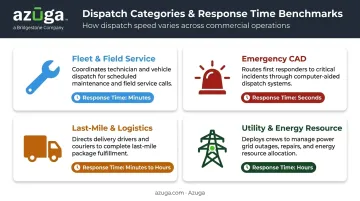
Fleet & Service Fleets Dispatch Software
This is the category most relevant to HVAC, plumbing, electrical, and construction businesses. The software matches technicians to jobs based on
- Current location relative to the job site
- Required certifications or skill sets
- Existing customer relationships (some platforms prioritize sending a technician who's already visited that address before)
- Real-time availability and schedule gaps
Platforms like Azuga plug into this workflow directly, integrating with service fleets tools such as ServiceTitan, Procore, and Fleetio to feed real-time vehicle location into the scheduling engine.
Computer-Aided Dispatch (CAD) for Emergency Services
Police, fire, and EMS agencies use CAD to receive incoming calls, verify location, track unit status, and dispatch the nearest available responder. These systems manage an incident from initial report through final disposition, and they operate under strict interoperability and reliability standards set by organizations like APCO and NENA.
Last-Mile & Logistics Dispatch Systems
Delivery and logistics companies rely on route optimization engines to sequence stops and assign drivers efficiently. This category has become a major investment priority. According to Gartner's 2024 last-mile delivery research, 42% of the 306 logistics leaders surveyed ranked automation technology among their top three priorities for improving last-mile operations.
Utility & Energy Resource Dispatch
Utilities use a different kind of dispatch entirely — balancing electricity generation and load across the grid. This runs on a much tighter clock than vehicle dispatch, with automatic generation control operating in a 1-to-10-minute window based on measurements polled every few seconds. This category operates on fundamentally different logic than service fleets or logistics dispatch, driven by grid physics rather than technician schedules or delivery windows.
Key Features to Look for in Automated Dispatch Software
Not every fleet needs every feature. The right platform depends on matching capabilities to your actual operational pain points, not chasing the longest feature list.
AI-Driven Route Optimization & Capacity Management
Good route optimization weighs traffic, time windows, and resource availability to generate the most efficient assignment. It also factors in vehicle capacity and driver availability, preventing routes that overload one vehicle while another sits underused.
Azuga's platform, for example, uses real-time traffic and location data to produce accurate ETAs and reduce idle time, helping vehicles reach customers faster while cutting fuel waste along the way.
Real-Time GPS Tracking & Visibility
Location accuracy is only as good as your ping frequency. Standard GPS trackers often update every few minutes, which can leave dispatchers working with stale data. Azuga tracks vehicles at 30-second intervals, giving dispatchers a much tighter picture of where every vehicle actually is when they're making assignment decisions.
Automated Notifications & Two-Way Communication
Delays and breakdowns happen. What matters is how fast everyone finds out. Look for
- Automatic alerts for accidents, harsh braking, or maintenance issues
- Customer-facing live tracking (Azuga's TrackMe feature shares a driver's real-time location and ETA directly with customers)
- In-app messaging between dispatchers and drivers for photos, locations, and quick updates
- Geofence alerts when a vehicle deviates from its planned route
Integration & Scalability
As your fleet grows, your dispatch software needs to grow with it. That means integrating with your existing GPS hardware, fuel cards, and service fleets or TMS platforms rather than forcing a rip-and-replace.
Azuga's integration marketplace connects with over 75 platforms, including ServiceTitan, Procore, Fleetio, and TowBook. Dispatch data flows directly into the tools your team already uses daily.
Driver/Technician Mobile App
A dispatch system is only as good as what happens on the driver's phone. Essential mobile capabilities include
- Live route and stop details with countdown timers to the next job
- Digital note and signature capture for proof of completion
- Access to individual performance scores and peer comparisons
- Fleet information accessible on the go, not just from a desktop dashboard
Benefits of an Automated Dispatch System
The core value of automated dispatch comes down to removing guesswork. Manual dispatching depends on someone remembering which technician is closest, checking a whiteboard, and making phone calls to confirm availability. That process is slow and error-prone, especially as call volume increases.
Automated systems replace that guesswork with real-time GPS data, the kind platforms like Azuga's telematics software track continuously, cutting dispatcher workload and reducing paperwork tied to manual scheduling. The financial upside can be significant.
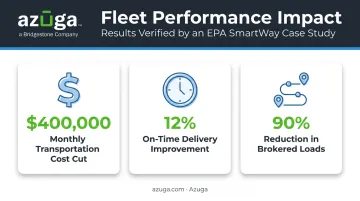
One EPA SmartWay case study documented a frozen-food logistics operator that used route optimization to achieve results like this within months, according to the EPA SmartWay case report:
- Improved on-time delivery by 12%
- Reduced brokered loads by 90%
Beyond cost, better dispatch accuracy directly improves
- On-time performance, since assignments account for real traffic and location data
- Customer satisfaction, because customers get accurate ETAs instead of vague windows
- Driver accountability, with digital records replacing "he said, she said" disputes
Achieving results like these isn't automatic, though. It depends on clean data and realistic implementation, which we'll cover next.
Best Practices for Implementing Automated Dispatch
Rolling out dispatch automation without a plan is how good software becomes shelfware. Follow a structured approach instead.
- Identify your specific pain points first. Are jobs getting misassigned? Are customers complaining about ETAs? Define the problem before shopping for a solution.
- Prioritize adoption over feature count. A platform with a steep learning curve will get ignored by dispatchers and drivers, no matter how powerful it is. Look for intuitive dashboards and minimal required training.
- Vet vendors on scalability and support, not just price. Ask how the platform integrates with your current GPS or fuel card systems, and confirm what support looks like after the sale, not just during it.
- Pilot before you scale. The US Postal Service projected $22 million in savings from a route optimization rollout but incurred $3.4 million in extra costs when software issues surfaced at full deployment. Test with a small group first.
- Treat it as a change management effort, not just a software purchase. McKinsey research found only 16% of organizations sustain performance gains after digital transformation long term; the ones that do invest heavily in training and communication alongside the technology.
How Azuga Powers Smarter Automated Dispatch
Automated dispatch is only as accurate as the data feeding it. Azuga's plug-and-play OBD-II device installs in minutes with a self-install setup, then streams real-time data straight into the dispatch workflow
- GPS location updated every 30 seconds
- Vehicle health diagnostics for maintenance alerts
- Driver behavior data, including speeding and harsh braking
That gives dispatchers current, reliable information instead of stale location pings when deciding who to send where.
Speed to value matters just as much as the data itself. For fleets automating dispatch for the first time, cost and support tend to matter as much as features. Azuga matches packages to fleet needs, with 24/7 phone, email, and web support included on every plan. That combination makes a meaningful difference for small and midsize service fleets or trucking operations that don't have an in-house IT team to lean on.
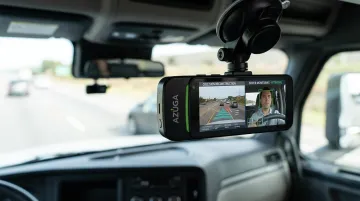
Dispatch software gets vehicles to the right place. Azuga's SafetyCam AI and Collision Reconstruction feature protects what happens once they get there. The dual-facing camera captures road and driver-facing footage during risky events, and the AI engine analyzes it for distraction or fault. Since 70% of accidents aren't caused by the fleet driver, that documentation can exonerate drivers and prevent drawn-out insurance disputes, protecting both your people and your bottom line during route execution.
Frequently Asked Questions
What is a dispatch system?
A dispatch system is software or a process used to assign and coordinate drivers, vehicles, or technicians to jobs, routes, or service calls. It can range from a manual whiteboard process to a fully automated, AI-driven platform.
What are the different types of dispatch systems?
The main categories are fleet and service fleets dispatch, emergency CAD for police/fire/EMS, last-mile and logistics dispatch, and utility or energy resource dispatch. Each uses different logic and operates on different time-sensitivity levels.
How does automated dispatch differ from manual dispatching?
Automated dispatch uses real-time data and algorithms to generate assignments instantly, while manual dispatching relies on phone calls, spreadsheets, or paper logs. Automation reduces errors and speeds up response times.
How much does automated dispatch software cost?
Azuga, for example, matches packages to fleet needs, with add-ons like AI dashcams available for fleets that need extra safety and liability protection.
Can automated dispatch integrate with existing GPS or fleet tracking tools?
Most modern platforms support integrations with GPS trackers, fuel cards, and third-party fleet or service fleets systems. Azuga's marketplace, for instance, connects with over 75 platforms including ServiceTitan, Procore, and Fleetio.
Is automated dispatch software suitable for small businesses?
Yes. Scalable, scalable packaging models have made automated dispatch accessible to small fleets, not just large enterprises. Many platforms also offer simple self-install hardware, keeping setup costs low for smaller teams.