Introduction
Construction crews, HVAC technicians, and delivery drivers don't work from a desk. They work from trucks, jobsites, and service calls scattered across a city or a county.
Mobile workforce management (MWM) software exists to keep all of that moving: scheduling, tracking, dispatching, and communicating with employees who are rarely in the same place twice.
Heading into 2026, this software category is changing fast. AI scheduling tools, safety cameras, and telematics integrations that once felt like extras are now baseline expectations. 76% of field-service leaders already report AI-powered scheduling and dispatch in use, according to Geotab's 2025 State of Service Fleets Report.
For construction, HVAC, trucking, utilities, and waste management companies, understanding these shifts isn't optional. It's how you control labor and fuel costs, stay ahead on compliance, and keep customers happy. This guide breaks down what's changing, why it matters, and how to pick the right platform for your fleet.
Key Takeaways
- AI scheduling, GPS geofencing, and safety analytics are now standard fleet features
- Rising labor costs and compliance rules are speeding adoption across field-based industries
- Fleets using connected safety tools cut accidents by 38% and control costs by 30%
- Platform fit depends on industry: scheduling-heavy for HVAC/construction, safety-heavy for trucking/waste management
Key Trends Shaping Mobile Workforce Management Software in 2026
These five trends are defining how forward-thinking fleet and service businesses manage mobile teams heading into 2026.
AI-Powered Scheduling and Dispatch Automation
Rule-based scheduling assigns jobs by simple logic: nearest tech, next open slot. AI and machine learning scheduling engines go further, weighing skill match, real-time location, traffic, and parts availability to build and rebuild schedules automatically. When a job runs long or a truck breaks down, the system reshuffles the day without a dispatcher manually re-optimizing routes.
Adoption has moved past the early-adopter stage. 76% of field-service organizations report using AI-powered scheduling and dispatch, per Geotab's 2025 survey of 100 field-service leaders, but only 4% report extensive integration, meaning most companies are still in partial rollout.
That gap matters. Full-scale AI dispatch cuts non-productive travel time and frees dispatchers from constant manual rework, letting them focus on exceptions and customer communication instead of reshuffling routes by hand.
For a plumbing or electrical contractor running 15-20 trucks, that shift can mean the difference between managing 20 jobs a day versus 35.
Real-Time GPS Tracking, Geofencing, and Route Optimization as a Baseline Expectation
GPS tracking used to be a differentiator. Now it's table stakes. Trucking fleets, construction crews, and utility teams expect real-time location visibility and automatic route optimization built into any platform they buy.
Geofencing has expanded well beyond basic vehicle tracking
- Entry and exit alerts notify managers automatically when a vehicle arrives at or leaves a job site
- Dwell time tracking shows how long a vehicle stayed, useful for billing and productivity checks
- Custom zones trigger workflows, like Azuga customer Smith & Solomon's repair-shop geofence that alerts its fleet director and notifies the on-duty mechanic the moment a vehicle pulls in for service
Labor cost pressure is driving this shift. Fleets need accurate, defensible records for payroll, billing, and compliance, not estimates. Azuga's tracking updates every 30 seconds on its top-tier plan, well ahead of the one-to-five-minute intervals common on standard fleet platforms, giving geofence alerts and route reconstruction tighter accuracy.
That level of detail matters if a dispute arises over hours worked or a job's completion time.
AI-Driven Safety and Driver Behavior Monitoring
Dashcams used to just record. Now they analyze. AI-powered driver-facing cameras detect distraction, harsh braking, and other risky events in real time, then flag them for review instead of requiring managers to scrub through hours of footage.
Azuga's SafetyCam AI illustrates how this works in practice
- A Driver Monitoring System captures driver-facing video the moment a risky event occurs
- An AI neural learning network analyzes the footage to tag distraction events, such as phone use or inattentiveness
- Collision Reconstruction processes event data after an accident to help determine fault
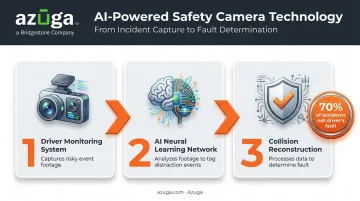
Azuga states that this technology helps prove that 70% of accidents are not the fault of the fleet's driver, a claim that matters directly to insurance negotiations and litigation defense.
Safety tech has become a top fleet priority as insurance premiums, litigation exposure, and driver safety concerns keep climbing.
Azuga customers have seen accidents drop by an average of 38% and speeding citations fall by 57% after adopting AI safety monitoring. Fewer accidents mean fewer claims, lower premiums over time, and less time defending liability the driver never caused.
The Rise of the Blended and Contingent Mobile Workforce
Full-time staff, part-timers, seasonal help, and 1099 contractors increasingly work side by side on the same crew. MWM platforms have to handle all of them under one system, with different pay rules, certifications, and access levels.
This isn't a fringe trend. 18.5% of workers in the construction industry are independent contractors, according to the Bureau of Labor Statistics, with a broader 6.5% contingent-work rate across natural-resources, construction, and maintenance occupations.
A few forces are pushing this
- Skilled labor shortages push companies to supplement full-time crews with contract talent
- The gig economy has normalized flexible staffing across nearly every trade
- Certification and licensing requirements (electrical, HVAC, CDL) demand systems that track who's qualified for which job, regardless of employment type
An MWM platform that can't distinguish an employee's overtime rules from a contractor's flat-rate job creates payroll headaches. The software needs to flex with the workforce, not force one rigid structure onto a mixed crew.
Deeper Integration Between MWM, Payroll, Fuel, and Maintenance Systems
Standalone tools create standalone problems. When scheduling software, payroll, fuel cards, and maintenance tracking don't talk to each other, someone ends up re-entering the same data three times, and errors creep in every time.
Fuel card integration shows the value of a unified approach. Connecting telematics data with fuel card providers lets fleet managers cross-reference vehicle location against fuel purchases, flagging suspicious transactions and directing drivers to cheaper nearby fuel automatically.
Azuga's fuel card integration, available on its SafeFleet and CompleteFleet plans, works this way, pairing purchase data with route and location history.
Why this matters for the bottom line
- Eliminates duplicate data entry between scheduling, payroll, and maintenance systems
- Reduces payroll errors caused by manual timesheet reconciliation
- Gives leadership one unified view of labor costs, fuel spend, and vehicle upkeep instead of three disconnected reports
For a mid-sized fleet running 50 vehicles, that visibility alone can surface cost leaks that used to hide in the gaps between systems.
What's Driving These Mobile Workforce Management Trends
A few forces are pushing this shift across nearly every field-based industry at once.
Technology has matured and gotten cheaper. AI, machine learning, and IoT-based telematics used to be enterprise-only investments. Transportation and logistics companies show how quickly that's changing: 70% adopted AI solutions in 2025, a 17% jump from the year before, according to Penske's 2025 Transportation Leaders Survey. Small and mid-sized fleets now have access to tools that once required enterprise IT budgets.
Customer expectations keep rising. Service fleets customers no longer accept vague arrival windows or radio silence. 74% of mobile workers report that customer expectations are higher than they used to be, per Salesforce's research on mobile field workforces. Real-time ETAs and proactive updates are the baseline now, not a bonus.
Cost pressures are mounting. Fuel, labor, and insurance expenses are all trending upward, and manual processes add to the waste. Behavior-based coaching and route optimization directly target that waste. Azuga customers, for example, have documented average annual savings of $9,462 through combined safety, productivity, and maintenance improvements.
Compliance requirements are only getting stricter. ELD rules under FMCSA require most commercial drivers to maintain duty-status records, and FLSA rules separately require employers to retain payroll and time records for years, not months. Automated tracking and recordkeeping remove the guesswork from both, reducing the risk of a compliance misstep during an audit.
How These Trends Are Impacting Service Fleets and Fleet-Based Businesses
These trends aren't theoretical. They're already reshaping daily operations, cost structures, and workforce dynamics across the industry.
Operational Impact
Day-to-day workflows look different than they did even two years ago. Dispatch adjustments happen in real time instead of over a radio. Timesheets fill in based on geofenced location data instead of a driver scribbling hours on a clipboard at day's end.
Fleet management software tied to full implementation has shown technician productivity gains of up to 14%, according to a Forrester Total Economic Impact study of Microsoft Dynamics 365 Service Fleets.
Results depend on how thoroughly a company integrates the tools into daily operations, but the direction is consistent: less paperwork, faster job turnaround, fewer scheduling gaps.
Business Impact
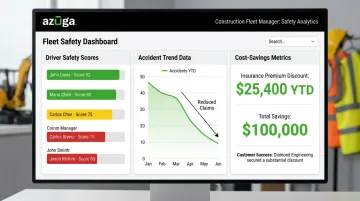
Strategically, companies are shifting budget toward safety and telematics technology because the payoff shows up on the insurance bill. Azuga customers have documented a 38% average reduction in accidents tied to AI-powered driver monitoring, an outcome insurers increasingly reward with better rates.
Diamond Engineering, a construction fleet using Azuga, secured more than a 10% discount on its commercial auto insurance premium after presenting fleet safety data to its provider. That's a direct, measurable line between adopting the technology and reducing a fixed cost.
Workforce Impact
Field employees and managers now need to interpret dashboards and safety scores, not just drive trucks or run job sites. That's a real skills shift, and companies that skip training on it tend to see resistance to new tools.
On the retention side, research consistently links unpredictable scheduling to higher turnover, with dissatisfaction and work-family conflict as the main drivers, per a peer-reviewed study published by Choper and colleagues in 2021.
Fairer, more transparent scheduling through MWM software addresses that root cause directly. Better communication tools also mean fewer surprises for crews, keeping good technicians around longer.
Future Signals for Mobile Workforce Management Beyond 2026
These trends won't stand still. Here's what to watch over the next few years.
- AI copilots become standard: AI assistants now handle scheduling conversations, draft post-job summaries, and flag anomalies before they escalate. Gartner predicts task-specific AI agents will appear in up to 40% of enterprise applications by 2026, up from less than 5% in 2025 — a broader enterprise trend, not dispatch-specific data.
- Predictive maintenance expands: IoT and telematics integration is moving from reactive alerts to predictive flags that catch failures before they happen, based on patterns across thousands of similar vehicles.
- Computer vision moves beyond dashcams: AI-enabled cameras are expanding into broader hazard detection on jobsites and around vehicles, not just in-cab driver monitoring.
- Point solutions consolidate: Expect fewer standalone apps and more unified platforms over the next one to three years, as enterprise-grade AI tools once reserved for large IT budgets become accessible to smaller fleets thanks to falling hardware and processing costs.
Choosing the Right Mobile Workforce Management Software for Your Fleet
Not every fleet needs the same tool, and the right fit depends on your fleet's core operational needs.
Match the platform to your primary need:
- Scheduling and dispatch-heavy: construction and HVAC crews need strong scheduling, GPS tracking, and route optimization
- Safety and compliance-heavy: trucking and waste management fleets need strong dashcam, ELD, and driver-behavior tools
- HR and payroll-heavy: larger operations blending contractors and employees need flexible pay rules and certification tracking
Once you've matched the platform type to your needs, a few practical factors determine how well it performs day to day.
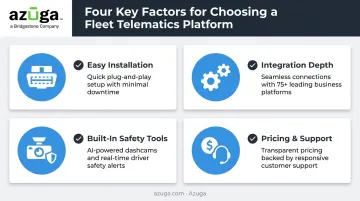
Prioritize easy installation. A lengthy enterprise rollout can stall adoption before it starts. Azuga's OBD-II device, for example, is a plug-and-play, self-install unit that doesn't require a professional installer or extra fees. Triton Air cited that simplicity as a deciding factor when choosing a telematics vendor.
Check integration depth. A platform that doesn't connect to your payroll system, fuel card provider, or maintenance software just creates a new data silo. Look for direct integrations rather than manual export and import between systems.
Look for built-in safety tools. AI dashcams and collision reconstruction protect fleets on two fronts: lower insurance premiums over time and stronger defense if litigation follows an accident. Azuga's SafetyCam AI, for instance, is built specifically to help prove driver fault, or the lack of it, after a collision.
Compare pricing models and support. Per-vehicle pricing tends to scale more predictably than flat-rate plans as a fleet grows or shrinks seasonally. Azuga matches packaging to fleet size and the features you select, with 24/7 phone, email, and web support included. That low barrier to entry suits small and mid-sized fleets that want to test the platform before committing to a long enterprise contract.
Frequently Asked Questions
What is mobile workforce management?
Mobile workforce management (MWM) coordinates scheduling, location tracking, and communication for employees who work outside a traditional office, such as field technicians, drivers, and construction crews. It combines software and hardware to keep dispersed teams connected and accountable.
What are the 4 pillars of workforce management?
Most workforce management systems center on four functions: forecasting labor demand, scheduling workers, tracking time and attendance, and analyzing performance. These aren't an official standard, but they cover what most platforms address.
How is mobile workforce management different from fleet management?
MWM is the broader umbrella, covering any employee who works away from a fixed location. Fleet management is more specific, focusing on technicians who install, maintain, or repair equipment, plus the work orders tied to that service.
What features should I look for in mobile workforce management software?
Look for GPS tracking, automated scheduling, integrations with payroll and fuel systems, and built-in safety features like dashcams. The right mix depends on whether your priority is dispatch efficiency, compliance, or driver safety.
How much does mobile workforce management software typically cost?
Azuga matches packaging to fleet size and the features you select, matched to your fleet size.
Which industries benefit most from mobile workforce management software?
Construction, HVAC, trucking, utilities, waste management, electrical, and plumbing businesses see the biggest gains, since these industries depend on mobile crews, vehicles, and time-sensitive scheduling. Any business managing employees outside a fixed office can benefit.