Introduction
A truck sits idle in the yard. Not because of a shortage of parts or a busy shop, but because nobody caught the missed oil change that turned into a blown engine.
Multiply that scenario across a fleet of 50 or 100 vehicles. Reactive maintenance becomes one of the biggest line items on the budget.
It's more common than most fleet managers would like to admit. A 2026 Fleetio survey of more than 600 fleet professionals found that 30.8% of fleets still rely on spreadsheets to track their operations.
That's a lot of sticky notes, calendar reminders, and tribal knowledge standing between a vehicle and a failed DOT inspection.
This guide breaks down what fleet maintenance software actually does, the features that matter most, how it differs from broader fleet management platforms, and how to pick a solution that fits your fleet's size and budget.
Key Takeaways
- Centralizes PM scheduling, inspections, work orders, and service history in one system.
- Shifts fleets from reactive repairs to proactive, scheduled maintenance, cutting downtime and costs.
- Core capabilities include PM scheduling, digital inspections, work order tracking, and cost reporting.
- Differs from fleet management software, which tracks GPS and driver behavior, not vehicle health.
What Is Fleet Maintenance Software?
Fleet maintenance software is a digital platform that helps businesses track, schedule, and automate maintenance workflows for vehicles and equipment. The goal is simple: catch problems before they become breakdowns, and keep assets running longer without surprises.
It replaces the patchwork most fleets grew up on: spreadsheets, paper logs, whiteboard calendars, and a manager's memory. Every service event, inspection, and repair now lives in a centralized digital record instead of scattered across notebooks and email threads.
How Service Triggers Work
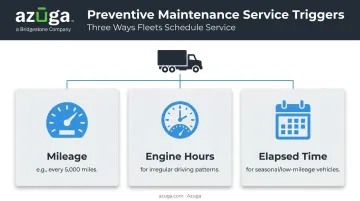
Instead of relying on someone to remember when the last oil change happened, the software triggers reminders automatically based on
- Mileage: service due every 5,000 miles, for example
- Engine hours: common for equipment and vehicles with irregular driving patterns
- Elapsed time: useful for seasonal or low-mileage vehicles that still need periodic checks
Who Uses It, and Where
Fleet managers set up the schedules. Technicians log the work. Drivers report issues through inspection apps. Each role feeds the same shared workflow.
Industries leaning hardest on this software include construction, HVAC, utilities, waste management, and trucking — sectors where vehicle downtime directly threatens revenue and, in some cases, safety compliance.
Fact.MR values the fleet maintenance software market at $11.6 billion in 2021, projecting growth to $30.9 billion by 2032, a 9.2% compound annual growth rate that reflects how many fleets are finally moving off spreadsheets and into purpose-built systems.
Key Features of Fleet Maintenance Software
Not every platform offers the same depth, but most solid fleet maintenance systems share a common core.
Preventive Maintenance Scheduling
This is the backbone feature. Service reminders trigger by mileage, engine hours, or elapsed time, so nothing depends on someone remembering a due date.
Azuga's platform, for example, pairs OBD-II telematics data with its VOYOLink integration to track odometer readings, oil life, and diagnostic trouble codes. Once maintenance comes due, it routes fleet managers to any of 36,000+ partner service shops with a single click.
Digital Inspections and DVIR Checklists
Mobile-first inspection forms let drivers flag issues at the start or end of a shift, rather than after something fails on the highway. These digital DVIRs also support DOT compliance, a requirement that hasn't gone away just because the paperwork moved online.
Under 49 CFR 396.11, drivers of non-passenger-carrying commercial vehicles must report defects when found. Safety-affecting issues must be corrected and certified before the vehicle goes back on the road.
Work Order Management
Work orders get created, assigned to a technician, and tracked through to completion, often with notes or photos attached documenting what was done. Some platforms handle this natively; others, including Azuga, focus on maintenance scheduling and service entry logging, then extend deeper work order functionality through integrations with dedicated maintenance platforms like Fleetio.
Parts and Inventory Tracking
Software that monitors parts usage helps prevent stockouts and keeps spending under control. This is a feature you'll find in dedicated CMMS-style platforms more often than in telematics-first systems, so it's worth checking whether it's native or handled via integration.
Cost Tracking and Total Cost of Ownership
Per-vehicle cost breakdowns for fuel, repairs, and labor help identify which assets are draining the budget unnoticed. Azuga's platform tracks these categories through separate tools: fuel card integration and FuelSaver for fuel costs, maintenance scheduling and diagnostics for repair costs, and geofencing/hours-of-service data for labor tied to job sites.
Automated Alerts and Mobile Notifications
Real-time alerts for upcoming service keep technicians and managers on the same page. Azuga sends maintenance alerts through its FleetMobile app and via scheduled email reports, so a fault code doesn't sit unnoticed for a week.
Benefits of Fleet Maintenance Software
Reduced Downtime and Lower Repair Costs
Predictive and preventive maintenance shifts fleets from "fix it when it breaks" to "fix it before it breaks." The exact downtime reduction varies by fleet and vehicle type, but catching a failing part during a scheduled check costs far less time than a roadside breakdown.
This same proactive approach lowers repair costs too. Emergency repairs come with a premium: rush parts, towing, overtime labor, and the lost revenue from a sidelined vehicle. Consistent scheduling keeps small issues from becoming expensive ones.
Extended Vehicle Lifespan and Regulatory Compliance
Regular servicing catches wear before it turns into failure, helping assets last longer and delaying costly replacement decisions. It won't add a guaranteed number of years to a vehicle's life, but skipping maintenance almost always shortens it.
Well-maintained fleets also stay audit-ready. Under 49 CFR 396.3, carriers must retain maintenance records showing inspection and service dates for as long as the vehicle is in service, plus six months after. Digital records make pulling those for an audit a matter of minutes instead of a filing-cabinet search.
Real-World Proof Point
Numbers matter more than promises here. Azuga customers report:
- 30% reduction in operational costs
- $9,462 in average annual savings from more effective fleet cost management
- 38% average reduction in accidents
- 57% average reduction in speeding citations
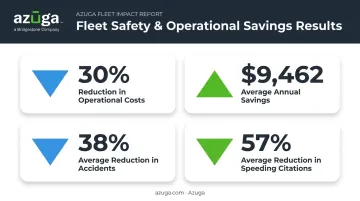
These figures reflect aggregate results across Azuga's customer base, not a single case study — but they illustrate the kind of ROI that shows up when maintenance and safety data live in one system.
That same data also drives better decision-making. Dashboards turn scattered service logs into something a manager can actually act on, prioritizing which vehicle gets repaired now, which gets replaced next quarter, and where the budget should go.
Fleet Maintenance Software vs. Fleet management Software
These two terms get used interchangeably, but they solve different problems.
Fleet management software is the broader category. It covers GPS tracking, route optimization, and driver behavior monitoring — the operational side of running a fleet.
Fleet maintenance software narrows in on vehicle health: inspections, repairs, preventive maintenance, and service history.
| Fleet Management Software | Fleet Maintenance Software | |
|---|---|---|
| Primary focus | Operations & location | Vehicle health |
| Core data | GPS, routes, driver behavior | Service records, inspections, repairs |
| Key question answered | "Where is my vehicle and how is it being driven?" | "Is this vehicle due for service, and what's its condition?" |
In practice, the two overlap constantly. A platform like Azuga combines GPS/telematics tracking with maintenance alerts and safety features in a single dashboard.
A fleet manager logs in and sees live vehicle locations, upcoming service schedules, active diagnostic trouble codes, and driver safety scores (all without switching between tools). One login covers both vehicle location and vehicle health.
How to Choose the Right Fleet Maintenance Software
Match Software to Fleet Size and Ease of Use
A five-vehicle plumbing company doesn't need the same setup as a 500-truck logistics operation.
- Smaller fleets need simple onboarding and low scalable packaging without long contracts.
- Mid-size fleets need flexible plans that scale without forcing a full platform switch.
- Larger fleets need scalability, API access, and dedicated account support to manage complexity.
Fleet size isn't the only factor. Technician adoption determines whether the software actually gets used. If logging an inspection or checking a maintenance alert takes five taps too many, drivers will fall back on paper.
Check Integration Capabilities and Total Cost
Confirm the platform plays well with your existing tools
- Fuel card providers
- Telematics/GPS systems
- Accounting software
Azuga's integration marketplace connects with 75+ platforms, including Fleetio, ServiceTitan, and Procore, so maintenance data doesn't sit in a silo separate from your other business systems.
Pricing matters just as much as integrations. Look past the listed rate: onboarding fees, hardware costs, and installation charges can turn a "cheap" plan into an expensive one fast.
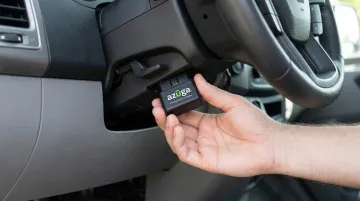
Azuga matches packages to fleet needs, with a self-installable, plug-and-play OBD-II device that's ready to go in about 20 seconds — no technician visit, no vehicle downtime for installation. That combination of packages matched to fleet needs and simple hardware setup makes it a practical starting point for fleets of nearly any size.
Frequently Asked Questions
How much does fleet maintenance software cost?
Costs vary based on added features like GPS integration, dashcams, or advanced reporting.
What's the difference between fleet management and fleet maintenance software?
Fleet management software focuses on operations: GPS tracking, routing, and driver behavior. Fleet maintenance software focuses specifically on vehicle health, including inspections, repairs, and service history.
Can fleet maintenance software track total cost of ownership (TCO)?
Most platforms combine fuel, repair, and service data per vehicle to help flag underperforming assets. Not every system produces a single consolidated TCO report, so compare how each platform presents this data before choosing one.
How does fleet maintenance software support DOT compliance and inspections?
Digital DVIR forms, checklists, and audit-ready service records simplify compliance documentation. This helps carriers meet FMCSA recordkeeping requirements without relying on paper files.
How quickly can a business see ROI from fleet maintenance software?
Many fleets notice measurable savings within a few months through reduced downtime and less administrative work. Larger returns tend to compound over the following 12 to 24 months as maintenance data accumulates.
Does fleet maintenance software work for small fleets, or only large ones?
Scalable, scalable packaging models make maintenance software practical even for fleets of just a handful of vehicles. Vendors commonly offer plans with no minimum fleet size, alongside enterprise options for larger operations.