Unplanned downtime gets expensive fast when maintenance decisions rely on tribal knowledge and sticky notes instead of data.
A CMMS, or computerized maintenance management system, fixes this by centralizing every work order, asset record, and maintenance schedule in one digital platform. Technicians and managers see the full picture in real time instead of chasing paperwork.
This guide covers what CMMS software actually is, how it works, the benefits organizations report, real industry use cases (including fleet maintenance), and how to pick the right platform for your operation.
Key Takeaways
- A CMMS centralizes work orders, assets, inventory, and maintenance schedules in one system
- Companies running a CMMS report double-digit drops in downtime and material costs
- CMMS handles maintenance execution; EAM oversees the full asset lifecycle, including procurement and disposal
- Your best fit depends on asset mix: facilities, equipment, vehicles, or all three
What Is CMMS Software?
A CMMS (computerized maintenance management system) is software that helps organizations plan, track, schedule, and document maintenance work across equipment, facilities, and vehicle fleets. Instead of paper work orders and disconnected spreadsheets, everything lives in one searchable database.
CMMS platforms aren't new. The concept dates back to the 1960s, when early systems ran on mainframes and mostly just digitized existing paper checklists.
What's changed is the delivery. Cloud computing moved data storage and server management off-site, while mobile apps let technicians open, update, and close work orders right from the shop floor instead of walking back to an office terminal.
That shift has fueled real adoption. The global CMMS market was valued at $1.3 billion in 2024 and is projected to reach $2.41 billion by 2030, according to a 2024 report by Grand View Research, growing at an 11.1% compound annual rate. Organizations across nearly every industry are moving off manual tracking because the cost of not knowing an asset's condition keeps climbing.
Who Actually Uses a CMMS?
A CMMS isn't just a tool for one department. Typical users include
- Maintenance managers who assign work orders and track technician workloads
- Technicians who receive, update, and close jobs from mobile devices
- Facility managers overseeing HVAC, electrical, and building systems
- Fleet supervisors managing vehicle inspections and repair schedules
- Safety and compliance teams who need documented proof of inspections and repairs
Each group pulls different reports from the same dataset, which is part of what makes centralized maintenance data so valuable.
CMMS vs. EAM: What's the Difference?
People often use "CMMS" and "EAM" interchangeably, but they're not the same thing.
CMMS focuses on maintenance execution: work orders, preventive maintenance scheduling, and asset history. EAM (enterprise asset management) covers the complete asset lifecycle, including procurement, financial tracking, capital planning, and disposal, with maintenance as just one piece of a much bigger picture.
| Focus area | CMMS | EAM |
|---|---|---|
| Primary scope | Maintenance execution | Full asset lifecycle |
| Lifecycle stage | After installation | Acquisition through disposal |
| Financial tracking | Labor, parts, work orders | Total cost of ownership, capital planning |
| Typical scale | Single site or department | Multi-site, enterprise-wide |
Modern CMMS platforms increasingly blur this line, adding multi-site management and lifecycle reporting once reserved for EAM systems. Instead of debating which label fits, focus on what decisions you need the software to support
- Work orders and PM scheduling: A CMMS is likely enough.
- Capital budgets and asset disposal across dozens of locations: You may need EAM-level functionality.
How Does CMMS Software Work? Core Features Explained
Every CMMS platform organizes maintenance work around a handful of core modules. Here's what each one actually does
- Work order management – Creates, assigns, prioritizes, and tracks maintenance tasks from the initial request through completion, with a full history attached to each asset
- Preventive maintenance (PM) scheduling – Sets calendar-based or meter-based triggers (mileage, engine hours, cycles) so maintenance happens on schedule instead of after something breaks
- Asset registry and hierarchy – Maintains a centralized database of equipment, vehicles, and facilities, complete with specs, warranties, manuals, and maintenance history
- Inventory and parts management – Tracks spare parts stock levels and usage patterns, and triggers automated reorder alerts before a technician gets stuck waiting on a part
- Mobile access and reporting dashboards – Lets field technicians update work orders from a phone while managers monitor KPIs like downtime and completion rates in real time
- Condition monitoring and IoT integration – Connects sensors directly to the platform so maintenance triggers off actual equipment condition (vibration, temperature, pressure) rather than a fixed calendar date
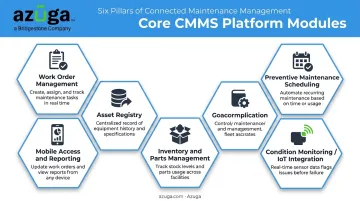
Two of these modules stand out from the rest
- Preventive maintenance scheduling delivers the fastest payback of the six, since it directly prevents the breakdowns that cause unplanned downtime
- Condition monitoring is the newest addition and the fastest-growing, generating a work order automatically once a sensor reading crosses a threshold
This is where CMMS platforms start to resemble predictive maintenance strategies used in fleet telematics, where onboard vehicle diagnostics play a similar role.
Benefits of CMMS Software
The value of a CMMS shows up in maintenance costs, uptime, and audit readiness. A federal maintenance benchmarking study found organizations running a CMMS reported average improvements of 20.1% less equipment downtime, 19.4% lower material costs, and 28.3% higher maintenance productivity. The average payback period was just 14.5 months.
These gains typically break down across five areas
- Reduced unplanned downtime: Proactive scheduling catches wear-and-tear issues before they cause a breakdown, so technicians work through a planned backlog instead of firefighting emergency repairs, which cuts overtime and stress.
- Lower maintenance and inventory costs: Better parts tracking and planned work cut rush-priced purchase orders and wasted labor hours. The U.S. Department of Energy estimates preventive maintenance programs save 12% to 18% over reactive-only upkeep.
- Extended asset lifespan: Running equipment on the maintenance intervals its designer specified keeps assets closer to their full design life and keeps repair costs predictable, whether it's a stamping press or a delivery van.
- Improved compliance and audit readiness: Digital work order records, timestamped sign-offs, and stored inspection history speed up regulatory audits, especially in healthcare (Joint Commission documentation) and trucking (on-demand inspection records).
- Greater visibility and accountability: Managers overseeing multiple sites or a large fleet get a single view of asset health, technician performance, and cost trends, a level of insight that's hard to build from spreadsheets scattered across a dozen laptops.
CMMS Use Cases by Industry
CMMS software looks different depending on what you're maintaining, but the core logic stays the same across industries: scheduled, documented, proactive maintenance.
- Manufacturing and facilities: Standardizing preventive maintenance across production lines protects throughput. A 2016 Plant Engineering survey found 51% of plants already ran a CMMS for PM scheduling and work history.
- Healthcare and utilities: Safety-sensitive equipment must stay compliant and operational. Joint Commission reviews found 7% of nursing care surveys flagged risks like nonworking defibrillators, the gap CMMS records help close.
- Construction, HVAC, plumbing, and service fleets: These businesses manage two asset types at once, equipment and vehicles, under one maintenance strategy, which is where fleet-specific tools start to matter.
Fleet and Vehicle Maintenance
The same CMMS logic that governs a stamping press applies to a box truck: mileage- or engine-hour-based PM schedules, documented inspection logs, and repair history tied to each unit. For fleets, that data has to come from the vehicle itself.
This is where GPS fleet tracking platforms complement traditional CMMS workflows. Azuga's battery-powered, hardwired, and Bluetooth beacon trackers, for example, feed live diagnostic trouble codes, odometer readings, and engine-hour data directly into a fleet's maintenance scheduling tools. When a check-engine alert fires, fleet managers get notified immediately instead of finding out when a driver reports a problem.
Smith & Solomon, a commercial driving school running a high-wear fleet, uses these DTC alerts to schedule preventive maintenance before minor issues turn into costly repairs. The company also set a geofence around its repair shop, so vehicles automatically trigger a service alert when they pull in.
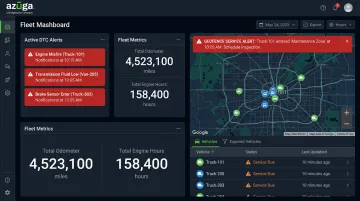
Triton Air, an HVAC service company, built a similar system using check-engine and low-battery alerts routed to the right technician.
For industries like construction, HVAC, plumbing, and trucking, this kind of automated, condition-based trigger does for vehicles what IoT sensors do for factory equipment: replacing guesswork with real data.
How to Choose the Right CMMS Software
Before comparing feature lists, get clear on what you're actually maintaining.
- Define your goals and asset types first. Facilities, equipment, vehicles, or a mix of all three changes which features matter most. A fleet-heavy operation needs mileage- and engine-hour-based scheduling; a manufacturing plant needs machine-level preventive maintenance (PM) history.
- Prioritize ease of use and mobile functionality. A CMMS only delivers value if technicians actually use it in the field, and if updating a work order takes five extra taps, adoption stalls.
- Check integration capabilities. Look for connections to your ERP, IoT sensors, or GPS/fleet tracking systems, since disconnected systems create data silos and someone ends up re-entering the same information twice.
- Skip the search for a single "best" CMMS. There isn't one, since the right platform depends on your industry, size, and whether you need a standalone CMMS or full EAM functionality. Shortlist two or three vendors and test each through a free trial before committing.
Frequently Asked Questions
What are CMMS tools?
CMMS tools are the individual features inside a CMMS platform, such as work order management, PM scheduling, asset tracking, inventory management, and reporting dashboards. Together, they form the full system.
What is the best CMMS software?
There's no single best option. It depends on your industry, company size, and asset types, so evaluate platforms based on your specific workflow needs rather than rankings alone.
What does CMMS stand for?
CMMS stands for computerized maintenance management system: software that centralizes maintenance planning, tracking, and reporting in one digital platform.
How much does CMMS software cost?
CMMS pricing varies by vendor and feature set. Entry-level and free-tier options exist for smaller teams, while advanced multi-user and enterprise deployments are typically quoted separately based on modules and user count.
Is a CMMS necessary for small businesses?
Even small teams benefit from moving off spreadsheets and paper logs. Affordable entry-level and even free-tier CMMS options exist, so cost isn't usually the barrier it once was.
What's the difference between CMMS and EAM software?
CMMS focuses on maintenance execution, while EAM covers the full asset lifecycle, including procurement, financial tracking, and disposal.