Manual tracking, paper logs, and "someone probably knows where it is" work fine for a handful of vehicles. They fall apart once your fleet or equipment inventory grows. The result: surprise breakdowns, missed maintenance windows, assets that quietly vanish between crews, and no real data to decide whether to repair or replace.
This guide breaks down what asset lifecycle management actually means, its five stages, why software has become essential, the features worth paying for, and how GPS and telematics data turns guesswork into decisions you can defend.
Key Takeaways
- Asset lifecycle management (ALM) tracks assets from acquisition to retirement, maximizing value and controlling costs
- The lifecycle spans 5 stages: planning, acquisition/deployment, utilization, maintenance, and disposal
- ALM software cuts unplanned downtime, extends asset life, and supports data-driven repair-vs-replace calls
- GPS and telematics data add real-time location, usage, and condition insights across the lifecycle
What Is Asset Lifecycle Management? Understanding the 5 Stages
Asset lifecycle management is the structured process of managing physical assets, meaning vehicles, tools, and heavy equipment, from the moment they're planned or acquired through active use, maintenance, and eventual retirement. The goal is straightforward: get the most value out of every asset while keeping costs under control.
The Institute of Asset Management defines this activity around the ISO 55000 standard as the "coordinated activity of an organization to realize value from assets." That framework covers identifying need, acquiring, operating, maintaining, and eventually disposing of or replacing an asset.
Following that framework gets complicated fast without a system to back it up. Manual tracking methods work when you have five trucks and a shared whiteboard. They stop working somewhere around asset number twenty. Spreadsheets go stale the moment a vehicle changes hands. Paper logs get left in the glovebox. Tribal knowledge disappears when your best technician takes a vacation, or leaves the company entirely.
The 5 Stages of the Asset Lifecycle
Most fleet and equipment operations can group their process into five stages
- Planning & Procurement – Assessing need, setting a budget, and selecting vendors before an asset ever gets purchased.
- Acquisition & Deployment – Onboarding the asset into active service: registration, tagging, and initial setup.
- Utilization & Operation – Actively using and monitoring the asset for location, usage hours, and performance.
- Maintenance – Performing scheduled and preventive work that keeps the asset running and extends its useful life.
- Disposal & Retirement – Decommissioning, reselling, or replacing the asset based on its full performance and cost history.
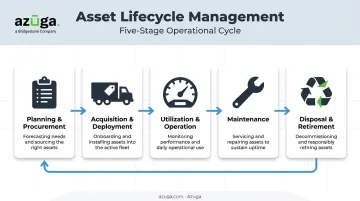
Skip any of these stages and you're flying blind at some point in the asset's life, usually right when a decision matters most.
Why Asset Lifecycle Management Software Matters for Fleet and Equipment-Heavy Businesses
Software-driven ALM catches problems spreadsheets simply can't. When you can see utilization data across your entire fleet, underused or redundant assets stand out immediately. That visibility stops over-purchasing before it happens.
Preventive maintenance scheduling is where the real savings show up. Instead of fixing things after they break, ALM software flags service needs based on:
- Mileage thresholds tied to service intervals
- Engine hours logged during operation
- Diagnostic trouble codes pulled directly from the vehicle
Azuga customers use this exact approach, catching Check Engine Light alerts before a vehicle becomes inoperable and scheduling repairs on their terms instead of the truck's.
Compliance matters here too, especially for regulated industries. Under FMCSA's Part 396 requirements, carriers must maintain dated inspection, repair, and maintenance records, generally for one year plus six months after a vehicle leaves the fleet. Centralized, always-current records make audits far less stressful than digging through a filing cabinet.
Beyond compliance recordkeeping, real-time monitoring catches problems while they're still cheap to fix. Condition alerts and diagnostic trends flag developing issues long before a breakdown occurs.
Complete lifecycle data also sharpens capital planning. The Department of Energy notes that utilization data helps fleets identify vehicles for downsizing, replacement, or pooling rather than guessing based on age alone. When you know total cost of ownership, not just purchase price, the repair-vs-replace decision stops being a coin flip.
Must-Have Features in Asset Lifecycle Management Software
Not every platform covers the full lifecycle. Here's what actually matters
- Centralized asset tracking across vehicles, trailers, and high-value equipment. Azuga's asset tracking tools tie individual tools to specific trailers and locations, with real-time GPS positioning so nothing goes missing at the wrong job site.
- Real-time location and usage tracking so dispatchers know exactly where an asset is and how hard it's being worked, not just where it was last logged.
- Automated maintenance alerts triggered by mileage, engine hours, or diagnostic trouble codes, not a fixed calendar date. Azuga lets managers set their own thresholds so schedules match how equipment is actually used.
- Centralized reporting and analytics covering lifecycle stage, utilization rates, and ownership history, giving managers one dashboard instead of five browser tabs.
- Geofencing around job sites and storage yards triggers automatic alerts when equipment crosses a boundary, solving the "idle at Site A while Site B waits" problem.
- Integration with existing systems. Azuga's marketplace connects with shop management tools like Fleetio, syncing mileage, location, and engine hours nightly, plus dispatch platforms like TowBook, so lifecycle data doesn't live in a silo.
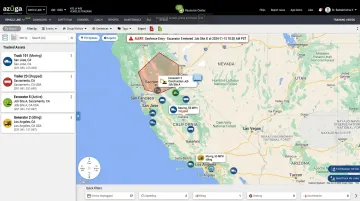
How GPS Fleet Tracking Strengthens Asset Lifecycle Management
GPS and telematics devices feed continuous, real-time data into ALM software. That data includes
- Vehicle location and route history
- Usage hours and idle time
- Driver behavior patterns, including harsh braking and speeding
- Engine diagnostics and fault codes
This shift turns reactive asset management, meaning fixing things after they break, into proactive management built on actual data.
Azuga's hardwired and battery-powered asset trackers deploy in minutes without a complex install, tracking at 30-second intervals, among the highest frequencies available in the industry. That granularity matters.
It's the difference between knowing an asset "was somewhere near the job site" and knowing exactly when it idled too long, or when condition data flagged a problem worth scheduling around.
Video data adds another layer of protection. Azuga SafetyCam's AI-driven collision reconstruction analyzes driver-facing footage through a neural learning network, tagging distraction events and preserving evidence when accidents happen.
The documented result: 70% of accidents are not the fault of the driver, and having that evidence on hand can eliminate the need for costly third-party forensic reconstruction.
This isn't just about safety optics. Onboard video paired with driver coaching produces measurable results in commercial fleets. FMCSA-backed research across two commercial motor vehicle fleets found:
- A 52.2% reduction in safety-related events when video monitoring was combined with feedback and coaching
- A 59.1% drop in the most severe events per 10,000 miles
Fewer accidents mean fewer unplanned repairs, and unplanned repairs are exactly what shorten an asset's useful life.
Choosing the Right Asset Lifecycle Management Software for Your Business
Not every business needs the same setup. Start by matching the platform to your primary asset type. Vehicle-heavy fleets like trucking, towing, and waste management need strong GPS and telematics integration, plus diagnostics that catch mechanical issues early. Equipment-heavy trades such as construction, HVAC, landscaping, and plumbing need maintenance and utilization tracking across mixed asset types, from vans down to hand tools.
Once you've matched the platform to your asset type, pricing structure matters just as much as features. Look for per-vehicle or per-asset pricing that scales whether you run five trucks or five hundred.
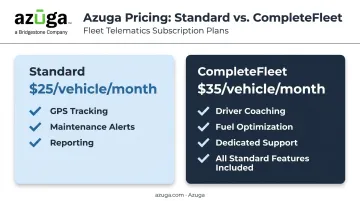
Azuga matches packaging to fleet size and the features you select, with a premium CompleteFleet tier that adds features like driver coaching, fuel optimization, and dedicated support.
Finally, weigh how fast you'll see value
- Self-install hardware means no technician appointments or fleet downtime during setup
- 24/7 support keeps small issues from becoming week-long delays
- Modular feature selection (GPS only, or GPS plus dashcams plus maintenance) lets you start lean and add capability as your asset count grows
Frequently Asked Questions
What is asset lifecycle management?
Asset lifecycle management is the structured process of managing a physical asset, like a vehicle or piece of equipment, from acquisition through retirement. The goal is maximizing value while controlling ownership costs at every stage.
What are the 5 stages of the asset lifecycle?
The five stages are planning and procurement, acquisition and deployment, utilization, maintenance, and disposal or retirement. Each stage builds on data from the one before it.
What is asset lifecycle management software?
It's a digital platform that automates asset tracking, maintenance scheduling, and reporting across every lifecycle stage. Instead of spreadsheets, everything lives in one centralized, real-time system.
How does asset lifecycle management software reduce costs?
It combines preventive maintenance scheduling, reduced downtime, and complete cost history for smarter repair-vs-replace decisions. Azuga customers, for example, save an average of $9,462 annually through proactive cost management.
Which industries benefit most from asset lifecycle management software?
Fleet- and equipment-heavy industries see the biggest impact: construction, trucking, utilities, HVAC, plumbing, and waste management. Any business juggling vehicles and equipment across multiple job sites benefits from centralized visibility.
How much does asset lifecycle management software cost?
Packaging scales per vehicle or asset, with rates rising for features like dashcams and maintenance tracking. Azuga, for example, matches packages to fleet needs, scaling with the features you choose.