Introduction
A plumber digs through a cluttered van for ten minutes looking for a pipe threader that isn't there. It's on another truck, or worse, still sitting at last week's job site. Multiply that by every crew member, every week, and you've got a real productivity leak.
Missing tools, unlogged equipment, and "who had this last?" disputes cost trade businesses real money in replacement purchases and wasted labor hours. QR code asset tracking software fixes this without expensive hardware.
It works using your team's existing smartphones. Snap a code, pull up the asset record instantly. This article covers how QR asset tracking works, its real benefits, and how it stacks up against barcodes and RFID. Pair it with GPS fleet tracking, and contractors get full visibility over tools and trucks.
Key Takeaways
- QR tags link physical equipment to digital records any smartphone can scan
- Setup costs less than RFID and stores more data than a barcode
- Best for tools, generators, and non-powered equipment; vehicles need automatic GPS tracking
- Pair QR tags with GPS fleet tracking, like Azuga, to cover tools and trucks alike
What Is QR Code Asset Tracking Software?
QR code asset tracking software attaches a unique 2D matrix code to each physical asset. Scan it with a smartphone camera, and it instantly pulls up that item's digital record: location, condition, maintenance history, and who checked it out last.
The technology isn't new or gimmicky. DENSO WAVE developed the QR Code in 1994 after manufacturing plants requested a faster way to track parts than traditional barcodes allowed. Japan's auto industry adopted it for electronic Kanban systems almost immediately, and it later became a global manufacturing standard before smartphones ever made it mainstream (DENSO WAVE history).
That industrial pedigree matters for one big reason: data capacity. A QR code can hold up to 7,089 numeric characters or 2,953 bytes of data, compared to roughly 48 characters on a standard GS1-128 barcode. That's the difference between storing just an ID number and storing enough information to link a rich, updatable asset profile.
QR codes also survive damage that would kill a barcode. Built-in error correction lets a code stay scannable even when part of it is torn, scuffed, or covered in grease.
DENSO WAVE's own specifications show that, depending on the correction level chosen, a QR code can restore between 7% and 30% of damaged codewords and still read correctly (DENSO WAVE error correction). For job sites where labels get kicked around a truck bed, that's not a minor perk.
How Do QR Code Asset Tags Work?
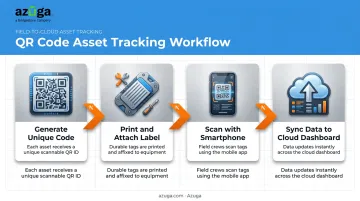
The workflow is straightforward
- Generate a unique code for each asset in the software
- Print and attach the label to the tool, generator, or equipment piece
- Scan with a smartphone whenever the asset moves, gets serviced, or changes hands
- Sync data instantly to a cloud dashboard, updating location, condition, and custody records
One thing to understand: QR tags aren't GPS. They only update when someone physically scans them. That makes them ideal for check-in/check-out logs and audit trails, not for continuous, real-time location monitoring.
If you need to know where a generator is right now without anyone scanning it, QR alone won't do that job. That's where GPS-based fleet and asset trackers—like Azuga's telematics devices—fill the gap, providing continuous location visibility between scans.
What Should QR Code Asset Tracking Software Include?
Not all platforms are built the same. Look for
- Mobile scanning app compatible with iOS and Android
- Offline scan mode for job sites without reliable signal
- Cloud dashboard for centralized reporting across crews and locations
- Check-in/checkout functionality to log custody automatically
- Audit trail history showing every scan event with timestamp and user
- Integration options with existing business or accounting systems
Key Benefits of QR Code Asset Tracking Software
The appeal comes down to balance. You get most of the functionality of expensive tracking systems without the infrastructure cost.
Key benefits include
- Faster asset identification: A scan pulls up an asset's full record in seconds, cutting down on manual recordkeeping that eats into crew time, according to Construction Executive.
- Increased asset visibility: QR labels cost pennies to print, so crews can tag every drill, ladder, and trailer across scattered job sites without hardware costs piling up.
- Lower costs than barcode scanners or RFID: Any smartphone camera works as the scanner, so there's no dedicated hardware to buy, charge, or replace — real savings for a 20-truck operation versus outfitting a fleet with RFID readers.
- Stronger accountability and audit trails: Every scan creates a timestamped record of who checked an asset in or out, so a missing $2,000 compressor doesn't mean guessing who had it last.
- Reduced downtime through better maintenance tracking: Linking service history to each tag helps techs catch overdue inspections before equipment breaks down mid-job.
- Durability even when labels are damaged: Built-in error correction means dirt, scuffing, and partial tears that would sideline a barcode often don't stop a QR code from scanning correctly.
QR Codes vs. Barcodes vs. RFID: Which Should You Use?
Each technology serves a different purpose. Here's how they compare on the factors that matter most for trade businesses
| Factor | QR Codes | 1D Barcodes | RFID |
|---|---|---|---|
| Data capacity | Up to 7,089 numeric / 2,953 bytes | ~48 characters (GS1-128) | Typically under 2 KB; some tags just a 96-bit ID |
| Scanning method | Smartphone camera, any angle | Laser or image scanner, needs alignment | Radio signal, no line of sight required |
| Range | Close-range (visual contact needed) | Close-range | Can exceed 10 meters (GS1 RFID standards) |
| Durability | High — error correction handles dirt/damage | Low — needs intact bars and clear background | Durable physically, but sensitive to metal and liquid interference |
| Setup cost | Low — uses existing smartphones | Low, but often needs dedicated scanner hardware | Higher — readers often run plus tag costs |
The right choice usually comes down to your existing infrastructure and scanning volume
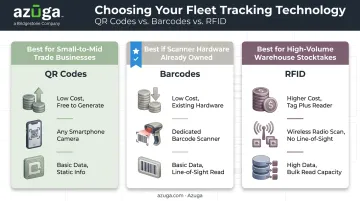
- QR codes work best for most small to mid-sized trade businesses — low setup cost, smartphone-native scanning, and enough data capacity for a full asset record
- RFID earns its higher cost in high-volume warehouse stocktakes, where bulk, non-line-of-sight scanning saves real time
- Barcodes stay viable if you've already invested in scanner hardware and don't need QR's extra data capacity
How to Implement QR Code Asset Tracking in Your Business
Types of Assets You Can Track with QR Codes
QR tagging works best on items that move between people, trucks, and job sites
- Hand and power tools
- Generators and compressors
- Trailers and attachments
- Safety gear and PPE
- IT hardware and job-site tech
Step-by-Step Implementation Process
- Audit existing assets: build a complete inventory before you tag anything
- Choose durable tag materials suited to the environment: indoor labels differ from what you'd use on outdoor or industrial equipment
- Generate and assign unique codes to each item in your software
- Attach labels in a consistent, visible spot on each asset
- Train staff on the scanning app so check-in/checkout becomes routine, not an afterthought
Best Practices for Long-Term Success
- Schedule regular audits to catch mislabeled or missing tags before they become bigger problems
- Use tamper-resistant labels on high-value items to discourage removal
- Restrict edit access so only authorized staff can change asset records
- Confirm your software supports offline scanning: Software Advice's service fleets research ranks it among the most critical mobile app features for crews without reliable signal
Beyond QR Codes: Pairing Asset Tags with GPS Fleet Tracking
QR tags only tell you something when someone scans it. That's fine for a ladder or a nail gun sitting in a truck bed. It's not fine for a $60,000 service vehicle you need to locate right now.
Vehicles and high-value mobile equipment need automatic, continuous tracking, not a manual scan-based log. That's where GPS fleet tracking fills the gap QR codes can't.
Azuga's GPS tracking platform pairs hardwired and battery-powered asset trackers with mounted equipment beacons, so high-value mobile gear gets continuous visibility without a complex install. Once it's running, it delivers real-time location and utilization data automatically, without anyone lifting a finger.
The businesses that benefit from QR-tagged tools, including construction, HVAC, electrical, plumbing, and landscaping crews, are the same ones seeing real results on the vehicle side
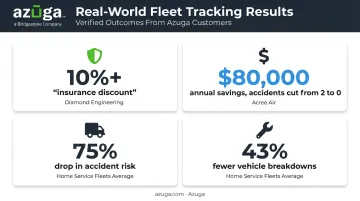
- Diamond Engineering used Azuga's asset visibility and driver monitoring data to secure a 10%+ discount on their insurance premium
- Acree Air cut accidents from 2 down to 0 and saved $80,000 annually on insurance premiums
- Home service fleets using Azuga have seen accident risk drop by 75% and vehicle breakdowns fall by 43%, based on Azuga's fleet performance data
Tag your tools with QR codes for accountability and audit trails. Track your trucks with Azuga's GPS fleet platform for the continuous visibility QR simply wasn't built to provide. Together, they cover every asset your business owns — the ones that sit still and the ones that drive away.
Frequently Asked Questions
Can QR codes be used to track inventory?
Yes. QR codes link individual stock items to digital records that update quantity, location, and status with every scan, making them a practical fit for inventory management.
How do QR code asset tags work?
Each asset gets a unique code that's generated, printed, and attached as a label. Scanning it with any smartphone camera pulls up or updates the digital record instantly.
Is QR code asset tracking expensive to set up?
No. Labels cost pennies to print, and there's no dedicated scanner hardware to buy since employee smartphones handle the scanning.
Can QR code asset tracking work without internet access?
Many platforms support offline scanning, storing data locally on the device and syncing it automatically once connectivity returns, a common need on remote job sites.
How durable are QR code asset tags in harsh environments?
Industrial-grade materials like polyester labels or anodized aluminum plates hold up against weather, chemicals, and abrasion. Built-in error correction also keeps codes readable even when partially damaged.
What's the difference between QR code tracking and GPS tracking?
QR tracking only updates when someone manually scans the code. GPS tracking, like Azuga's fleet platform, reports vehicle location and driver behavior automatically and continuously, with no manual action required.