Many fleet managers can't. Documents live in three-ring binders at the yard, spreadsheets on someone's laptop, and paper DVIRs stuffed in a glove box. When records are scattered, a routine audit turns into a scramble, and an accident claim turns into a liability nightmare.
Fleet documentation covers everything from maintenance logs to driver qualification files, and it applies whether you're running eighteen-wheelers, HVAC vans, or utility trucks. This guide breaks down what fleet documentation includes, why it matters, the paper-versus-digital debate, and how GPS fleet software takes the manual work off your plate.
Key Takeaways
- Fleet documentation covers maintenance, inspections, compliance, and driver records, each with different retention rules
- Incomplete records are a leading cause of failed roadside inspections and DOT audit penalties
- Video and telematics data can resolve fault disputes and cut insurance costs after an accident
- Digital fleet management software automates the record-keeping that paper systems handle manually
What Is Fleet Documentation?
Fleet documentation is the complete paper or digital trail that follows a vehicle from the day it joins your fleet to the day it's sold or scrapped. It records what the vehicle is, what condition it's in, whether it's legal to operate, and who's been driving it. Auditors, insurers, and your own accounting team all rely on different pieces of this same file.
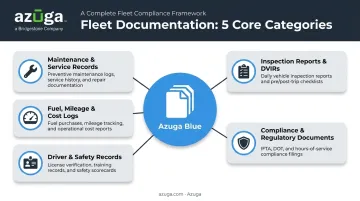
Five categories make up most of what you'll need to track
- Maintenance and service records — Every repair, part replacement, and scheduled service interval. A complete history shows an auditor (or a buyer, if you're selling the vehicle) exactly what's been done and when.
- Inspection reports — Daily pre-trip and post-trip Driver Vehicle Inspection Reports (DVIRs) flag defects before they become roadside violations or breakdowns. Periodic inspections, required at least every 12 months under FMCSA rules, add another layer of documented safety review.
- Compliance and regulatory documents — Vehicle registrations, permits, insurance certificates, and DOT/FMCSA paperwork keep every unit road-legal. Miss a renewal date, and inspectors can pull the vehicle out of service on the spot.
- Driver and safety records — License verification, training certificates, and incident reports tie directly to individual drivers, not just vehicles. This is where Driver Qualification Files (DQFs) live.
- Fuel, mileage, and cost logs — These support IFTA tax reporting, budgeting, and utilization analysis, helping you decide which vehicles are earning their keep and which ones are costing more than they earn.
Why Fleet Documentation Matters
Incomplete or inaccurate paperwork is one of the fastest ways to fail a DOT audit. During CVSA's 2025 International Roadcheck, 5.9% of inspected drivers were placed out of service, with hours-of-service violations accounting for 32.4% of those OOS citations and false logs making up another 10%. These violations often stem from records that weren't kept, weren't current, or couldn't be produced fast enough.
The financial exposure is real, too. Under current federal penalty schedules, failing to prepare or maintain a required record can trigger civil penalties of up to $1,584 per day, capped at $15,846 per violation. Multiply that across a fleet with multiple gaps, and a documentation problem becomes a budget problem fast.
Documentation as Litigation Protection
Good records don't just satisfy regulators. They protect you after an accident. When fault is disputed, clear maintenance history, driver logs, and video evidence often decide the outcome.
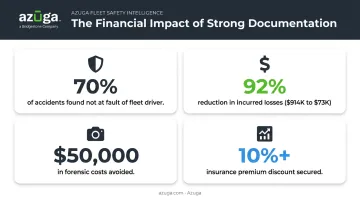
Azuga's SafetyCam AI, for example, uses collision reconstruction to combine dashcam footage with GPS and vehicle sensor data. Azuga's internal data shows that 70% of accidents are found not to be the fault of the fleet driver once this evidence is reviewed.
One fleet insurance partner, QuadScore, saw this play out directly: stored dashcam footage from an Azuga client helped police clear the driver of fault, avoiding an estimated $50,000 in forensic reconstruction costs and a potential $1 million claim. QuadScore now requires dashcams across all its auto clients as a result.
Documentation as a Cost-Control Tool
Beyond litigation, organized records reveal patterns
- Flags vehicles with recurring maintenance costs that signal it's time to replace them
- Catches fuel spend climbing faster than mileage justifies
- Tracks how much downtime specific units accumulate over a quarter
A three-year case study involving Azuga's platform showed one fleet's insurance carrier reduce incurred losses by 92%, from $914,000 down to $73,000, after implementing documented driver safety monitoring. Diamond Engineering's president, Rod Gartner, credited similar data with a direct win: presenting Azuga's asset location and driver behavior records to their insurer secured a premium discount of more than 10%.
Well-documented vehicles also sell better. A verifiable service history at auction or resale reassures buyers and typically supports a higher price.
Paper-Based vs. Digital Fleet Documentation
Paper systems have real limits. Physical files take up storage space, get lost or damaged, and depend on someone remembering to fill them out correctly. When an auditor asks for three years of maintenance history on a specific unit, digging through filing cabinets eats hours you don't have.
Digital systems solve most of these problems
- Centralized access lets any authorized team member pull a vehicle's full history from any location
- Automated updates mean records populate as events happen, not days later
- Real-time visibility shows compliance status across the whole fleet at a glance
- Faster audit prep because everything's searchable instead of buried in a drawer
Federal rules already accommodate this shift. Under 49 CFR 390.31, electronic copies of required records satisfy FMCSA requirements as long as they're accurate, accessible, legible, and reproducible. Paper was never mandatory; it's just the default fleets fall into without a better system.
Most fleets today run a hybrid model, mixing paper and digital records. That balance keeps tilting toward fully digital as ELD mandates and telematics adoption spread across every vertical, from trucking to construction.
Best Practices for Managing Fleet Documentation
Strong documentation habits don't happen by accident. They come from a handful of deliberate practices
- Standardize your templates. Use the same format for inspection reports and maintenance logs across every vehicle and location, so records are comparable.
- Centralize storage. One cloud-based system, one source of truth. Nobody should have to guess which spreadsheet is current.
- Track version history. Know when a record was updated and by whom, so outdated data never gets mistaken for the current status.
- Set role-based permissions. Drivers, technicians, and administrators should only see and edit what's relevant to their job.
- Define retention timelines. Requirements vary by record type
| Record Type | Federal Retention Requirement |
|---|---|
| DVIR (required defects) | 3 months from report date |
| Vehicle maintenance records | 1 year, plus 6 months after the vehicle leaves your control |
| Core Driver Qualification File records | Employment period, plus 3 years |
| Annual MVR review | 3 years from the review date |
| Periodic inspection report | 14 months |
- Run internal audits regularly. Check documentation completeness before an inspector does it for you, not after a violation shows up on your CSA score.
"Now we not only talk about safe driving but also document it. That has made a difference and resulted in improved safety of our clients and lower insurance costs for us."
— Gordon Raley, CEO, Family Service Foundation (Azuga customer)
Practicing good habits and documenting them are two different things. That gap is what separates fleets that pass audits smoothly from those that don't.
How GPS Fleet Management Software Simplifies Documentation
Manual logging is where most documentation gaps start. GPS fleet software closes those gaps by capturing data the moment it happens, no driver memory or end-of-shift paperwork required.
Azuga's plug-and-play OBD-II device installs in minutes, without a mechanic or downtime. Once it's in, it starts capturing data straight from the vehicle
- Odometer readings and fuel data logged automatically
- Diagnostic codes pulled directly from the engine
- Continuous, time-stamped location and trip history via GPS
On Azuga's CompleteFleet plan, that tracking updates every 30 seconds, four times more frequently than the standard two-minute interval on entry-level plans. Fleet managers get a far more granular record of where a vehicle was and when.
That level of detail only helps if support keeps pace. Backed by 24/7 phone, email, and web support, fleets have a direct line to help whenever an audit request comes in unexpectedly.
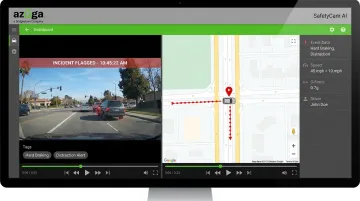
Dashcam integration adds another automatic layer. Azuga's SafetyCam AI detects hard braking, sudden acceleration, and driver distraction, then logs and tags each event without anyone touching a button. When an incident does happen, that footage plus GPS breadcrumb data becomes ready-made evidence instead of a dispute over who remembers what.
Software integrations pull everything else into one place
- Fuel card data ties spending directly to specific vehicles and trips
- Maintenance dashboards track service reminders and completed work in one view
- Reports can be scheduled to generate and email automatically in PDF or Excel format
The result: instead of chasing down five different documents from five different systems, a fleet manager opens one dashboard and has the answer.
Common Challenges in Fleet Documentation Management
Even fleets that want to do this right run into predictable obstacles.
Fragmented records are the biggest one. When maintenance logs live in a spreadsheet, inspection reports sit in a filing cabinet, and driver files are in a separate HR system, nobody has a full picture of any single vehicle's history. Gaps hide in the space between systems.
Inconsistent data entry compounds the problem. One technician fills out a service form thoroughly; another jots down two lines. Over time, records become unreliable, and unreliable records are almost as risky as missing ones.
Slow retrieval during a surprise inspection is where it all comes to a head. A roadside officer or auditor doesn't wait while someone drives back to the office to find a paper file. Without a centralized system, that delay alone can turn a routine check into a flagged violation.
Frequently Asked Questions
What documents are required for DOT compliance?
FMCSA requires vehicle registration, Driver Qualification Files, maintenance records, and inspection reports (including DVIRs) at minimum. Requirements vary by vehicle type and operation, so check current 49 CFR Parts 391, 395, and 396 for specifics.
How long should fleet maintenance records be kept?
Maintenance records must generally be kept for 1 year, plus 6 months after a vehicle leaves your control. Other document types, like DVIRs or DQFs, follow their own retention rules under current FMCSA guidance.
What is a DVIR (Driver Vehicle Inspection Report)?
A DVIR is a pre-trip or post-trip inspection report drivers complete to flag vehicle defects before operation. It helps catch safety issues before they cause a breakdown or a roadside violation.
Can fleet documentation be fully digital?
Yes. Under 49 CFR 390.31, electronic records satisfy FMCSA requirements as long as they're accurate, accessible, and reproducible. Most fleets now manage inspections, maintenance logs, and driver files through digital platforms.
How does GPS tracking help with fleet documentation?
GPS platforms like Azuga automatically log trip data, mileage, and driver behavior in real time, removing the need for manual entry. This reduces errors and creates a continuous, audit-ready record for every vehicle.
What happens if fleet documentation is incomplete during an audit?
Incomplete documentation can lead to fines, out-of-service orders, or a higher CSA score, all of which increase scrutiny and insurance costs down the road. Proactive, centralized record-keeping is the best defense against these outcomes.