Introduction
If your dispatch board still lives in a spreadsheet, you already know the problem. One team tracks jobs in a shared doc, another logs mileage on paper, and a third checks vehicle locations through a separate GPS login that never quite syncs with anything else.
Service and trade businesses lose hours every week reconciling data that should already talk to each other.
That disconnect is exactly what cloud-based platforms eliminate. Cloud adoption is no longer optional, either. Cloud deployments now account for 53.4% of the global fleet-management-software market as of 2025, according to Fortune Business Insights, and that share keeps climbing as legacy systems age out.
This article breaks down what a cloud-based TMS actually is and the real benefits it delivers. You'll also find the features worth paying for, what it costs, and how to pick the right platform for your fleet in 2026.
Key Takeaways
- Cloud TMS platforms run entirely online, need no local servers, and work from any connected device
- They cut upfront costs, deploy faster, and give dispatchers real-time visibility that legacy systems can't touch
- Modern platforms bundle GPS tracking, AI dashcams, and safety scoring for construction, HVAC, and plumbing fleets
- Your best fit depends on fleet size, integration needs, and monthly budget per vehicle
What Is a Cloud-Based TMS?
A transportation management system (TMS) is software that handles routing, dispatch, tracking, and day-to-day transportation operations. "Cloud-based" simply means the software lives on the provider's servers, not yours. You log in through a browser or app instead of installing anything on-site.
That distinction matters more than it sounds. Traditional on-premise TMS software requires
- Upfront licensing fees
- Dedicated servers your IT team maintains
- Manual updates and patches
- In-house troubleshooting when something breaks
Cloud, or SaaS, platforms flip that model. You pay a subscription, updates roll out automatically, and the provider manages the infrastructure behind the scenes.
Two Different Kinds of "TMS"
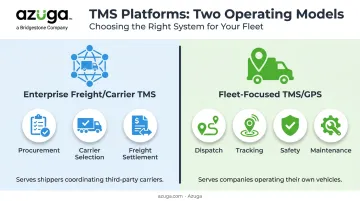
Here's where confusion creeps in. "TMS" actually covers two distinct categories
- Enterprise freight/carrier-management platforms: built for shippers coordinating multiple third-party carriers, focused on procurement, carrier selection, and freight settlement.
- Fleet-focused TMS/GPS platforms — built for companies that own and operate their vehicles, covering dispatch, tracking, safety, and maintenance.
Azuga falls into the second category, serving industries like construction, electrical, HVAC, landscaping, plumbing, and utilities where the vehicles on the road belong to the business, not a network of outside carriers.
Core Components You'll Find in Most Platforms
Regardless of category, most cloud TMS platforms share a common backbone
- Real-time GPS tracking
- Route and dispatch optimization
- Reporting dashboards
- Third-party software integrations
Increasingly, AI and machine learning power the layer on top of that backbone. Predictive maintenance alerts flag fault codes before a breakdown happens. Driver behavior scoring turns raw telematics data into coaching opportunities. Automated exception handling flags geofence violations, fuel anomalies, and accidents without a manager having to dig through logs manually.
Key Benefits of a Cloud-Based TMS in 2026
Faster Deployment and Scalability
On-premise systems can take months to install and configure. Cloud platforms move faster. Samsara reports fleets going live in days for smaller operations and under four weeks for a 500-vehicle rollout, while Fleetio notes most customers are fully operational within 90 days. Scaling up or down means adjusting your subscription, not buying new servers.
Lower Total Cost of Ownership
Subscription pricing removes the need for on-site servers and dedicated IT staff. That doesn't mean cloud is always cheaper dollar-for-dollar, but it shifts spending away from hardware maintenance and toward predictable monthly costs tied to your actual fleet size.
Real-Time Visibility and Tracking
Live dashboards show vehicle location and job status continuously, not on a delay. Azuga's platform updates location data every 30 seconds, which gives dispatchers far tighter accuracy than older GPS polling methods that ping every few minutes.
Improved Driver Safety and Reduced Risk
This is where cloud platforms earn their keep. Fleets using Azuga have seen a 38% average decrease in accidents and a 57% reduction in speeding citations.
AI dashcams add another layer. Azuga's SafetyCam AI uses collision reconstruction to help exonerate drivers when they're not at fault, which can prevent expensive, drawn-out litigation.
Measurable Cost Savings
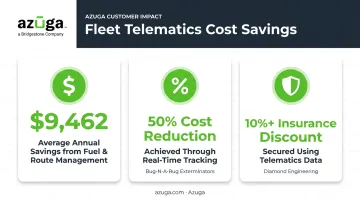
Real numbers matter more than vague promises. Azuga customers have saved $9,462 annually through better fuel and route management. Trade-specific examples back this up:
- Bug-N-A-Rug Exterminators cut costs by 50% through real-time driver tracking
- Diamond Engineering secured a 10%+ insurance premium discount using telematics data
- Kitsap Garage Door Company, a garage door installation and repair company, is featured among Azuga's documented customer success stories
Better Integrations and Remote Accessibility
Cloud TMS platforms connect to the tools you already run. Azuga's marketplace includes 75+ integrations, from ServiceTitan and Procore to Fleetio and TowBook, plus fuel card providers. Managers and drivers alike get mobile access, whether they're in the office or standing at a job site.
Cloud-Based TMS vs. On-Premise TMS: A Quick Comparison
The differences boil down to speed, cost structure, and who carries the maintenance load.
| Factor | Cloud TMS | On-Premise TMS |
|---|---|---|
| Deployment time | Days to a few weeks | Often months |
| Upfront cost | Low (subscription-based) | High (licensing + hardware) |
| Ongoing maintenance | Handled by provider | Requires in-house IT staff |
| Updates | Automatic | Manual |
| Data control | Provider-managed | Direct, on-site control |
| Internet dependency | Required | Not required |
On-premise systems still have a case: they don't rely on connectivity, and some businesses prefer keeping data entirely in-house. But that control comes at the cost of hardware investment and staff hours spent on upkeep.
Security is often the top concern people raise about cloud platforms. According to the Cybersecurity and Infrastructure Security Agency (CISA), SaaS environments shift much of that burden onto the provider
- Providers carry most of the security responsibility, not the end user
- Data is encrypted both at rest and in transit
- Automation and orchestration in cloud environments are difficult to replicate on-site
Security still depends on the specific provider and configuration. But the gap between cloud and on-premise has narrowed considerably.
Must-Have Features and Cost Considerations for a 2026 Cloud TMS
Features to Look For
Not every cloud TMS is built the same. Before you commit, check for
- Frequent-interval GPS tracking and geofencing: Azuga's 30-second updates are a useful benchmark for what "real-time" should actually mean
- AI-powered safety tools: driver-facing dashcams like Azuga SafetyCam AI that detect distraction events and reconstruct collisions to help prove fault
- Route optimization and dispatch scheduling: reduces windshield time and cuts unnecessary fuel spend
- Plug-and-play hardware: an OBD-II device drivers install themselves in minutes, minimizing rollout downtime
Cost Considerations
Once you've settled on the features your fleet needs, the next question is what they'll cost. Cloud TMS and GPS fleet software typically price per vehicle, per month, and ranges vary widely depending on scope.
- Basic maintenance-tracking software sits at the lower end of the market
- Full GPS tracking plans cost more once safety and analytics features are included, per market data from Geotab
- Azuga matches packages to fleet needs, with premium tiers adding AI collision analysis, custom reporting, and a dedicated Customer Success Manager
Small businesses can get started affordably, while larger fleets typically move into higher tiers for advanced analytics and dedicated support.
How to Choose the Right Cloud-Based TMS for Your Fleet
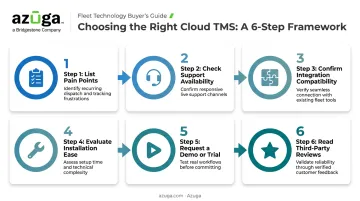
Start with an honest audit before you shop for vendors
- List your pain points. Manual tracking, high insurance premiums, and lack of job visibility are common ones. This defines your must-have feature list.
- Check support availability. Does the vendor offer 24/7 phone, email, and chat support? What happens when something breaks at 9 p.m. on a Friday?
- Confirm integration compatibility. Your fuel cards, dispatch software, and accounting tools should connect without duct tape and workarounds.
- Evaluate installation ease. Self-install OBD-II devices mean less downtime than scheduling a mechanic for every vehicle.
- Request a demo or trial. Feed the platform your actual fleet data before signing anything.
- Read third-party reviews. Sites like G2 offer validated user ratings that cut through marketing claims.
Fleet size and required integrations matter, but your realistic budget per vehicle usually narrows the field faster than any feature checklist alone.
Frequently Asked Questions
What is an example of a cloud-based TMS?
Azuga is one example, offering GPS tracking, AI dashcams, and safety analytics for fleet-owned vehicles. Enterprise freight-focused platforms also exist for shippers coordinating multiple outside carriers.
Is a cloud-based TMS secure?
Reputable providers use data encryption, redundant data centers, and automated backups. These often exceed what a single on-premise setup can maintain without a dedicated IT team.
How long does it take to implement a cloud-based TMS?
Implementation typically takes days to a few weeks, depending on fleet size and hardware. Legacy on-premise systems often take months by comparison.
What's the difference between a TMS and a fleet management system?
TMS traditionally refers to freight and carrier management for shippers. Fleet management platforms like Azuga focus on tracking, safety, and maintenance for company-owned vehicles, though the terms increasingly overlap.
How much does a cloud-based TMS cost?
Pricing depends on vehicle count and feature set. Entry-level packaging is matched to fleet size and the features you select, while premium tiers with AI safety tools can add AI safety tools and dedicated support.
Can a cloud-based TMS integrate with other business software?
Yes. Most platforms connect with ERP systems, fuel card providers, dispatch tools, and accounting software through APIs. Azuga alone supports 75+ integrations across popular service fleets and dispatch platforms.