The problem usually isn't the technology category. It's the gaps. Many platforms skip critical capabilities like video telematics or scalable integrations, which leads to poor driver adoption and wasted budget. A 2025 Verizon Connect report found that 62% of GPS fleet-tracking users rated the technology as extremely or very beneficial for daily operations, but that benefit only shows up when the right features are actually in place.
This guide breaks down the must-have features across safety, efficiency, compliance, and integrations, then shows how to match them to industries like construction, HVAC, and trucking.
Key Takeaways
- GPS tracking, video safety, maintenance, and compliance tools belong on one platform, not five
- GPS tracking users report 62% higher efficiency and 16% lower fuel costs, per industry benchmarks
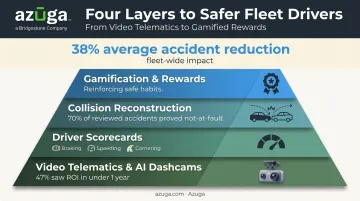
- AI-powered safety tools work: Azuga customers see a 38% average reduction in accidents
- Scalable, integration-friendly software prevents a costly platform switch as your fleet grows
Real-Time GPS Tracking, Route Optimization & Geofencing
Near real-time GPS tracking is the foundation everything else builds on. Without it, dispatch runs on guesswork and ETAs are little more than hopeful estimates. With it, managers see exactly where every vehicle sits, dispatch the closest driver to a new job, and give customers ETAs that actually hold up.
Route Optimization That Actually Cuts Miles
Route optimization software analyzes traffic, weather, and vehicle data to shave unnecessary miles and idle time off every route.
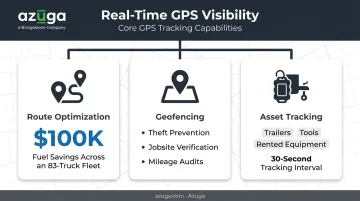
The results can be substantial. Sonoco Recycling cut fuel costs by $100,000 after deploying route optimization and GPS visibility across an 83-truck fleet. The company also increased average material collected per route from 10-12 tons to 17-18 tons.
Geofencing for Security and Cost Control
Beyond trimming miles and fuel costs, precise location data also strengthens security. Geofencing draws a virtual boundary around a jobsite, depot, or delivery zone and alerts managers the moment a vehicle enters or exits. This does more than flag unauthorized use—it also
- Prevents theft by flagging after-hours vehicle movement
- Helps utility and pest control fleets confirm technicians actually reached assigned job sites
- Supports toll and mileage audits by verifying which routes vehicles actually took
- Reduces liability by documenting when a vehicle left an approved service area
Asset Tracking Beyond the Vehicle
Vehicles aren't the only thing worth tracking. Construction and logistics fleets lose trailers, generators, and equipment constantly. Asset tracking extends GPS visibility to
- Trailers and non-powered equipment
- Job-site tools and machinery
- Rented or leased equipment that needs return-date monitoring
Tracking frequency matters as much for a job-site generator as it does for a delivery van. A ping every few minutes can put a vehicle or asset several blocks from its actual location during a dispute or accident. Azuga uses high-frequency, 30-second interval tracking, which keeps location data precise enough to matter during dispatch decisions or incident reviews.
Driver Safety: Video Telematics, AI Dashcams & Driver Scorecards
Video telematics pairs road-facing and in-cab cameras to catch risky behavior as it happens: speeding, harsh braking, hard cornering, and distracted driving. AI-powered dashcams take this further, issuing real-time alerts the moment a driver shows signs of fatigue or distraction, before those moments become accidents.
The payoff arrives faster than many fleet managers expect. 47% of in-cab video users reported positive ROI in under one year, according to Verizon Connect's fleet technology survey.
Separately, a VTTI model cited by the NTSB estimated that widespread use of video event recorders paired with coaching could cut fatal crashes by 20% and injury crashes by 35%. That's a modeled projection, not a guaranteed outcome, but it explains why insurers pay close attention to video adoption.
Scorecards That Turn Data Into Coaching
Driver safety scorecards translate raw event data into a single number that's easy to track and easy to coach against. Azuga's scorecard, for instance, weighs hard braking, rapid acceleration, speeding, hard cornering, idling, and airbag deployment into a composite score. Fleet managers use that score to
- Spot patterns early: multiple harsh-braking events in a week often signal distraction before it causes a claim
- Target coaching precisely: instead of generic training, drivers get short video modules tied to their specific weak spots
- Track improvement over time: scores create a paper trail insurers respect when negotiating premiums
Protecting Fleets From False Liability Claims
Scorecards help prevent incidents, but when accidents happen despite best efforts, footage becomes the deciding factor. Collision reconstruction technology uses AI to analyze accident video and reconstruct what actually occurred. Azuga's SafetyCam AI has helped prove drivers are not at fault in 70% of accidents reviewed, protecting fleets from costly false claims and unnecessary litigation.
Gamification Reinforces the Culture
Footage and scorecards curb risk after the fact, but sustaining safe habits day-to-day calls for a different lever: recognition. Monitoring alone breeds resentment if it's the only tool in play. Reward programs flip the dynamic.
Azuga's approach, sometimes called Social Telematics, automatically identifies top-performing drivers, delivers rewards, and reports results to managers without manual tracking. One fleet, Air Engineers, turned this into a monthly ritual: presenting scores and handing gift cards to the top three drivers. What one manager called "a sore point" became a routine that noticeably lifted overall driver scores.
Maintenance, Fuel Efficiency & Compliance Automation
A fleet management system earns its keep by preventing three expensive problems before they happen: breakdowns, wasted fuel, and compliance violations.
Preventive & Predictive Maintenance
Diagnostic monitoring continuously reads engine fault codes and odometer data while tracking fuel levels, flagging problems before they cause a breakdown on the road. That early warning matters. A truck that fails mid-route costs far more in downtime and missed jobs, plus towing fees, than a scheduled repair ever would.
Automated service reminders and a centralized maintenance dashboard simplify this at scale. Fleet managers using Azuga's platform can schedule maintenance, log service entries, and monitor diagnostic trouble codes for every vehicle, trailer, and piece of equipment from one screen. No more chasing spreadsheets across a growing fleet.
Fuel Cost Management
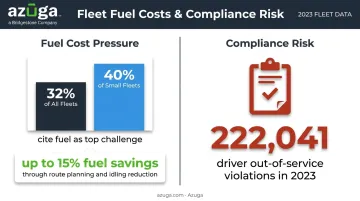
Fuel remains one of the biggest line items on any fleet budget, and it's getting worse. A 2025 survey of over 500 U.S. fleet professionals found fuel costs were a top challenge for 32% of respondents overall, jumping to 40% among smaller fleets. Idling alerts and mileage tracking directly attack this problem by flagging wasted engine time and inefficient driving patterns.
The savings add up. Azuga customers have reported fuel savings of up to 15% through better route planning, reduced idling, and driver behavior coaching combined.
Regulatory Compliance
Manual logbooks and paper inspection reports are a liability waiting to happen. ELD and Hours of Service (HOS) tracking automate FMCSA compliance by:
- Automatically recording duty status when vehicle motion starts or stops
- Issuing visual and audible warnings before a driver approaches an HOS violation
- Maintaining audit-ready logs for roadside inspections
DVIR automation adds another layer, capturing pre- and post-trip inspection data with driver and mechanic sign-off, which FMCSA requires fleets to retain for three months. In 2023 alone, FMCSA recorded 222,041 driver out-of-service violations during roadside inspections, a stark reminder of how much exposure exists without automated recordkeeping.
Integrations, Scalability & Ease of Use
A fleet system that can't talk to the rest of your business creates more work, not less. Open APIs and integrations with fuel cards, ERP systems, and dispatch tools keep data flowing automatically instead of forcing someone to re-enter it by hand.
Azuga's integration marketplace connects with more than 75 platforms, including ServiceTitan, Procore, Fleetio, and TowBook, so fleets don't have to abandon the tools they already run on.
Ease of adoption matters just as much as feature depth. Look for
- Plug-and-play hardware that installs in minutes without a technician visit
- Mobile-friendly dashboards drivers and managers can actually navigate without training sessions
- Modular, tiered plans that lets a small fleet start with core GPS tracking and add dashcams or advanced reporting later
That last point saves real money. Businesses that outgrow a rigid, all-or-nothing platform often face an expensive, disruptive switch. Starting with a scalable system avoids that entirely.
How to Choose the Right Fleet Management System for Your Business
Not every fleet needs the same feature set. The right system depends heavily on what your vehicles actually do.
| Industry | Priority Features |
|---|---|
| Construction & Utility | Equipment/asset tracking, jobsite geofencing, durable hardware |
| Trucking & Logistics | ELD/HOS compliance, DVIR automation, route optimization |
| Service Fleets (HVAC, Plumbing) | Dispatch and routing tools, service fleets integration |
Beyond features, evaluate the business side carefully
- Total cost of ownership: Compare simple per-vehicle packages against vendors that only share details on request; hidden fees add up fast
- Contract terms: Understand lock-in periods and cancellation policies before signing
- Support availability: Fleet issues don't wait for business hours, so 24/7 phone, email, and chat support matters more than most buyers initially think
Azuga applies this same logic in practice, with packages matched to fleet size and features, and unlimited 24/7 phone, email, and chat support included at no extra cost. Whichever provider you choose, run it through these pricing, contract, and support questions before signing.
Frequently Asked Questions
What are the key features of fleet management software?
The core categories are GPS tracking, driver safety with video telematics, maintenance management, fuel tracking, and compliance automation. A complete system combines all five rather than treating them as separate add-ons.
What features should I look for in construction fleet management software?
Prioritize equipment and asset tracking, jobsite geofencing, and hardware durable enough for rough job-site conditions. Standard passenger-vehicle trackers often don't hold up on active construction sites.
How much does fleet management software typically cost?
Azuga, for example, matches packages to fleet needs.
Why is fleet management important for a business?
It improves day-to-day efficiency, cuts fuel and maintenance costs, and keeps drivers safer and compliant with regulations. Fleets without it tend to operate reactively instead of proactively.
How does fleet management software improve driver safety?
Video telematics catches risky behavior in real time, while AI dashcams alert drivers to fatigue or distraction. Fleets using this data alongside driver scorecards have cut accidents by 38% on average.
Is fleet management hardware difficult to install?
Not with modern providers. Many offer plug-and-play OBD-II devices that businesses can self-install in minutes, unlike older wired systems that required a professional technician.