A fleet management dashboard fixes this by pulling GPS tracking, driver behavior, maintenance status, and cost data into one live screen. In a 2024 survey of US fleets, GPS-tracking users reported average reductions of 9% in fuel costs, 10% in labor costs, and 15% in accident costs.
This guide covers what a fleet dashboard actually is, the features worth paying for, the different dashboard types, real benefits, and how to pick the right one for your fleet.
Key Takeaways
- A fleet dashboard consolidates GPS, telematics, driver behavior, maintenance, and fuel data into one real-time interface
- Core features include live vehicle tracking, driver safety scoring, maintenance alerts, fuel monitoring, and compliance reporting
- GPS tracking has cut accidents by up to 38% and speeding citations by 57%, saving fleets an average of $9,462 a year
- Choosing the right dashboard comes down to easy setup, packages matched to fleet needs, integrations, and support, not a long feature list
What Is a Fleet Management Dashboard?
A fleet management dashboard is a centralized digital interface that pulls live data from GPS devices, telematics or OBD-II connectors, and fuel or maintenance systems into a single visual command center. Instead of five browser tabs and a stack of spreadsheets, a dispatcher or safety manager opens one screen and sees everything that matters.
It replaces
- Manual check-in calls to confirm a driver's location
- Siloed spreadsheets tracking fuel spend or maintenance dates separately
- Delayed end-of-week reports that arrive after a problem has already cost money
Dashboards scale with the business. A landscaping company with four trucks can monitor them from a phone app, while an enterprise trucking fleet can track hundreds of vehicles across multiple depots on the same platform.
United Mechanical Inc., a California HVAC contractor, summed it up through their safety director
"It is the easiest, most intuitive system I have used to date. Everything that I need is a click away."
Industries that lean on dashboards most include construction, HVAC, plumbing, landscaping, pest control, electrical, and long-haul trucking, anywhere vehicles are the backbone of daily revenue.
How a Fleet Dashboard Works Behind the Scenes
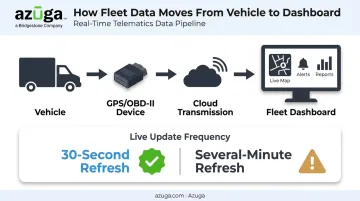
The mechanics are straightforward. A GPS or OBD-II device gets installed in each vehicle, usually plugged directly into the diagnostic port under the dashboard. That device transmits location and engine diagnostic data to the cloud, and the dashboard turns it into a live map and set of reports.
Azuga's plug-and-play OBD-II tracker, for example, reports at 30-second intervals, which keeps the map close to real time instead of showing where a truck was ten minutes ago. That update frequency matters more than it sounds. 30-second updates let a dispatcher redirect the nearest available technician to an emergency job with confidence, while slower updates every few minutes can leave a gap between what's on screen and where the vehicle actually is. Faster refresh rates mean more actionable, trustworthy data for dispatch decisions.
Key Features of a Fleet Management Dashboard
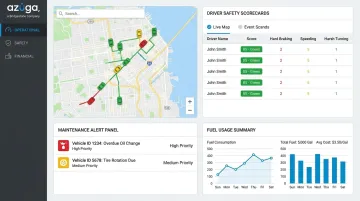
Not all dashboards are built the same. The most useful ones combine several data streams into a single, filterable view. That view adjusts based on who's looking, whether that's a dispatcher, a safety manager, or a business owner reviewing monthly costs.
Live GPS Vehicle Tracking
Real-time location, route history, and stop duration let a manager watch deliveries progress without picking up the phone. If a truck sits at a job site for 45 minutes longer than expected, the dashboard flags it automatically instead of waiting for a customer complaint.
Driver Behavior and Safety Monitoring
Dashboards flag speeding, harsh braking, rapid acceleration, and aggressive driving events as they happen. Pairing that data with AI-powered dashcam footage adds context managers wouldn't otherwise get.
Azuga's SafetyCam technology, for instance, uses a dual-facing camera (a 155-degree road view plus an in-cab view) and only uploads footage when a risky event triggers it. That footage helps answer the question GPS data alone can't: was the driver distracted, or reacting to something on the road? Beyond speeding and hard braking, this layer typically catches
- Distracted or inattentive driving
- Unauthorized vehicle use outside work hours
- Crash and collision events, flagged instantly to managers
Maintenance Alerts and Vehicle Diagnostics
Mileage-based and diagnostic-based alerts flag when a vehicle needs service before a warning light turns into a breakdown on the highway. Preventive maintenance scheduled off dashboard alerts costs far less than an emergency tow and a missed service window.
Fuel Usage and Cost Tracking
Fuel is one of the largest line items in any fleet budget. ATRI's 2024 cost analysis puts fuel at roughly $0.553 per mile for trucking fleets, and idling alone can burn about a gallon per hour. The EPA notes that eliminating unnecessary idling can save a typical long-haul truck more than 900 gallons a year.
A dashboard makes that waste visible by tracking
- Fuel consumption and MPG by vehicle or driver
- Idle time trends over days or weeks
- Cost per mile, broken down by route or job type
Reporting, Compliance, and Custom Alerts
Automated Hours of Service and inspection reports cut down the paperwork burden that used to eat up an afternoon every week. Configurable alerts let managers set exceptions, like a speeding threshold or a missed inspection, so the system flags problems instead of requiring someone to go looking for them.
Types of Fleet Management Dashboards
Most dashboards fall into a few practical categories, though few providers treat these as rigid, separate products
| Dashboard Type | Primary Focus | Best For |
|---|---|---|
| Operational/Tracking | Live location, routes, dispatch status | Day-to-day dispatch decisions |
| Safety & Compliance | Driver scorecards, violation alerts, HOS reporting | Risk management, regulatory audits |
| Maintenance & Financial | Vehicle health, cost per mile, asset utilization | Long-term budgeting and planning |
Operational dashboards answer "where is my vehicle right now?" They're built for dispatchers making real-time routing calls.
Safety and compliance dashboards center on driver scorecards, violation history, and automated Hours of Service reporting, useful for property-carrying drivers who face the FMCSA's 11-hour driving and 14-hour duty-window limits.
Maintenance and financial dashboards track total cost per mile, fuel spend, and how well each asset is being utilized, which matters more for planning next year's budget than for today's dispatch board.
Most fleets quickly outgrow the idea of juggling three separate tools. Azuga's platform, for example, brings all three views into a single dashboard, filtered by user role, saving more time than switching between standalone systems ever does.
Benefits of Using a Fleet Management Dashboard
Real-time visibility changes fleet management from reactive to proactive. Fleets using Azuga's platform have reported a 38% average decrease in accidents and a 57% reduction in speeding citations, largely because drivers know managers are monitoring and coaching their behavior in real time.
The cost impact shows up quickly too. Azuga customers report average annual savings of $9,462 per fleet, alongside a 30% reduction in operational costs overall. Consolidating fuel, maintenance, and labor data into one view makes waste obvious instead of buried in three different reports.
Faster access to data changes how managers work day to day
- Managers schedule maintenance before a breakdown, not after
- Dispatchers reroute around delays instead of learning about a missed appointment later
- Teams catch fuel waste within weeks, not at year-end reconciliation
There's also a legal protection angle that doesn't get talked about enough. Azuga built its SafetyCam AI with Collision Reconstruction specifically to establish fault after an accident.
Azuga's data shows fleet drivers aren't at fault in 70% of accidents. Video and telematics records turn that finding into fast insurance resolutions instead of months of costly litigation.
None of this happens in a vacuum. Fleets running on time, with fewer accidents and less downtime, tend to see the downstream benefit too: customers who trust that a technician or delivery will show up when promised.
How to Choose the Right Fleet Management Dashboard
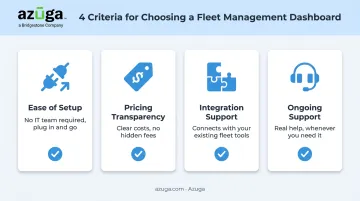
Feature lists are easy to pad. What actually determines whether a dashboard gets used, or gathers dust after month two, comes down to four things.
- Ease of setup. Look for self-installable, plug-and-play devices. Azuga's OBD-II tracker installs in minutes without scheduling a technician or pulling a vehicle out of service.
- Total cost of ownership and scalability. Confirm what's included before signing anything. Azuga matches packaging to fleet size and the features you select, a rate that scales from a five-truck landscaping company to enterprise fleets running hundreds of vehicles.
- Integration support. Check whether the dashboard connects to your fuel cards, accounting software, or service fleets platform. Azuga's marketplace includes ServiceTitan, Procore, Fleetio, and TowBook among 75-plus integrations, cutting out double data entry.
- Ongoing support. Dashboard adoption often hinges on whether help is available when something breaks. Confirm 24/7 phone, email, and web support before committing, not after.
None of these are exciting to evaluate. They're also the reason some dashboard rollouts succeed while others quietly get abandoned six months in.
Frequently Asked Questions
What is a fleet management dashboard?
It's a centralized digital interface that consolidates GPS tracking, driver behavior, maintenance, and fuel data into one real-time view. Fleet managers use it to make dispatch, safety, and cost decisions without checking multiple systems.
What features should a fleet management dashboard include?
At minimum, look for live GPS tracking, driver safety monitoring, maintenance alerts, fuel tracking, and compliance reporting. Anything less leaves gaps that push you back to spreadsheets.
How much does a fleet management dashboard cost?
Azuga matches packaging to fleet size and the features you select, a helpful benchmark when comparing quotes.
Do I need special hardware to use a fleet dashboard?
Most dashboards require a GPS or OBD-II device installed in each vehicle to collect location and diagnostic data. Self-install plug-and-play options, like Azuga's OBD-II tracker, make setup possible in minutes without a mechanic.
Can a fleet management dashboard be customized for different roles?
Yes, modern platforms support different views so dispatchers see live maps, safety managers see driver scorecards, and executives see cost and utilization trends. Each role draws from the same data, just filtered to what matters most for that job.
What are the benefits of using a fleet management dashboard?
Expect improved driver safety, lower operational costs, faster decision-making, and stronger compliance. Fleets also gain legal protection through video evidence when accidents happen.