Introduction
Picture a fleet manager juggling a clipboard, three spreadsheets, and a phone that won't stop ringing. Somewhere out there, a technician is idling at a job site, a trailer went missing last week, and nobody's sure when the last oil change happened on truck #14.
This is still daily life for a lot of fleets running on desktop-only systems or paper logs.
The pressure to fix this isn't going away. Trucking's marginal operating cost hit $2.270 per mile in 2023, according to ATRI's 2024 operational costs report, with non-fuel costs alone climbing 6.6%.
Add a driver shortage and rising safety scrutiny, and manual tracking becomes a liability, not just an inconvenience.
Mobile asset management apps solve this by moving fleet data out of the office and onto the devices already in every driver's pocket. This article breaks down why that matters in practice, beyond what the vendor brochures promise.
TL;DR
- Real-time tracking puts live vehicle, equipment, and driver data on any smartphone
- Safety monitoring catches risky driving before it becomes a costly accident
- Heavy-equipment theft costs owners $300 million to $1 billion annually, per NER's industry theft data
- Skipping mobile tracking means inconsistent maintenance, creeping fuel costs, and messy liability disputes
- Value comes from daily use and acting on the data, not just collecting it
What Is a Mobile Asset Management App?
A mobile asset management app is software that lets fleet managers, drivers, and technicians track vehicle or equipment location, status, and condition. Updates happen straight from a phone or tablet, in real time.
It's used across a range of assets, including
- Fleet vehicles and trailers
- Heavy equipment and machinery
- Tools and small equipment
Industries such as construction, HVAC, plumbing, trucking, and utilities rely on it daily.
The outcome matters more than the technology itself: safer drivers, lower costs, and equipment that stays in use instead of sitting idle and unaccounted.
How This Looks in Practice
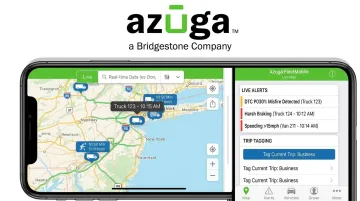
Azuga's approach pairs hardwired and battery-powered asset trackers (straightforward mount, no complex professional install) with the Azuga FleetMobile app. Once devices are online, managers get
- Live location tracking
- Asset utilization and condition alerts
- Driver behavior alerts
- Trip tagging and panic-button access
| Function | Traditional tracking | Mobile asset management |
|---|---|---|
| Location updates | End-of-day reports or phone calls | Continuous, live GPS feed |
| Maintenance logs | Paper forms, delayed entry | Logged on-site, synced instantly |
| Driver behavior | Anecdotal, after-the-fact | Flagged in real time with video |
Key Advantages of Mobile Asset Management Apps
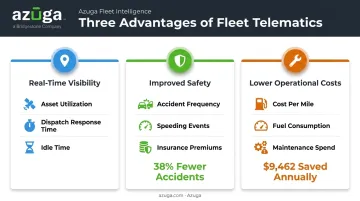
The advantages below aren't abstract. Each one maps to a metric fleet managers already track, whether that's accident frequency, fuel spend, or downtime.
Advantage 1: Real-Time Visibility Into Vehicles and Assets
GPS-enabled apps give dispatchers live status on every vehicle and asset instead of relying on a driver's phone call. Azuga's CompleteFleet plan pings location every 30 seconds, which is frequent enough to catch a truck that's off-route before it becomes a customer complaint.
Why it matters:
- Eliminates guesswork in dispatching and reduces idle or misallocated assets sitting unused on a job site
- Speeds up decisions when a customer calls with an urgent request
In Azuga's Hobart Service case study, branch managers used the live map to instantly identify the closest available technician for emergency calls, cutting response time without a single extra phone call.
KPIs impacted:
- Asset utilization rate
- Dispatch response time
- Idle time (Azuga's native idle reports flag wasted hours that could otherwise be billable)
This advantage matters most for fleets spread across multiple job sites or wide geographic territories, where a missing trailer or an idle truck can go unnoticed for days.
Advantage 2: Improved Driver and Fleet Safety
Knowing where a vehicle is doesn't guarantee how it's being driven. Mobile apps combine GPS with driver behavior monitoring, flagging speeding, harsh braking, sudden acceleration, and distraction before they turn into accidents. Azuga's SafetyCam AI adds dual-facing video and collision reconstruction, giving fleets evidence instead of a "he said, she said" dispute.
Safety exposure isn't theoretical. 6,050 large trucks and buses were involved in fatal crashes in 2022, a 2% increase from the year before, according to FMCSA's large truck and bus crash facts.
Why it matters:
- Proactive alerts catch risky habits before they cause a wreck
- Video evidence resolves claims faster and can exonerate drivers
- Azuga customers have reported accidents dropping by an average of 38% and speeding citations by 57%
Diamond Engineering used Azuga's driving data to negotiate a 10%+ insurance premium discount, a real line item on their renewal invoice.
KPIs impacted:
- Accident frequency
- Speeding and harsh braking events
- Insurance claims and premiums
- Claims resolution time
Safety monitoring pays off fastest for fleets with high mileage, newer drivers, or heavy compliance exposure, like utilities and trucking.
Advantage 3: Lower Operational Costs and Better Maintenance Management
Safer driving cuts accidents, but daily wear on vehicles still adds up. Instead of paper inspection sheets that sit in a glovebox for a week, technicians log maintenance and repairs on-site through the mobile app. Diagnostic trouble codes and automated reminders catch small issues before they become expensive breakdowns.
Why it matters:
- Timely maintenance reduces unplanned downtime
- Fuel and idling data expose wasteful routes or habits
- Azuga customers have saved an average of $9,462 annually through better cost management, with some reporting operational costs cut by up to 30%
KPIs impacted:
- Cost per mile
- Fuel consumption
- Maintenance spend
- Vehicle downtime
Savings compound fastest for larger fleets or older vehicles that need frequent attention. A five-truck operation with newer equipment won't see the same dollar impact as a 50-vehicle fleet running equipment past its prime.
What Happens When Mobile Asset Management Is Missing or Ignored
Skip mobile tracking, and the consequences show up slowly, then all at once
- Maintenance gets inconsistent. Paper logs get lost or delayed, leading to breakdowns that could've been caught early
- Accidents aren't resolved fairly. Without video or location data, liability disputes drag on and often favor whoever has the better story
- Dispatching stays reactive. Managers rely on phone calls instead of live data, wasting time and fuel on poor routing
- Costs creep up unnoticed. Fuel waste, excess idling, and small repair bills pile up without anyone tracking the trend
- Scaling gets harder. Adding trucks or job sites without visibility multiplies the chaos instead of simplifying it
Dorglass, an Azuga customer, saw 5 to 8 fender benders a year before adopting fleet tracking. After implementation, that number dropped to 1 to 2 per year, with speeding events falling 85% below the industry average. That gap is what "missing" looks like in real numbers.
How to Get the Most Value from a Mobile Asset Management App
Buying the software is the easy part. Getting value out of it depends on how it's used day to day.
- Require consistent logins. Every driver and technician needs to use the app daily, not just when it's convenient, so the data reflects real operations.
- Review data on a set schedule. Weekly or monthly check-ins on driver scores, idle time, and maintenance alerts catch problems early.
- Act on patterns, not just alerts. A driver with repeated speeding events needs coaching, while a truck with recurring breakdowns needs a maintenance review.
The fleet manager at Air Engineers, an Azuga customer, turned this into a routine: monthly driver score reviews in front of the whole team, with gift cards for the top three performers. What started as a "sore point" became part of the daily culture, and scores improved steadily as a result.
For CompleteFleet customers, quarterly reviews with a dedicated Customer Success Manager add a built-in accountability check, so the data doesn't just sit in a dashboard nobody opens.
Conclusion
A mobile asset management app delivers its real value through the visibility, safety, and cost control it brings to operations that used to run on guesswork and phone calls.
These benefits compound. The longer a fleet uses the data consistently, the sharper its coaching, maintenance, and dispatch decisions become.
That compounding effect starts with a simple first step. A plug-and-play platform like Azuga's requires no complex installation, and its scalable packaging scales with fleet size. That combination makes it easier for a five-truck operation or a 500-vehicle fleet to start seeing these results without a drawn-out rollout.
Frequently Asked Questions
What is mobile asset management?
It's the practice of tracking and managing vehicles, equipment, and other assets in real time using mobile devices, GPS, and telematics technology. It replaces manual, after-the-fact record-keeping with live data.
How is mobile asset management different from traditional asset tracking?
Traditional tracking relies on manual logs or desktop updates entered after the fact. Mobile asset management captures data continuously from the field, so managers see what's happening as it happens.
What types of assets can be tracked with a mobile asset management app?
Vehicles, trailers, heavy equipment, tools, and other mobile machinery can all be tracked. Industries like construction, utilities, HVAC, and trucking rely on this most heavily.
Is mobile asset management only useful for large fleets?
No. Small and mid-sized fleets benefit just as much, since even a handful of vehicles or equipment pieces can create costly blind spots. The advantages of real-time tracking apply regardless of fleet size.
How much does a mobile asset management app typically cost?
Options vary based on hardware, features, and contract length. As a reference point, Azuga matches packaging to fleet size and the features you select, scaling up with add-ons like AI dashcams.
Can mobile asset management apps work without an internet connection?
Many apps support local data capture that syncs once connectivity returns, though this varies by provider. Confirm offline capabilities with your chosen platform before relying on it in low-signal areas.