The shift is measurable. Berg Insight counted nearly 4.9 million active commercial video-telematics systems in North America in 2023, with growth projected to hit 11.7 million units by 2028 — a 19% annual growth rate.
Here's the problem: many drivers and fleet managers install these cameras without understanding how they actually detect hazards and issue alerts. That gap leads to misplaced trust, careless mounting, and missed safety value. This guide breaks down what ADAS is, exactly how it works inside a dashcam, and where it delivers real-world results.
Key Takeaways
- ADAS dashcams combine cameras and AI to detect road hazards instantly
- The process moves through four stages: sensing, processing, alerting, and logging
- Core features include collision, lane, pedestrian, and headway alerts
- Aftermarket ADAS adds safety alerts to vehicles lacking factory systems
- Flagged events power fleet coaching, scoring, and collision reconstruction
What Is ADAS?
ADAS, or Advanced Driver Assistance System, is camera- and sensor-based technology that continuously scans road conditions and issues real-time alerts to help prevent collisions. In a dashcam, it's the difference between passively recording footage and actively watching the road for you.
The technology exists because human reaction time is unreliable. NHTSA's crash causation research assigned the critical reason for a crash to the driver in 94% of studied cases. The agency is careful to note, though, that a "critical reason" isn't the same as fault or cause.
Distraction and delayed recognition are baked into how people drive.
What ADAS dashcams are NOT:
- Self-driving systems: they don't touch the steering wheel or the brakes
- A replacement for a vehicle's built-in OEM safety suite
- Guarantees against collisions: they're a warning layer, not a control system
Where ADAS dashcams earn their keep is retrofitting. A 2015 box truck or a 2018 service van never shipped with factory collision warnings, but an aftermarket dashcam gives it one. For fleets running mixed-age vehicle rosters, this creates a consistent safety layer across every truck, van, or sedan on the lot, with no OEM upgrade cycle required.
Most ADAS dashcams offer some combination of
- Forward Collision Warning
- Lane Departure Warning
- Pedestrian Detection
- Following-Distance (Headway) Monitoring
Feature depth varies widely. Basic consumer units might only handle forward collision alerts, while enterprise-grade fleet systems layer in driver monitoring, cloud connectivity, and collision reconstruction on top.
How Does ADAS Work in Dashcams?
ADAS in a dashcam runs on a loop: sense the road, process what it sees, alert the driver, and log the result. Each stage depends on the one before it.
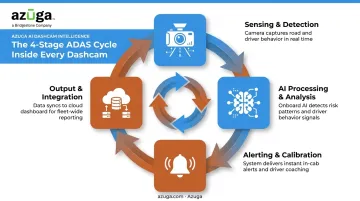
Sensing & Detection
Once the vehicle powers on, the forward-facing camera starts capturing continuous video. Some alerts don't activate immediately, though: Forward Collision Warning, for example, typically only engages above a defined speed threshold, since low-speed maneuvering would trigger constant false alarms.
Camera footage rarely works alone. Many systems combine it with GPS data for vehicle speed and location context, plus G-sensor/accelerometer readings for detecting hard braking, sharp turns, or impacts.
Here's the catch: a poorly mounted camera, an obstructed windshield, or a cracked lens can degrade or completely disable detection. Placement isn't a minor detail: it's the foundation the entire system depends on.
AI Processing & Analysis
Once video is captured, an onboard AI or neural network analyzes each frame. It's looking for lane markings, the vehicle ahead, and pedestrians using image-recognition algorithms trained on those specific shapes and movements.
From there, the system runs calculations in real time
- Time-to-collision (TTC): how many seconds until impact at current closing speed
- Lane position deviation: how far the vehicle has drifted from its marked lane
- Following distance: the gap between the vehicle and whatever's ahead of it
Accuracy here isn't guaranteed. A Florida DOT evaluation of an aftermarket camera system on transit buses found post-calibration false-positive rates ranging from 2% for headway warnings to 8% for forward-collision warnings.
Before calibration, those same warning types produced false-positive rates as high as 38%. Processing speed and accuracy directly shape whether drivers trust the alerts or start ignoring them.
Alerting & Calibration
Alert sensitivity isn't fixed. Systems typically adjust thresholds for day versus night driving, since headlight glare and reduced visibility change what counts as a genuine hazard versus noise.
Calibration is what makes any of this reliable. During setup, installers (or the system itself) need to account for
- Camera height and mounting angle
- Lane marker recognition in the vehicle's specific driving environment
- Positional offsets relative to the vehicle's centerline
Skip this step and the consequences show up fast. That same Florida DOT study found false-positive rates dropped from 20% to 2% for headway warnings simply from route adjustment and recalibration. Calibration, not hardware quality alone, determines whether a system earns driver confidence or gets muted.
Output & Integration
When the system detects a hazard, it produces two things: an immediate audio or visual alert to the driver, and an automatically flagged, event-triggered video clip for later review.
That second output is where fleet value multiplies. Flagged clips feed into broader safety platforms for driver coaching, safety scoring, and incident review.
Azuga's SafetyCam AI with Collision Reconstruction is one example: it compiles flagged event data to help exonerate drivers and resolve claims faster. That matters, since Azuga's data shows 70% of accidents are not the fault of the fleet driver involved.
Output quality translates into measurable outcomes. Azuga reports fleets using its safety platform see an average 38% decrease in accidents, alongside a 57% drop in speeding citations. Accurate detection paired with the right downstream analytics changes driver behavior, going beyond simple documentation.
Where ADAS Dashcams Are Used
In practice, ADAS runs in the background during every trip: continuous monitoring while driving, automatic flagging when something risky happens, and a post-trip review by the driver or fleet manager afterward.
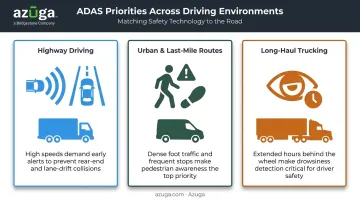
Different environments stress different features
- Highway driving leans on Forward Collision and Lane Departure Warnings, where speeds are high and reaction windows are short
- Urban and last-mile routes put pedestrian detection to work, given the density of foot traffic and intersections
- Long-haul trucking benefits from fatigue-related alerts, since driver drowsiness builds over hours behind the wheel
Industry adoption looks different depending on the fleet type. Logistics and trucking operations, ride-hailing and taxi services, and construction or utility fleets each pair ADAS dashcams with broader GPS fleet tracking platforms.
This pairing combines behavior alerts with real-time vehicle location visibility. Azuga's platform is built around exactly this combination, giving fleet managers one dashboard for both.
Conclusion
ADAS works because it never stops the cycle: sense the road, analyze what's happening, alert the driver, and log the result for later. That loop is what closes the gap between spotting a hazard and a human reacting to it in time.
For fleets weighing their options, the platform behind the dashcam matters as much as the ADAS technology itself. Azuga's SafetyCam AI ties detection directly to coaching, scoring, and collision reconstruction — helping fleets cut accidents by an average of 38% and prove drivers weren't at fault in up to 70% of incidents.
Frequently Asked Questions
What is ADAS on a dash cam?
ADAS on a dashcam is a camera-and-AI system that detects hazards like lane drift, tailgating, or an unsafe following distance, then alerts the driver in real time. It supplements human awareness rather than replacing it.
Which dash cams have ADAS?
Many mid-to-premium aftermarket dashcams now include ADAS features like forward collision and lane departure warnings. Fleet-grade options often combine ADAS with driver monitoring systems (DMS) and cloud connectivity for added coverage.
Can I add ADAS to my fleet vehicles?
Yes — aftermarket ADAS dashcams can be installed in any vehicle, regardless of factory equipment. They supplement rather than replace a true OEM system, but they're an effective way to add alerts across older or mixed-age fleets.
How much does an ADAS dash cam cost?
Consumer models are often sold as a one-time hardware purchase. Fleet-grade platforms typically run as monthly subscriptions, often with packages matched to fleet needs that scales based on channel count and AI feature depth.
Does an ADAS dashcam replace my vehicle's factory safety system?
No. Aftermarket ADAS is a supplementary alert layer, not a substitute for a factory-calibrated OEM system. It fills gaps in older vehicles or adds consistency across a mixed-age fleet.
Do ADAS dashcams need calibration to work properly?
Yes. Accurate detection depends on correct camera placement and, in many models, an initial calibration step involving camera height and lane positioning. Skipping this step is one of the most common causes of false or missed alerts.