Construction equipment and material theft alone is estimated to cost companies up to $1 billion annually, according to a 2023 Insurance Journal analysis from IAT Insurance Group. That's just theft. Add in the labor hours wasted hunting for tools, vehicles sitting idle because nobody knew where they were, and equipment that fails because a maintenance schedule lived in someone's memory instead of a system, and the real cost climbs fast.
Sticky notes and spreadsheets can't keep up with a growing fleet or field-service operation. This article breaks down what asset tagging actually is, the tag types available, and why pairing tags with a real tracking and management system is the difference between knowing where your assets were and knowing where they are right now.
Key Takeaways
- Asset tagging gives every item a unique ID for individual tracking and management
- Common tag types include barcodes, QR codes, RFID, NFC, and GPS devices
- Tags identify assets, but a management system turns that ID into real-time data
- Fleet and field-service businesses see the strongest ROI when tags pair with GPS tracking
What Is Asset Tagging?
Asset tagging is the process of attaching a unique physical or digital identifier to a piece of equipment. Common identifier types include barcodes, QR codes, RFID chips, NFC tags, and GPS devices. Once attached, the equipment can be individually identified, located, and tracked throughout its working life.
Here's the mechanism behind it: each tag carries a unique ID number. That ID links to a digital record containing the asset's serial number, purchase date, current location, and maintenance history. Scan the tag, and the record pulls up.
A simple example: A barcode label on a service vehicle's toolbox. A technician scans it before heading out, and the system displays the toolbox's full inventory, its last inspection date, and which crew used it last. No guessing, no phone calls to the shop.
Asset Tagging vs. Asset Tracking vs. Asset Management System
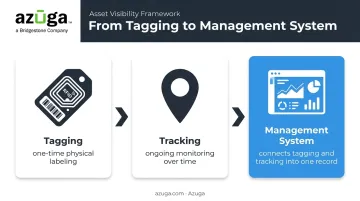
These three terms get used interchangeably, but they describe different things
- Tagging - the one-time physical act of labeling an asset with an identifier
- Tracking - the ongoing process of monitoring that asset's location and condition over time
- Management system - the software platform that connects tagging and tracking into one usable record
Tagging without a connected system provides limited value. It's the equivalent of a barcode with no database behind it - a unique identifier that means nothing without a system to interpret it. The tag is the label. The system is what makes the label mean something.
Types of Asset Tags & Which Assets Need Them
Not every asset needs the same tag. The right choice depends on how the asset moves, how it's scanned, and where it lives.
- Barcode tags - Low cost, require a direct line of sight to scan. Best for indoor, fixed assets like office equipment or stationary tools.
- QR code tags - Scannable with any smartphone camera and able to store more data than a linear barcode. Popular for field maintenance workflows where technicians need quick access to service history.
- RFID tags - No line-of-sight needed. Available in passive (reader-powered) and active (battery-powered) forms, ideal for warehouses and industrial equipment where dozens of items need scanning at once.
- NFC tags - Short-range, tap-to-confirm technology. Useful for verifying a technician was physically present at an asset during an inspection.
- GPS trackers - Unlike static tags, GPS devices provide continuous, real-time location for vehicles and mobile equipment, with no scanning required at all.
RFID's line-of-sight advantage shows up in the accuracy numbers. A widely cited industrial case study published in the International Journal of Retail & Distribution Management modeled inventory accuracy improving from 95% to 99.99% after implementation. That figure came from a modeled scenario, not a live post-rollout audit, but it illustrates the ceiling RFID can reach when scanning at scale.
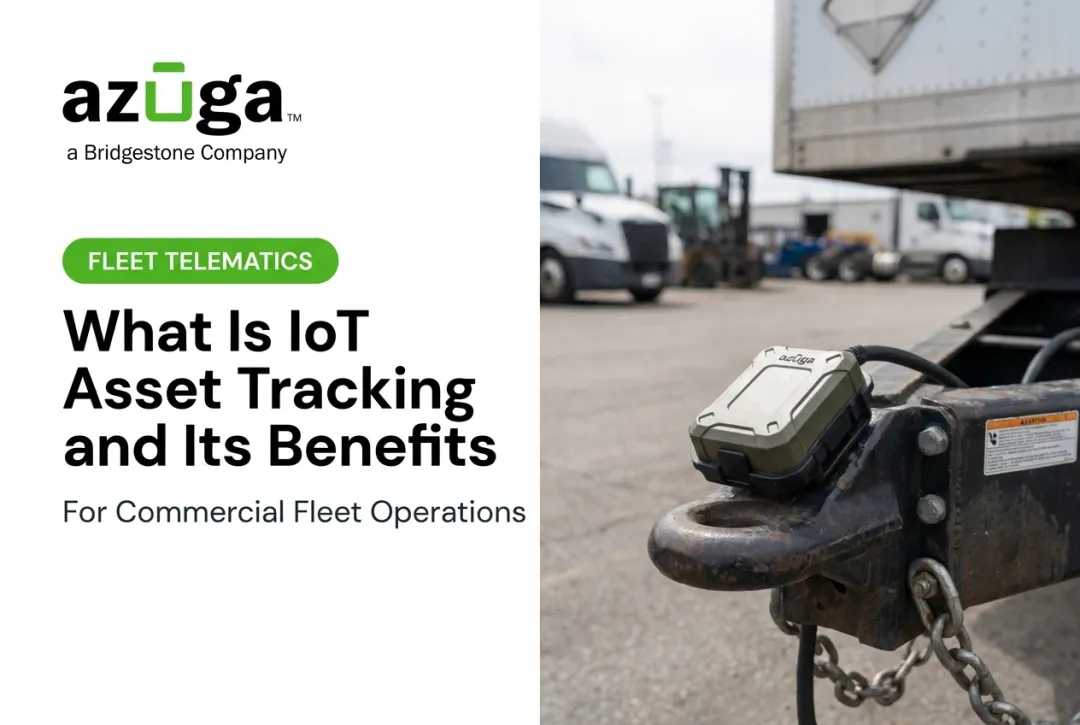
For mobile assets and equipment, hardwired GPS trackers, battery-powered units, and Bluetooth beacons, like the ones Azuga offers, let a business start tracking within minutes, with no complex professional installation required.
Which Assets Need Tags?
Not everything in the warehouse needs a tracker. Prioritize tagging assets that meet one or more of these criteria
- Critical to daily operations - if it fails, work stops
- High liability risk - equipment where misuse or malfunction creates legal exposure
- High replacement cost - vehicles, heavy machinery, specialized tools
- High theft risk - portable tools, IT equipment, appliances, and furniture that walk off jobsites easily
Benefits of Asset Tagging
The payoff from tagging shows up in three main areas: time, loss prevention, and lifecycle planning.
Faster location, less wasted labor. A 2024 ASCE study on mechanical, electrical, and plumbing work identified searching for missing or inappropriate equipment as a recurring source of non-value-adding downtime on job sites. Tagged assets with a searchable digital record eliminate the guesswork that otherwise costs crews hours.
Theft and loss prevention. Tamper-evident tags and consistent tracking reduce unaccounted losses. The National Equipment Register's 2016 theft report compiled 11,574 stolen-machine reports that year alone, a figure that almost certainly undercounts total incidents since many go unreported. Tagged equipment is easier to identify if recovered, and harder to resell.
Improved audit accuracy and lifecycle planning. Tagging supports
- Depreciation tracking tied to purchase date and condition
- Warranty management by linking service records to the original purchase
- Maintenance scheduling based on actual usage data, not guesswork
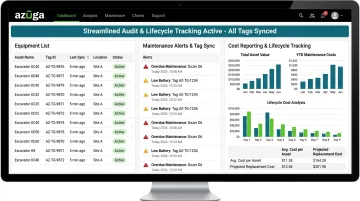
Azuga's asset tracking platform ties these workflows together, syncing tag data with maintenance alerts and cost reports so audits take minutes instead of days.
How to Implement an Asset Tagging Program
Rolling out asset tagging works best as a phased process rather than a weekend project.
- Conduct a complete asset inventory. Walk every location, list every asset, and establish a consistent, unique ID or naming convention before a single tag goes on equipment.
- Match tag type to asset and environment. Choose tags built for how and where each asset operates
- Barcode or QR labels for indoor tools
- Rugged RFID tags for harsh environments
- GPS trackers, like Azuga's devices, for high-value mobile assets
Create the digital record in your asset management software first, then affix the physical tag. A tag with no backing record is dead weight. 3. Train staff on scanning and logging. Set clear procedures for who scans what, when, and how damaged tags get replaced or new acquisitions get added to the system.
Skipping step one is the most common mistake. Businesses tag equipment first and build the naming system later, which leads to duplicate IDs and mismatched records within months.
Why Tags Alone Aren't Enough: The Case for an Asset Management System
A tag identifies an asset. It doesn't tell you where that asset is right now, whether it's overdue for service, or whether the driver operating it just slammed the brakes. That's the job of the management system sitting behind the tag.
For mobile assets, this gap matters most. Consider a barcode on a work van: it tells you what the van is, but nothing about where it sits at 2 p.m. on a Tuesday.
Fleet and field-service businesses close that gap by pairing identification with GPS-based tracking that updates continuously. On Azuga's higher-tier plans, tracking refreshes as frequently as every 30 seconds.
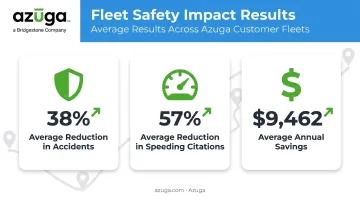
The operational payoff is measurable. Azuga customers report:
- 38% average reduction in accidents
- 57% average reduction in speeding citations
- $9,462 in average annual savings from more effective fleet cost management
Beyond these safety and cost metrics, a management system unlocks capabilities no static tag can offer
- Maintenance alerts that flag service needs before they become breakdowns
- Driver behavior monitoring, including hard braking, speeding, and distraction detection
- Dashcam-based collision reconstruction, which can exonerate drivers and cut litigation costs after an accident
- Cost reporting that turns raw location and diagnostic data into fuel, maintenance, and insurance insights
Accessing these capabilities doesn't require a complex rollout: the barrier to entry is lower than most businesses expect. Hardwired, battery-powered, and Bluetooth beacon trackers let a company go from "tagged but untracked" to fully visible across its assets in minutes, without pulling equipment offline for a lengthy install.
Frequently Asked Questions
What is the purpose of an asset tag?
An asset tag's purpose is to uniquely identify a piece of equipment so it can be tracked, maintained, and managed throughout its lifecycle. Without it, there's no reliable way to link the physical item to its history.
What is required for an asset tag?
A functional asset tag needs three things: a unique ID number, a scannable element like a barcode, QR code, or RFID chip, and a linked digital record containing the asset's details. Without any of these elements, it's just a sticker.
What is an example of an asset tag?
A barcode label affixed to a company vehicle or piece of machinery is a common example. Scanning it pulls up the asset's maintenance history, purchase date, and current assignment.
Is my asset tag legit?
Cross-check the tag's ID against your internal asset register to confirm it matches a registered record. Legitimate tags typically include tamper-evident features, such as a void pattern that appears if someone tries to remove or swap the label.
What is the difference between asset tagging and asset tracking?
Tagging is the one-time physical labeling step. Tracking is the ongoing process of monitoring that asset's location and condition over time. You need both, but they're not the same task.
Which type of asset tag is best for tracking vehicles and mobile field equipment?
GPS-based trackers are the best fit for mobile assets because they provide continuous, real-time location data. Azuga's devices, for example, update every 30 seconds, compared to static barcodes or RFID tags that only confirm identity at the moment of a scan.