This is exactly the gap video telematics closes. It pairs AI-powered dash cams with traditional telematics sensors, giving fleet managers actual eyes and data on every vehicle, not just a blinking dot on a map.
Traditional GPS-only telematics tells you where a vehicle was. It can't tell you why a driver slammed the brakes or whether they were texting before a collision. That blind spot leaves fleets exposed to false liability claims, preventable accidents, and drivers who never get the coaching they need.
This guide breaks down what video telematics is, how the technology actually works, what it costs, and how to pick the right system for your fleet.
Key Takeaways
- Video telematics merges AI dash cams with GPS, accelerometers, and engine diagnostics into one data stream
- It captures the context behind risky events, like harsh braking or distraction, revealing what happened and why
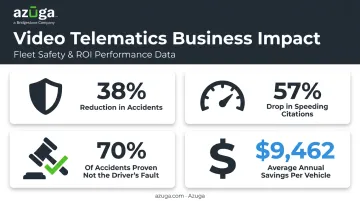
- Azuga customers report accidents dropping 38% and speeding citations falling 57% after adoption
- Options range from basic forward-facing cameras to AI-driven systems that coach drivers in real time
What Is Video Telematics?
Video telematics is the fusion of high-definition video footage with telematics data, meaning location, speed, harsh-event flags, and vehicle diagnostics, all pulled into one platform. Instead of reviewing a GPS log and guessing what happened, fleet managers get a synchronized video-and-data record for every notable event.
Four components make this work together:
- Telematics device or OBD-II connector — pulls vehicle diagnostics, speed, and location
- Onboard camera(s) — forward-facing, driver-facing, or both, capturing the road and cabin
- AI processing chip or cloud analytics engine — detects behaviors like phone use, tailgating, or seatbelt non-compliance
- Software dashboard — where managers review footage, run reports, and build coaching programs
How This Differs From Traditional Telematics
Standard telematics answers "where" and "how fast." Video telematics answers "what actually happened." It adds AI-detected behaviors, visual proof, and full incident context rather than just a stream of GPS pings.
This isn't a niche technology anymore. Berg Insight estimated the installed base of video telematics systems reached nearly 6.1 million units in North America and more than 1.6 million units in Europe during 2024.
Growth is projected to hit 13.8 million North American units by 2029, showing fleets are betting on visual context, not just location data.
Most systems transmit footage wirelessly to the cloud, giving managers near-real-time access to review incidents without waiting for a vehicle to return to the yard.
How Does Video Telematics Work? (Step-by-Step)
Understanding the mechanics helps you evaluate vendors more critically. Here's the process from data capture to actionable insight.
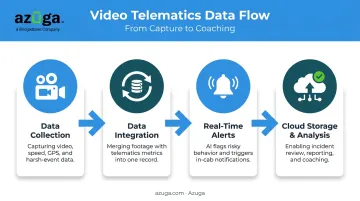
- Data collection — AI dash cams and telematics sensors continuously record video, speed, GPS location, and harsh-event data (hard braking, rapid acceleration, sharp cornering) as the vehicle operates.
- Data integration — Footage syncs with telematics metrics like GPS coordinates and engine diagnostics, creating a single event record instead of two disconnected data sources.
- Real-time alerts — AI algorithms flag risky behavior, such as distraction or tailgating, and trigger instant in-cab notifications along with alerts to the fleet manager's dashboard.
- Cloud storage and analysis — Footage and data upload securely to the cloud, letting managers review incidents, pull reports, and build targeted driver coaching plans.
A separate field study of 21 commercial trucks equipped with in-vehicle monitoring systems (IVMS) confirmed this effect. Real-time feedback drove a 60% decrease in speeding events and a 50% decrease in aggressive-driving incidents, according to Virginia Tech Transportation Institute research.
Why Tracking Frequency Matters
High-frequency location tracking, like Azuga's 30-second ping intervals, improves how accurately video and telematics data correlate. Tighter intervals mean the footage you pull up actually matches the exact moment a harsh-braking event registered, rather than an approximation from minutes earlier.
Types of Video Telematics Camera Systems
Not every fleet needs the same camera setup. Here's how the three main tiers break down.
Forward-Facing Cameras
These capture only the road ahead. They're useful for documenting collisions, proving what the vehicle encountered, and settling basic disputes. But they miss what's happening inside the cab entirely, so distraction or fatigue-related incidents go unrecorded.
Driver & Forward-Facing (Dual-Facing) Cameras
Dual-facing systems record the road and the driver simultaneously. This gives you the full picture: did the driver see the hazard, were they distracted, or was the incident unavoidable? It's the minimum setup most fleets need for genuine liability protection.
AI-Enabled Dual-Facing Cameras
This is the most advanced tier. These systems use computer vision and neural networks to automatically detect unsafe behaviors, no manual video review required.
Azuga's SafetyCam AI, for example, runs driver-facing footage through a neural learning network that tags possible distraction events and flags them for coaching. No manager has to scrub through hours of footage to catch them.
Key advantages of AI-enabled systems:
- Detects behaviors like phone use, drowsiness, and hard cornering automatically
- Delivers real-time in-cab alerts that correct behavior before it becomes an incident
- Rebuilds accident scenarios through collision reconstruction from captured data
The Business Impact and Benefits of Video Telematics
Video telematics extends far beyond compliance, reshaping how fleets operate day to day.
Safety Improvement
Real-time alerts and coaching reduce risky driving before it turns into a collision. Results vary by fleet, but they can be dramatic.
In an FMCSA-sponsored field study of onboard video monitoring across 156 commercial vehicles, one participating fleet cut its crash rate 59.8%, from 12.5 to 5.0 crashes per million vehicle miles traveled. Azuga customers report an average 38% reduction in accidents and a 57% drop in speeding citations.
Faster Incident Resolution & Liability Protection
Video evidence paired with collision reconstruction helps settle disputes fast instead of dragging through months of litigation. Azuga's SafetyCam AI with Collision Reconstruction is built specifically to help exonerate drivers, and Azuga reports this technology proves 70% of accidents are not the fault of the fleet driver.
Lower Operational Costs & Efficiency Gains
Fewer accidents mean lower insurance premiums, less downtime, and reduced maintenance spend. Azuga customers report saving an average of $9,462 annually through combined fuel, maintenance, and insurance savings tied to improved driving behavior.
Improved Driver Coaching and Retention
Video-backed feedback replaces vague warnings with specific, documented moments. Family Service Foundation, a 38-vehicle nonprofit fleet, credits Azuga's SafetyCam and Driver Rewards tools with a real culture shift.
"Now we not only talk about safe driving but also document it. That has made a difference and resulted in improved safety of our clients and lower insurance costs for us." — Gordon Raley, CEO, Family Service Foundation
Combined video and telematics insights also support better route planning, reduced idle time, and smarter vehicle utilization, turning safety data into operational savings across the board.
How Much Does Video Telematics Cost?
- Camera type: single forward-facing, dual-facing, or AI-enabled
- Fleet size: per-vehicle packaging typically improves at scale
- Subscription tier: basic tracking versus full safety-suite plans with coaching and collision reconstruction
Azuga takes a different approach, offering packages matched to fleet size and features. This makes advanced video telematics accessible to small and mid-size fleets that might otherwise assume the technology is out of budget.
Many fleets also report that self-install hardware eliminates the installation fees that used to come bundled with older telematics contracts.
How to Choose the Right Video Telematics Solution
Start with your objectives, not the vendor list. Are you solving for safety, liability protection, coaching, or operational efficiency? Your answer shapes everything downstream.
Look for these non-negotiables:
- Easy self-installation — plug-and-play OBD-II devices that don't require a mechanic or vehicle downtime
- Integration with existing platforms — connects with your fleet management, maintenance, or dispatch software instead of creating a separate silo
- 24/7 customer support — incidents don't happen on business hours, and neither should your access to help
Beyond the basics, prioritize AI-driven features that turn raw footage into action, particularly
- Collision reconstruction — reconstructs impact events to prove fault and exonerate drivers
- Automated distraction detection — flags risky behavior in real time for targeted coaching
Platforms like Azuga's SafetyCam AI build both capabilities in, converting hours of footage into coaching material and legal protection without adding to your team's workload.
Frequently Asked Questions
What is video telematics?
Video telematics combines AI dash cam video with telematics sensor data, meaning GPS, speed, and diagnostics. Together, they give fleet managers a complete picture of both driver behavior and vehicle performance in one connected system.
How much does telematics cost?
Basic GPS-only telematics typically costs less than full video telematics packages, which varies. Azuga's video telematics matches packages to fleet needs.
What's the difference between telematics and video telematics?
Traditional telematics tracks location, speed, and vehicle diagnostics only. Video telematics adds cameras, giving you visual context for events instead of just numbers on a map.
Do I need Wi-Fi or cellular data for video telematics to work?
Most systems rely on built-in cellular connectivity to upload footage to the cloud, not Wi-Fi. Some hardware supports both, but cellular is typically the primary connection for remote fleet vehicles.
Can video telematics footage be used as evidence in accident claims?
Yes. Timestamped video combined with telematics data is commonly used in crash investigations and insurance claims to help establish what happened. However, footage must still meet evidentiary authentication standards to hold up in court.
How long is dash cam footage stored before being overwritten?
Retention varies by provider and plan. Standard footage on the device is often overwritten within days, while flagged or critical safety events are typically uploaded and preserved in the cloud for longer review windows.