Introduction
A truck sits idling at a jobsite for two hours while the crew waits on a delayed delivery. An excavator nobody remembers renting shows up on next month's invoice. A driver gets blamed for a fender-bender that wasn't their fault.
Sound familiar? Running a construction fleet across scattered jobsites means juggling dozens of vehicles and machines you can't physically watch. Fuel gets wasted, maintenance gets skipped until something breaks, and safety incidents happen without warning.
The stakes are real. OSHA reports that roughly 75% of struck-by fatalities in construction involve heavy equipment like trucks or cranes, according to its Construction Struck-By eTool.
These risks all trace back to the same root cause: limited visibility. Construction fleet and equipment telematics solves that problem by combining GPS tracking, onboard diagnostics, and cloud software to show you exactly where your vehicles and machines are, how they're being used, and when they need attention.
This guide covers the core benefits, real-world applications, must-have features, and how to pick the right system for your operation.
Key Takeaways
- Real-time GPS and diagnostics reveal location, behavior, and machine health instantly
- Idle-time reduction and predictive maintenance cut fuel waste and repair costs
- AI dashcams and collision reconstruction prove up to 70% of accidents aren't the driver's fault
- Look for plug-and-play hardware, frequent GPS updates, and integrations with your existing tools
- Platforms like Azuga offer self-installable hardware and packages matched to fleet needs
What Is Construction Fleet and Equipment Telematics?
Telematics starts with a small device, hardwired into powered machinery or mounted as a battery-powered tracker or beacon on equipment and trailers. That device captures GPS location, engine hours, and utilization data, then transmits it over a cellular network to a cloud dashboard managers can check from a phone or laptop.
Fleet Telematics vs. Equipment Telematics
These two terms often get lumped together, but they cover different assets
- Fleet telematics tracks on-road vehicles: trucks, vans, pickups, and other vehicles that move between jobsites and public roads.
- Equipment telematics covers non-road machinery like excavators, loaders, and generators, tracking engine hours, fuel levels, hydraulic pressure, and fault codes.
- Overlapping needs show up when one contractor runs both truck fleets and heavy equipment, requiring reports that cover every asset in a single view.
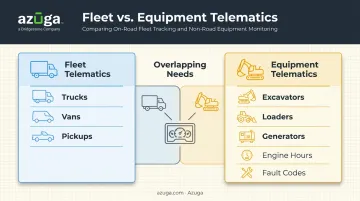
Most contractors need both. A general contractor running crew trucks alongside a fleet of skid steers manages two distinct asset types under one platform.
From Raw Data to Daily Decisions
The real value shows up once that data feeds into dashboards, automated alerts, and reports. Instead of calling foremen for status updates, a fleet manager using a platform like Azuga can pull up idle-time trends, maintenance flags, and location history in one screen and make decisions in minutes instead of days.
Key Benefits of Telematics for Construction Fleets
Telematics pays for itself in several concrete ways. Here's where contractors typically see the biggest returns.
Reduced Fuel and Operational Costs
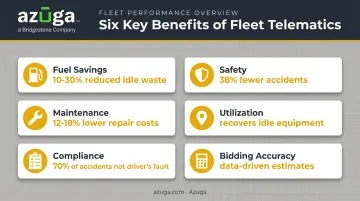
Idle time is one of the most controllable costs in a construction fleet, yet it's rarely tracked without technology. According to Trimble's Mike Granruth, speaking to the Association of Equipment Manufacturers, 10% to 30% of fuel consumed by construction equipment is wasted through nonproductive idling. Telematics can cut that waste by 10% to 15% on average.
Azuga customers across trades and construction-adjacent fleets have reported operational cost reductions of up to 30% after implementing idle monitoring and route optimization.
Improved Driver and Jobsite Safety
GPS data flags speeding and harsh braking before those habits turn into accidents. Add AI-powered dashcams, and managers get video evidence of distracted driving and near-misses, too.
Azuga fleet customers have seen a 38% average decrease in accidents and a 57% reduction in speeding citations.
Proactive Maintenance Instead of Reactive Repairs
Reactive repairs cost more, period. The U.S. Department of Energy's Federal Energy Management Program found that preventive maintenance programs save 12% to 18% over reactive maintenance, with a cost benchmark of roughly $13 per horsepower annually versus $18 for reactive repairs.
Engine-hour tracking and fault-code alerts let managers schedule service before a breakdown strands a crew mid-project.
Better Equipment Utilization
Idle or forgotten assets, sometimes called "ghost equipment," sit unused on jobsites while managers pay to rent more gear. Location and usage data expose these gaps so equipment gets reallocated instead of duplicated.
One contractor tracking utilization data recovered tens of thousands of dollars in equipment sitting idle across jobsites rather than paying for new rentals.
Simplified Compliance and Dispute Protection
ELD, IFTA, and DVIR features cut down on paperwork and audit risk for on-road construction vehicles. On the safety side, AI collision reconstruction protects drivers from false blame.
Azuga's data shows that 70% of accidents are not the fault of the fleet's driver, and video evidence combined with reconstruction tools can prevent costly, drawn-out litigation.
More Accurate Project Bidding
Historical fuel, utilization, and idle-time data give estimators real performance benchmarks instead of rough guesses when pricing the next job. That means fewer underbid contracts and tighter margins on future projects.
Examples of Construction Telematics in Action
Here's what these benefits look like on an actual jobsite
- GPS tracking and geofencing: A contractor running trucks and vans across five sites sets geofences around each site's perimeter and gets an instant alert if a vehicle leaves without authorization, useful for security and route compliance.
- Fuel and idle-time monitoring: An automated alert fires when a dump truck exceeds a set idle threshold, prompting a manager to coach the operator or adjust the day's schedule.
- AI dashcams and driver scorecards: Inward- and outward-facing cameras, like Azuga's SafetyCam AI, catch a driver checking a phone at a red light, turning the footage into a targeted coaching session instead of a guessing game about what happened.
- Automated maintenance alerts: A loader hits its 250-hour service mark, and the system generates a work order automatically, no spreadsheet tracking required.
- Digital compliance and inspection reporting: Digital records replace paper DVIRs and manual ELD logs, cutting audit prep time and reducing the risk of a failed roadside inspection.
- Mixed-fleet asset tagging: Generators, trailers, and hand tools get GPS tags so they don't quietly disappear between sites, a common and expensive problem on busy jobsites.
Features to Look for When Choosing a Construction Telematics System
Not every telematics platform fits a construction operation. Prioritize these features
- Easy installation and scalability. Hardwired, battery-powered, and beacon trackers get equipment and mixed fleets online in minutes and scale easily as your operation grows, without a lengthy professional install project for every unit.
- High-frequency, real-time location updates. Pings every 30 seconds give dispatchers accurate jobsite coordination. Hourly updates leave too much guesswork for active construction sites.
- Integrated video safety tools. AI dashcams and collision reconstruction are essential for liability protection and driver coaching, especially on high-traffic sites where incidents are common.
- Automated maintenance and diagnostic alerts. Look for service scheduling tied to engine hours, mileage, or calendar intervals, not just a manual checklist.
- Integrations with existing business systems. Compatibility with fuel cards, accounting platforms, and job-costing tools avoids duplicate data entry and keeps your office staff sane.
- Packages matched to fleet needs and responsive support. Predictable scalable packaging and 24/7 support matter most for small and mid-size contractors who don't have a dedicated IT team.
How Azuga Helps Construction Fleets Get More From Telematics
Azuga is a GPS fleet management platform built for simplicity and affordability, backed by Bridgestone, and used across construction and related trades like electrical, HVAC, and utilities.
Fast, easy-to-deploy hardware. Azuga's hardwired asset trackers, battery-powered units, and equipment beacons mount to machines and trailers without a complex professional installer visit. Combined with 30-second tracking intervals, construction managers get near real-time visibility across every active jobsite without unnecessary downtime.
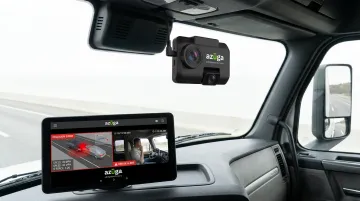
Video that protects your drivers. Azuga SafetyCam AI with Collision Reconstruction captures dual-facing HD video and uses an AI neural network to reconstruct accident scenes. That's the technology behind Azuga's finding that 70% of accidents aren't the fault of the fleet's driver, which can mean the difference between a quick claim resolution and expensive litigation.
Packaging that fits any size fleet. Azuga matches packaging to fleet size and the features you select, with 24/7 phone, email, and web support included. Whether you're running five trucks or five hundred, the pricing model stays predictable as you scale.
That same predictable pricing carries across Azuga's full platform, which extends beyond on-road vehicles to cover heavy construction equipment, trailers, and tools through its Equipment Management and Asset Tracking capabilities, giving mixed-fleet contractors one system instead of three.
Frequently Asked Questions
What is the best telematics system for construction equipment?
It depends on your fleet mix. Vehicle-heavy fleets benefit from easy-install, safety-focused platforms like Azuga, while equipment-heavy fleets may also need OEM or CAN-bus specific tools for specialized machinery.
What are examples of construction telematics?
Common examples include GPS tracking, geofencing, fuel and idle monitoring, AI dashcams, automated maintenance alerts, and digital compliance reporting for ELD, IFTA, and DVIR requirements.
How much does construction telematics cost?
Most platforms package per vehicle depending on features. Azuga matches packaging to fleet size and the features you select, including support.
Can telematics track both vehicles and heavy equipment?
Many platforms specialize in one or the other, so mixed-fleet contractors often need complementary vehicle and equipment tracking tools. Azuga supports both through its fleet and equipment management modules.
How quickly can a construction company see ROI from telematics?
Most fleets see measurable fuel and safety-related savings within the first few months. Azuga customers have reported annual savings of roughly $9,462 from more efficient fleet cost management.
Does telematics help with regulatory compliance?
Yes. ELD, IFTA, and DVIR features automate hours-of-service logging, mileage reporting, and inspection records, cutting paperwork and reducing audit risk for construction fleet managers.