The term "virtual fleet" gets used loosely, though. Some companies use it to describe software-managed vehicles they already own. Others use it for on-demand delivery networks built on gig drivers and rented trucks. Both are legitimate uses of the phrase, but they solve different problems.
This guide focuses on virtual fleet management technology: the cloud software, GPS devices, and dashcams that let businesses track and manage vehicles they own. We'll cover what it actually is, the benefits worth paying attention to, the features that separate strong platforms from weak ones, which industries depend on it most, and how to choose a solution that fits your fleet.
Key Takeaways
- Track vehicles and coach drivers remotely, with no yard visits required
- 87% of enterprise fleets use GPS telematics, and small fleets are closing the gap
- AI dashcams with collision reconstruction protect drivers from false liability claims
- Self-installable hardware gets fleets running in minutes, not weeks
What Is Virtual Fleet Management?
Virtual fleet management is the use of cloud-based software, GPS telematics devices, and connected dashcams that let a business monitor, track, and manage its own vehicles and drivers from anywhere. No radio dispatch, no windshield inspections, no waiting for a driver to call in with a status update.
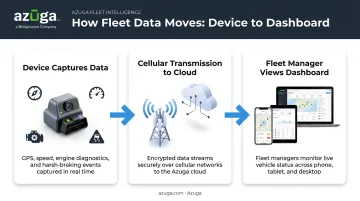
Here's how it works mechanically: a small device, usually an OBD-II tracker, plugs into a vehicle's diagnostic port and starts collecting data immediately.
That data moves through three steps
- The device captures GPS position, speed, engine diagnostics, and harsh-braking events
- It transmits that data over a cellular network to a cloud dashboard
- A fleet manager pulls up the dashboard on a phone, tablet, or laptop to see the entire fleet in near real time
Virtual Fleet Management vs. Traditional Fleet Oversight
Traditional fleet oversight relied on physical check-ins: drivers calling dispatch, managers doing windshield inspections in the yard, paper logs tracking mileage and maintenance. It worked, sort of, but it left blind spots between every check-in.
Virtual tools close those gaps with always-on visibility. That need grew fast as more operations teams started managing field workers who were never in the same building as their supervisor.
Remote oversight now defines how most fleets run day to day. Verizon Connect's 2025 survey found GPS tracking use at 59% of small fleets, 76% of medium fleets, and 87% of enterprise fleets, showing that scale, not novelty, is driving adoption now.
Clearing Up the Confusion: "Virtual Fleet" vs. "Virtual Fleet Management"
Some platforms use "virtual fleet" to describe something entirely different: a network of independent contractor drivers a company hires on demand, without owning a single vehicle. That's a real model, common in last-mile delivery.
"Virtual fleet management," the focus of this guide, means something else. It's about digitally managing vehicles a business already owns, whether that's three plumbing vans or three hundred delivery trucks. If your goal is remote visibility into your own fleet, this is the category you're shopping.
Key Benefits of Virtual Fleet Management Solutions
Fleet software has moved past being a nice-to-have add-on. Here's the tangible payoff for businesses that adopt it
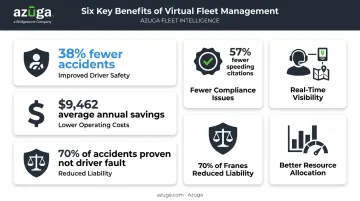
- Improved driver safety: Real-time alerts catch harsh braking, speeding, and distraction the moment they happen, not weeks later when a claim surfaces. Azuga customers report accidents dropping by an average of 38% after driver coaching tied to those alerts.
- Fewer compliance issues on the road: Speed monitoring alerts help drivers self-correct before a citation happens, and Azuga fleets have seen speeding citations fall by 57% on average. Independent research backs this up: FMCSA's Class 8 truck study found driver coaching cuts speeding by 33% and unsafe driving events by up to 63%.
- Lower fleet operating costs: Automated maintenance alerts catch small problems before they become expensive, while idle-time tracking and route optimization cut wasted fuel. Azuga customers save an average of $9,462 annually and cut operational costs by up to 30%.
- Real-time visibility without being on-site: A dispatcher can see vehicle location, driver status, and job progress from any device, enabling faster rerouting and fewer "where's my technician" calls from customers.
- Reduced liability and litigation risk: AI dashcams with collision reconstruction give fleets hard evidence when accidents happen. Azuga's SafetyCam AI can help prove up to 70% of accidents aren't the fault of the fleet's own drivers.
- Better resource allocation: Utilization data shows which vehicles sit idle and which are overworked, helping fleets right-size their vehicle count instead of buying extra trucks "just in case."
Must-Have Features in a Virtual Fleet Management Platform
Not all platforms are built the same. Here's what actually matters when comparing options.
Real-time, high-frequency GPS tracking. A location ping every few minutes doesn't cut it for a dispatcher routing the nearest driver to an urgent job. Azuga tracks vehicles at 30-second intervals, giving dispatch teams map data that reflects the road right now, not five minutes ago.
AI-powered dashcams and driver-facing video. Neural-network video analysis can flag distraction events like phone use before they turn into accidents. Azuga's SafetyCam AI analyzes driver-facing footage, tags risky events, and feeds that data into collision reconstruction when something does go wrong.
Independent camera testing shows performance can vary by lighting and driving conditions, particularly at night. It's fair to ask any vendor how their system performs after dark.
Plug-and-play hardware installation. A self-installable OBD-II device means no scheduling a technician and no vehicle downtime. Azuga's devices plug into the OBD port and start transmitting in about 20 seconds.
Third-party integrations. A platform that connects to fuel cards, maintenance software, and the tools you already run turns scattered data into one source of truth. Azuga's marketplace includes more than 75 integrations, including ServiceTitan, Procore, Fleetio, and TowBook.
Driver safety scoring and coaching tools. Automated scorecards flag at-risk drivers before they become a liability. Air Engineers, an Azuga customer, built a monthly recognition program around driver scores and saw a measurable shift toward safer habits fleet-wide.
Responsive customer support. Fleets run around the clock, so support needs to as well. Azuga provides 24/7 phone, email, and web support across every plan, plus a dedicated Customer Success Manager for CompleteFleet customers.
Industries That Rely on Virtual Fleet Management
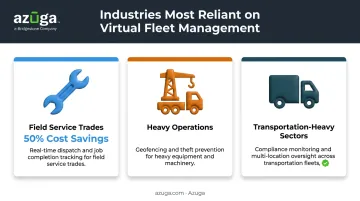
Some sectors depend on this technology more than others, because vehicles and driver time make up their biggest operating costs. Three industries show this reliance most clearly
Service fleets trades. HVAC, electrical, plumbing, pest control, and landscaping companies use virtual visibility to dispatch the nearest available technician and confirm job completion. Pest control company Bug-N-A Rug Exterminators reported 50% cost savings after adding real-time driver tracking to its dispatch process.
Heavy operations. Construction, utilities, waste management, and towing fleets run expensive, specialized vehicles that are easy targets for theft and misuse. Geofencing alerts flag when equipment leaves an approved area. Azuga customer Smith & Solomon credited geofence alerts with giving management better control over vehicle oversight and maintenance timing.
Transportation-heavy sectors. Trucking, telecom, and enterprise fleets scale compliance, driver safety, and multi-location oversight across dozens or hundreds of vehicles. Azuga's eLogs tools help trucking fleets meet FMCSA Hours of Service requirements, while breadcrumb reporting and geofencing give multi-site operations a single view of activity across every location.
How to Choose the Right Virtual Fleet Management Solution
Picking a platform comes down to four things.
Evaluate total cost of ownership. Look for clear terms without hidden installation or cancellation fees. Azuga's plans match packages to fleet needs, with the higher tier covering AI dashcams and collision reconstruction. Confirm exactly what's included before you compare vendors, and factor hardware, support, and add-ons into the full picture.
Prioritize ease of setup. A self-installable device gets a fleet of any size running in minutes, not weeks of waiting on technician appointments. That matters even more for fleets adding vehicles regularly.
Confirm scalability and support. The right platform should handle three vehicles as easily as three hundred, backed by support that doesn't disappear once the contract is signed. Azuga backs every plan with unlimited 24/7 support and adds a dedicated Customer Success Manager for larger fleets.
Check integration and customization options. Verify the software connects with tools already running the business
- Fuel cards
- Maintenance systems
- Dispatch platforms
A platform that operates in isolation just creates another data silo to manage.
Frequently Asked Questions
What is a virtual fleet?
A virtual fleet typically means vehicles managed remotely through software and telematics, though it can also refer to third-party drivers a company hires without owning vehicles. This guide uses the first definition.
How does virtual fleet management save money?
It cuts costs through reduced fuel waste, fewer accidents and citations, and maintenance scheduled before small issues become costly repairs. Azuga customers save an average of $9,462 annually as a result.
Is virtual fleet management the same as GPS tracking?
No. GPS tracking shows where a vehicle is, but virtual fleet management adds safety analytics, dashcams, maintenance alerts, and reporting on top of that location data.
Can small businesses use virtual fleet management software?
Yes. Packages matched to fleet needs make these tools accessible to fleets with just a handful of vehicles, not only large enterprises.
How quickly can a business set up a virtual fleet management system?
Plug-and-play OBD-II devices can be self-installed in minutes. Azuga's devices are ready to transmit data about 20 seconds after plugging into the vehicle's diagnostic port.
Does virtual fleet management work for businesses with multiple locations?
Yes. A cloud dashboard gives centralized visibility across every job site or branch from any device, so managers don't need to be physically present at each location to stay informed.