Fleet management workflow automation uses software and GPS telematics to trigger repetitive tasks automatically, maintenance reminders, inspection prompts, dispatch updates, and compliance reports, without a manager chasing each one down manually.
This guide breaks down the five core workflow pillars, the highest-ROI tasks to automate first, the KPIs that prove automation is working, and a practical rollout plan you can start this quarter.
Key Takeaways
- Every fleet workflow runs on five pillars: vehicles, drivers, dispatch, maintenance, and monitoring.
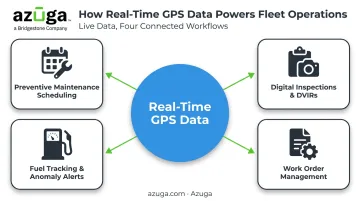
- Preventive maintenance, digital inspections, fuel tracking, and work orders deliver the fastest wins.
- Tracking KPIs like uptime and cost-per-mile turns automation data into real business decisions.
- A phased rollout beats a one-time software switch for long-term adoption.
What Is Fleet Management Workflow Automation?
A fleet management workflow is the connected sequence of tasks that keeps vehicles and drivers operating safely: planning, dispatch, maintenance, and monitoring, all working together instead of in isolation.
Automation replaces manual triggers with software ones. Common examples include
- Flagging maintenance needs automatically based on mileage, engine hours, or calendar date instead of a spreadsheet check
- Converting paper DVIRs into time-stamped digital forms
- Updating dispatch assignments based on live GPS location instead of a phone call
Automation doesn't replace the fleet manager. It removes the administrative grind
- Chasing paperwork and compliance forms
- Cross-checking spreadsheets for maintenance schedules
- Sending reminder emails to drivers and technicians
This frees managers to focus on cost control, driver safety, and decisions that require judgment. The software executes routine tasks; the person still runs the fleet.
The Core Pillars of a Fleet Management Workflow
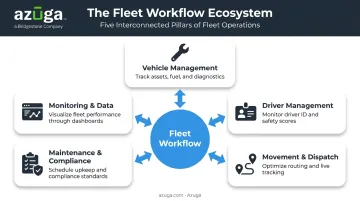
Whether you're running a construction fleet, an HVAC service crew, or a long-haul trucking operation, every fleet workflow rests on the same five interconnected pillars.
Vehicle Management
This pillar covers vehicle availability, condition checks, and lifecycle tracking. Automation flags service needs before they become breakdowns, using mileage triggers, engine-hour counters, and diagnostic trouble codes rather than waiting for a dashboard warning light. The goal is simple: know a vehicle needs attention before it's stranded on a job site.
Driver Management
Driver management includes scheduling, qualification tracking, training records, and behavior monitoring. Automated alerts catch license renewals and certification expirations before they lapse, avoiding the scramble (and compliance risk) of discovering a driver's credentials expired mid-route.
Movement & Dispatch Management
This pillar governs job assignment, route planning, and real-time tracking from dispatch to delivery. Automated dispatch tools match the closest available vehicle to a job based on live location, cutting the guesswork out of assignment decisions.
Maintenance & Compliance Management
Preventive maintenance schedules tie directly to DOT and FMCSA compliance requirements. Under 49 CFR 396.3, motor carriers must systematically inspect, repair, and maintain vehicles, with maintenance records retained for at least one year while the vehicle is in service. Digital documentation reduces audit risk because records stay retrievable and complete, rather than buried in a filing cabinet.
Monitoring & Data Management
This pillar pulls data from all four other pillars into dashboards, giving managers a single view to spot inefficiencies and adjust course in real time. Strong GPS tracking strengthens this foundation.
Azuga's platform, for example, tracks driver behavior metrics such as
- Harsh braking events
- Speeding duration
- Rapid acceleration
- Idle time
These metrics roll into a composite Driver Score that feeds cleaner data into every other pillar's workflow.
High-ROI Workflows to Automate First
Not every task deserves automation on day one. Start with workflows that are repetitive, prone to manual error, and directly tied to cost or compliance. Automating a broken process just speeds up the same mistakes at scale.
Preventive Maintenance Scheduling
Automated triggers based on mileage or engine hours catch service needs before they turn into breakdowns. The stakes are real: Fleet Maintenance reports an estimated $448 to $760 per vehicle per day in downtime costs, attributed to Element Fleet Management.
That figure is dated (2015) and shouldn't be treated as a universal current benchmark, but it illustrates why a missed service reminder is never just an inconvenience.
Digital Inspections & DVIRs
Time-stamped digital inspections with photo attachments close the gaps paper forms create: lost sheets, illegible handwriting, inspections that never actually happened.
Under 49 CFR 396.11, DVIRs and related repair certifications must be retained for three months from the report date. Electronic formats are permitted as long as records stay legible and retrievable.
Fuel Tracking & Anomaly Alerts
Automated MPG tracking and fuel card integration catch waste and unusual patterns early, before they compound into a real budget problem.
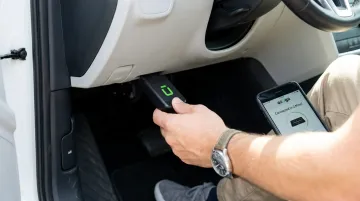
Plug-and-play OBD-II devices, such as the one Azuga offers, make this data capture effortless. There's no wiring or shop visit needed; the device plugs into the vehicle's existing OBD port and starts transmitting immediately.
Work Order Management
Centralizing work orders against individual vehicle records eliminates duplicate parts orders and shortens repair cycle times. When a service history lives in one place instead of scattered across sticky notes and separate systems, technicians stop guessing what's already been done.
One thing ties these four workflows together: tight, frequent GPS data. Azuga's real-time tracking feeds live location and diagnostic data into maintenance, inspection, fuel, and work order systems simultaneously, so a change in one workflow (like a flagged DTC code) shows up instantly across the others.
Key KPIs for Fleet Management Workflow Automation
Automation only matters if it moves the needle on cost, safety, and uptime. KPIs prove that outcomes actually improved, not just that paperwork got faster.
Here are the core metrics worth tracking, paired with the pillar they measure and the automation feature that drives them
| KPI | Pillar | Automation Feature |
|---|---|---|
| Vehicle uptime/utilization | Vehicle Management | Mileage/engine-hour maintenance triggers |
| Cost-per-mile | Monitoring & Data | Fuel, maintenance, and mileage dashboards |
| Preventive maintenance compliance rate | Maintenance & Compliance | Automated service scheduling alerts |
| Average repair cycle time | Maintenance & Compliance | Centralized work order tracking |
| Fuel cost per vehicle | Vehicle Management | Fuel card integration, MPG monitoring |
| Accident/incident rate | Driver Management | Driver behavior scoring, dashcam alerts |
For context on where these numbers land industry-wide: ATRI's 2026 report puts average trucking operating costs at $2.336 per mile, or $1.854 excluding fuel.
On the safety side, NETS benchmark data from 2022 shows a composite rate of 4.55 collisions per million miles across nearly half a million commercial vehicles. Compare your own numbers against similar duty cycles and vehicle classes, not against a different industry entirely.
Azuga customers offer a useful benchmark for automation's real-world impact. Fleets using the platform report an average 38% reduction in accidents, a 57% drop in speeding citations, and $9,462 in annual savings per customer from better cost management.
Review cadence matters, too. Track safety and fuel metrics weekly since they shift fast, and review cost-per-mile and utilization monthly since these need a longer view to spot trends.
Benefits of Automating Fleet Workflows
The payoff from automation shows up in three places.
Efficiency gains. Tasks that used to take a manager hours—cross-referencing spreadsheets, chasing signatures—get done automatically. Fewer manual errors mean fewer double-booked jobs and fewer missed reminders.
Compliance and risk reduction. Audit-ready digital documentation replaces the "let me find that folder" scramble during a DOT inspection. Missed regulatory deadlines drop when the system, not a person's memory, tracks renewal dates.
Cost savings. Lower fuel waste, fewer unplanned breakdowns, and better budget forecasting all compound over time. Azuga states that fleets using its platform see operational costs drop by 30% on average, driven by combined savings across fuel monitoring, maintenance scheduling, and reduced accident-related expenses.
How to Roll Out Fleet Automation Successfully
Rolling out automation all at once, every workflow, every vehicle, on day one, is a fast way to overwhelm your team and stall adoption. A phased approach works better. Here's how to phase it in
- Audit current manual tasks. Rank them by time cost and error frequency. If your maintenance scheduling causes the most missed services, start there.
- Introduce one or two workflows at a time. Roll out preventive maintenance automation first, gather feedback from drivers and technicians, then add digital inspections once the first workflow feels routine.
- Choose a platform built to scale. Look for a system that grows with your fleet, integrates with your existing fuel cards, and doesn't require a service technician to install hardware.
Azuga's OBD-II device installs in minutes, no mechanic, no scheduled downtime. That matters when you're rolling out across dozens of vehicles on a tight timeline.
Support keeps the rollout moving, too
- 24/7 phone, email, and web support, so questions don't wait until morning
- Self-install setup that skips technician visits and downtime
- Coverage that scales as you add more vehicles
Frequently Asked Questions
What is the fleet management workflow?
It's the connected system of vehicle checks, driver management, movement and dispatch, maintenance, and monitoring that keeps a fleet operating safely and efficiently. Each pillar feeds data into the others.
What are the core pillars of a fleet management workflow?
Five pillars make up every fleet workflow: vehicle management, driver management, movement and dispatch, maintenance and compliance, and monitoring and data management. They work together, not in isolation.
What are the key KPIs for fleet management workflow automation?
Core KPIs include vehicle uptime, cost-per-mile, preventive maintenance compliance rate, average repair cycle time, fuel cost per vehicle, and accident rate. Review safety and fuel metrics weekly; review cost and utilization monthly.
How long does it take to implement fleet automation software?
Timelines vary by fleet size and starting point. High-impact workflows like preventive maintenance and digital inspections typically show measurable improvements within the first few months of a phased rollout.
Can small fleets benefit from workflow automation?
Yes. Automation scales down well; Azuga matches packaging to fleet size and the features you select, and the platform supports fleets with as few as one to four vehicles, with no minimum size requirement.
What is the difference between fleet management and fleet automation?
Fleet management is the overall discipline, overseeing vehicles, drivers, safety, and costs. Fleet automation is the technology layer that executes repetitive tasks, like maintenance reminders and dispatch updates, within that discipline.