Introduction
Picture a dispatcher at 7 a.m., staring at a whiteboard covered in driver names, a spreadsheet open in another window, and a phone that won't stop ringing with last-minute order changes. Sound familiar?
This manual juggling act is still how many fleets operate, and it shows. Late deliveries pile up, fuel gets wasted on backtracking routes, and customers grow frustrated waiting on vague arrival windows.
Dispatch routing software fixes this by automating the two hardest parts of fleet operations: assigning jobs and planning the routes to complete them. This guide breaks down what the technology does, how it works step by step, and which features matter most when you're choosing a platform.
Key Takeaways
- Dispatch routing software combines job assignment and route optimization in one automated system
- Live traffic, weather, and capacity data drive route decisions and on-the-fly adjustments
- Adopters typically cut fuel and labor costs by up to 30% while improving on-time delivery rates
- The right fit depends on fleet size, industry, and your existing GPS tracking setup
What Is Dispatch Routing Software?
Dispatch routing software is a technology platform that automates two connected tasks: assigning the right driver or vehicle to a job, and calculating the most efficient path to complete it. Algorithms process live data, including traffic conditions, delivery windows, and vehicle capacity, to build routes that a human dispatcher simply can't match by eye.
The financial stakes make this more than a convenience upgrade. Fuel and driver wages alone account for roughly 60% of the average per-mile cost of running a truck, based on ATRI's 2023 operational cost analysis, which found fuel at 28% and wages at 32% of total marginal cost.
Shave miles off routes and hours off schedules, and you're cutting into the two biggest line items on your P&L.
These savings compound when the platform doesn't work alone. Most integrate with GPS tracking, ERP systems, and warehouse management software to create one connected operational picture.
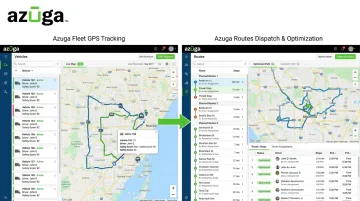
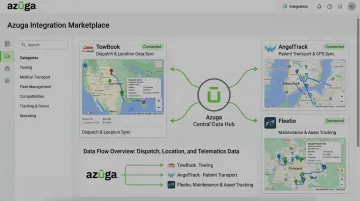
Azuga's own ecosystem reflects this approach: Azuga Fleet handles GPS tracking and driver behavior monitoring, while Azuga Routes manages the dispatch and optimization layer. Both feed data into an integration marketplace that includes tools like TowBook and Fleetio for specialized dispatch needs.
Dispatch vs. Routing: What's the Difference?
These terms get used interchangeably, but they're not the same function.
- Dispatching means assigning the right driver, vehicle, or technician to a specific job based on location, priority, and available capacity. It's the "who does what" decision.
- Routing determines the sequence and path of stops a driver should follow to complete their assigned jobs as efficiently as possible. It's the "in what order, on what path" decision.
The two work in tandem, but good software still manages them as distinct steps. Dispatch happens first; routing optimizes the execution.
How Does Dispatch Routing Software Work?
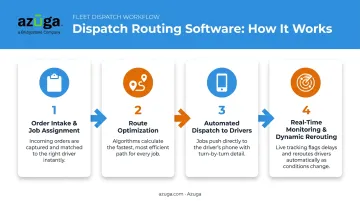
Most platforms follow a repeatable workflow that turns a raw order into a completed, optimized stop. Here's how that plays out in practice.
Step 1: Order Intake and Job Assignment
The system receives order details, such as location, priority level, and service type, then automatically matches it to an available vehicle or technician. This decision weighs proximity, current capacity, and skill requirements, replacing the manual guesswork of a dispatcher scanning a map.
Step 2: Route Optimization
Once a job is assigned, the algorithm calculates the most efficient route by weighing distance, live traffic conditions, delivery or service windows, and vehicle constraints like weight limits. More advanced systems go further, factoring in
- Driver skill level and historical service times at similar jobs
- Fuel-efficient paths that avoid unnecessary idling or elevation changes
- Multi-stop sequencing that reduces total drive time across a shift
Step 3: Automated Dispatch to Drivers
Route details, turn-by-turn navigation, and special instructions get pushed directly to a driver's mobile app or in-cab device. This removes the manual radio or phone call, cutting communication delays and reducing errors from miscommunicated addresses or instructions.
Step 4: Real-Time Monitoring and Dynamic Rerouting
Dispatchers watch progress on a live map, and the system automatically reroutes vehicles when traffic jams up, a vehicle breaks down, or a customer adds a last-minute stop. A route plan built at 7 a.m. rarely survives until noon once traffic, breakdowns, and new stops pile up. These systems adjust automatically as conditions change, without a dispatcher touching the keyboard.
Key Benefits of Dispatch Routing Software
The value shows up in dollars, time, and fewer headaches.
- Lower operational costs. Waste Management cut miles per haul by 11.6% and saved $11 million in 2024 through enterprise route optimization, per INFORMS' case study. UPS's ORION system saves $320+ million annually and 10 million gallons of fuel across 55,000 drivers.
- Improved on-time performance. Real-time ETAs and automated customer notifications cut down on the "where's my driver" calls that eat up dispatcher time and erode customer trust.
- Increased fleet utilization. Drivers complete more stops per shift without adding vehicles or headcount, while dispatchers save hours once spent manually building routes.
- Enhanced safety. Azuga fleet customers average 38% fewer accidents and 57% fewer speeding citations through combined route efficiency and driver monitoring. SafetyCam AI Collision Reconstruction adds proof: 70% of fleet accidents aren't the driver's fault, and video evidence heads off costly litigation.
- Greater visibility and reporting. Real-time location data and route-versus-plan analytics give fleet managers audit-ready records and the insight needed for long-term planning.
Types of Routing Used in Dispatch Software
Not every fleet needs the same routing approach; the right type depends on how predictable your stops are.
| Routing Type | Best For | How It Works |
|---|---|---|
| Static (fixed) | Waste collection, scheduled maintenance | Pre-planned routes that repeat on a set schedule |
| Dynamic | Fleets with frequent last-minute changes | Adjusts in real time based on traffic, weather, and new orders |
| On-demand/last-mile | Food delivery, service fleets | Generates routes instantly for one-off or same-day requests |
Static routing works well when stops rarely change week to week, offering simplicity at the cost of flexibility. If an order gets delayed, dispatchers often end up running the same fixed route twice rather than reconfiguring it on the fly.
Dynamic routing accounts for live conditions like traffic, weather, and time windows, adjusting automatically as circumstances shift throughout the day. This suits fleets in construction, HVAC, or utilities where jobs pop up unpredictably.
On-demand or last-mile routing builds routes the moment a request comes in, common in food delivery and same-day service fleets. Speed matters more than long-term planning here.
Must-Have Features When Choosing Dispatch Routing Software
Not all platforms are built the same. Here's what actually separates capable platforms from the rest.
Real-time GPS tracking and location visibility. Azuga's integration marketplace connects with 75+ platforms, including specialized tools like TowBook for towing dispatch and AngelTrack for EMS and fire department routing. This means GPS and dispatch data flow directly into the systems your team already uses.
None of this matters, though, if drivers can't act on route changes in real time.
Mobile driver app and dynamic rescheduling. Drivers need turn-by-turn navigation and instant updates the moment a route changes mid-day. When evaluating platforms, check specifically for
- Automatic route updates pushed straight to the driver's device
- Two-way communication between dispatch and drivers without phone calls
- Proof-of-completion capture for service or delivery confirmation
Frequently Asked Questions
What's the difference between routing and dispatching?
Dispatching assigns jobs to the right driver or vehicle based on location and capacity. Routing plans the most efficient path or sequence of stops to complete those jobs. They work together, but they're distinct steps.
What are the three types of routing?
Static routing uses fixed, repeating routes for predictable stops. Dynamic routing adjusts in real time based on traffic and order changes. On-demand routing generates instant routes for same-day requests.
What is a dispatch process?
A dispatch process starts when an order comes in, gets assigned to the right available resource, and then sends route and job details to the driver for execution. Modern platforms automate all three steps.
Is dispatch routing software the same as GPS fleet tracking software?
Not exactly. GPS fleet tracking, like Azuga Fleet, provides the real-time location and vehicle data that dispatch routing software relies on. They're complementary tools rather than identical ones.
How much does dispatch routing software cost?
Options vary based on fleet size and feature tier. GPS-based fleet platforms, including Azuga, use packages matched to fleet needs, with premium tiers offering high-frequency tracking and advanced safety features.
Can small businesses benefit from dispatch routing software?
Yes. Small fleets see reduced fuel costs and real-time savings through affordable, scalable platforms rather than enterprise-only tools. According to Azuga customer data, a 38-vehicle nonprofit fleet improved safety documentation and lowered insurance costs after adopting the platform.