Introduction
A technician is running late because the dispatcher had no idea he was still stuck at his last job. The customer waited three hours for a two-hour window, then called the office to complain. Sound familiar?
Scattered schedules, paper work orders, and phone-tag dispatching are still common in field service businesses, from HVAC to towing to utilities. These gaps cost time, money, and long-term customer trust, and they only get worse as your fleet grows.
To make things more confusing, "FSM" doesn't mean the same thing everywhere. Telecom engineers use it for finite state machines, while some finance software calls it Finance Service Management. Neither applies if you're running a plumbing company or a fleet of service vans.
This guide defines FSM the way field-based service businesses actually use it: coordinating people, vehicles, and jobs. We'll break down its core components, show which industries depend on it, and explain why GPS fleet visibility has become part of any modern FSM strategy.
Key Takeaways
- FSM coordinates scheduling, dispatch, work orders, and mobile technicians on-site
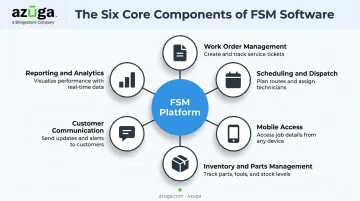
- Core components include work orders, scheduling, mobile access, inventory, communication, and reporting
- Construction, HVAC, plumbing, utilities, and waste management crews depend on FSM daily
- GPS fleet tracking gives dispatchers real-time data for routing, safety, and cost control
What Is Field Service Management (FSM)?
Field Service Management is the coordination of people, vehicles, tools, and information needed to deliver services performed away from a company's office: installs, repairs, maintenance calls, inspections. According to IBM's field service management overview, it covers coordinating employees and equipment for work performed off company property, including scheduling, dispatch, work orders, inventory, and contracts.
In plain terms, if your business sends technicians to customer sites, FSM is how you keep those jobs, people, and vehicles organized.
From Paper Boards to Mobile Platforms
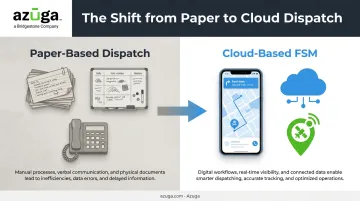
Field service used to run on paper dispatch boards, phone calls, and gut instinct. Dispatchers pinned index cards to a wall or scribbled routes on a whiteboard. Today, most of that coordination happens through cloud-based software with mobile apps that update in real time, a shift that's made scheduling faster and far less error-prone.
FSM Means Different Things in Different Industries
Search "FSM" online and you'll find conflicting definitions, which is exactly the problem business owners run into. Outside of field service software:
- Telecom: FSM often refers to a "finite state machine," a technical term used in network protocol standards.
- Automotive: No industry-wide expansion of FSM is consistently verified; some shops use "Service Mode" instead.
- Finance: Some software vendors use "Finance Service Management" for internal finance workflow tools.
None of these relate to coordinating field technicians. If you're researching software for a service business, make sure the FSM you're reading about matches your context.
FSM vs. Facilities Management vs. Fleet Management
These three terms get mixed up constantly, but they solve different problems.
| Term | What It Manages | Focus |
|---|---|---|
| Field Service Management | People, jobs, and customer service delivered on-site | Mobile workforce coordination |
| Facilities Management | Buildings and physical workplaces | Built environment operations |
| Fleet Management | Vehicles and mobility assets | Vehicle lifecycle and usage |
Facilities management keeps buildings running. Fleet management keeps vehicles running. FSM connects both to the actual job: getting the right technician, with the right tools, to the right customer, on time.
Who's Involved in FSM
Four groups typically touch an FSM system:
- Dispatchers assign jobs and monitor progress in real time
- Field technicians receive job details and update status from the road
- Service managers track performance and resolve escalations
- Business owners rely on reporting to make staffing and pricing decisions
When these groups share the same real-time data, jobs get done faster and customers stay informed, whether it's a one-time repair call or a recurring commercial contract.
Core Components of FSM Software
Modern FSM platforms bundle several once-separate functions into a single system. Instead of juggling spreadsheets, sticky notes, and separate apps, dispatchers and technicians work from one shared source of truth. Here's what that typically includes.
Work Order Management
Every job starts with a work order, capturing the customer's location, the problem, priority level, and what tools or parts the job needs. A good work order system creates a clear audit trail from the initial call to the final invoice, so nothing gets lost between office and field.
Scheduling and Dispatch
Rules-based or AI-driven scheduling assigns jobs based on technician skill, location, and availability. Instead of manually matching the closest available tech to a job, the system does it automatically, cutting travel time and improving first-time fix rates. According to Aberdeen Group research, organizations with structured service planning hit a 76% first-time fix rate, compared to 51% for those without it.
Mobile Access for Technicians
Field workers need more than a printed job sheet. Mobile apps give technicians real-time access to job details, customer history, and digital forms, often with offline functionality for areas with spotty signal. Technicians close out jobs on-site instead of driving back to the office to file paperwork.
Inventory and Parts Management
Tracking tools and parts across trucks and warehouses prevents the classic "we don't have the part" callback. When technicians can see what's in stock, on their van or at the warehouse, before they arrive, they show up prepared instead of scheduling a second visit.
Customer Communication Tools
Automated appointment reminders, arrival-window notifications, and self-service portals keep customers in the loop without tying up office staff on the phone. Fewer "where's my technician" calls means dispatchers spend more time actually dispatching.
Reporting and Analytics
Dashboards track completion rates, technician productivity, and customer satisfaction scores. This data turns guesswork into decisions, showing which routes waste time, which technicians need coaching, and where service contracts are most profitable.
Who Uses Field Service Management?
FSM shows up anywhere a business sends workers to a customer's location instead of the other way around. That spans a wide range of trades:
- Construction and general contracting
- Electrical services
- HVAC installation and repair
- Landscaping and lawn care
- Pest control
- Plumbing
- Telecom installation and repair
- Utilities (water, gas, electric)
- Waste management and hauling
- Towing and roadside assistance
The way FSM plays out looks different depending on the work. A utility crew responding to a power outage needs rapid, event-driven dispatch: get the nearest qualified crew to the failure point immediately, with no advance scheduling possible.
An HVAC company running seasonal maintenance works from a planned calendar instead, scheduling recurring inspections months ahead based on standards like ASHRAE/ACCA 180.
Both scenarios need the same underlying system: a way to match the right worker to the right job at the right time. They just run it in opposite directions, one reactive, one planned.
Business size doesn't change the need. A two-truck plumbing outfit and a 500-vehicle utility fleet face the same core problem: getting jobs assigned, tracked, and completed without dropping the ball. Structured scheduling and dispatch scale down to solo operators and up to enterprise field forces without changing the underlying logic.
Key Benefits of Field Service Management
Efficiency Gains From Automation
Automated scheduling and dispatch remove the guesswork of matching technicians to jobs by hand. A Forrester Total Economic Impact study commissioned by Microsoft modeled a composite organization with 1,000 technicians and found service productivity improved from 7% in year one to 14% by year three after adopting FSM software. The same model estimated a 5% to 10% reduction in travel time as routing improved.
Lower Costs Through Better Routing
Smarter routing means fewer wasted trips and less windshield time between jobs. Technicians spend more hours working and less time driving in circles. The same Forrester model found a 12% drop in second visits by year three, compounding the savings over a full fiscal year.
Stronger Customer Satisfaction
Cost savings aren't the only payoff. Real-time updates and accurate arrival windows change how customers experience your business. Instead of guessing when a technician will show up, they get a text with a specific window and a live update if plans shift. That visibility builds the trust that turns a one-time repair into a repeat customer.
Better Compliance and Lower Liability
FSM software creates a documented trail for every job:
- SLA tracking shows whether response times met contract terms
- Digital safety checklists replace paper forms that get lost or filled out after the fact
- Timestamped job records provide an audit trail if a customer disputes work performed
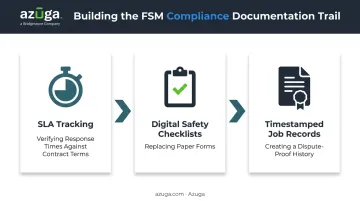
That documentation matters when a contract is on the line or a customer questions what was done on-site.
The Cost of Skipping FSM
The benefits above assume FSM is already in place. Skip it, and businesses running on paper schedules and phone calls tend to hit the same wall: double-booked technicians, dispatchers who can't see where a truck actually is, and customers calling the office because nobody told them the technician was running late.
None of that shows up as one clean number. It shows up in every missed appointment and every technician who drives an hour for a job that should have taken fifteen minutes to route.
The Role of GPS Fleet Tracking in Field Service Management
Scheduling software is only as good as the data feeding it. If a dispatcher doesn't know where a vehicle actually is, "optimized" routing is just a guess.
Vehicle and driver visibility is a core requirement in FSM for any business running a mobile fleet. Dispatchers need real-time location and ETA data to make scheduling decisions that hold up during the day, not just on paper the night before.
Adding a Real-Time Visibility Layer
GPS fleet tracking platforms like Azuga complement FSM software rather than replace it. Azuga's OBD-II device plugs directly into a vehicle's diagnostic port, with no wiring and no professional installer required, ready in about 20 seconds per vehicle. For a fleet of 50 trucks, that's a full rollout in under an hour of hands-on time.
Once installed, the device reports vehicle location at 30-second intervals through Azuga's High Frequency Tracking feature. That granularity gives dispatchers the live data FSM systems need to reassign the closest available technician, update customer ETAs, and catch delays before they snowball into missed appointments.
That same visibility layer matters after an incident, too. Field service vehicles rack up miles every day, and accidents happen.
Azuga's SafetyCam AI with Collision Reconstruction pairs dual-facing HD video with GPS and sensor data to reconstruct what happened before and during a collision. Azuga's own data shows 70% of accidents are not the fault of the fleet driver, and that footage can back up the claim when a lawsuit is on the line.
What Pairing FSM and Fleet Visibility Looks Like in Practice
Real-time tracking and accident accountability only pay off if they translate into better outcomes. Field service businesses that combine dispatch software with GPS tracking report measurable results. Azuga customers see, on average:
- 38% fewer accidents
- 57% fewer speeding citations
- $9,462 in annual savings per fleet
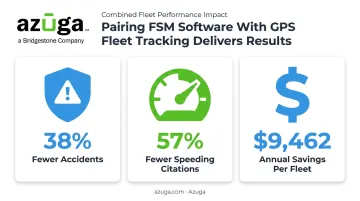
Those numbers reflect what happens when dispatch decisions are based on real vehicle data instead of assumptions, and when drivers know their behavior is visible.
Scaling It to Any Size Business
Those results scale with fleet size, and adding the technology doesn't require a platform overhaul. Azuga's plans start around $25 per vehicle per month, making it a practical add-on for a five-truck plumbing company or a 200-vehicle utility contractor. Businesses already dispatching through platforms like ServiceTitan can plug Azuga's vehicle location data directly into the dispatch board they already use.
Frequently Asked Questions
What does FSM mean?
FSM stands for Field Service Management: the coordination of scheduling, dispatch, work orders, and mobile technicians for businesses that deliver services at a customer's location rather than their own facility.
What does FSM mean in telecom, automotive, and finance?
In telecom, FSM often means "finite state machine," a technical term used in network protocol standards. Some finance software vendors use "Finance Service Management" for internal workflows, and there's no standard automotive definition for FSM.
What is the difference between FSM and facilities management?
Field Service Management coordinates mobile technicians and the jobs they perform at customer sites. Facilities management focuses on operating and maintaining physical buildings and workplaces, a different discipline entirely.
What does a field service manager do?
A field service manager oversees scheduling, assigns jobs based on technician skill and availability, manages inventory and equipment, tracks SLA compliance, and monitors technician performance and job completion quality.
How does GPS fleet tracking support field service management?
Real-time vehicle location and driver behavior data, like Azuga's 30-second GPS tracking, help dispatchers assign the closest technician, provide accurate customer ETAs, and hold drivers accountable for efficient routes.
Is field service management software worth it for small businesses?
Yes. Cloud-based FSM and fleet tracking tools, such as Azuga plans starting at $25 per vehicle monthly, scale affordably for small trade businesses, cutting scheduling admin and wasted trips.