Introduction
Picture a plumbing company owner finishing a job at 6 p.m., then sitting down to manually re-enter that invoice into QuickBooks because her scheduling app doesn't talk to her accounting software.
Multiply that by 15 jobs a week, and you've got hours of duplicate data entry, delayed billing, and the occasional embarrassing invoice that never got sent.
This scenario plays out daily across the trades. QuickBooks remains the accounting backbone for most small and mid-sized service businesses, which is exactly why QuickBooks integration has become a non-negotiable requirement when shopping for field service management (FSM) software.
This guide breaks down the top FSM platforms with QuickBooks integration, explains what separates a real integration from a marketing checkbox, and helps you match a platform to your scheduling, dispatching, invoicing, and fleet needs.
TL;DR
- Housecall Pro, Jobber, ServiceTitan, FieldPulse, Smart Service, and Intuit FSM top the list for QuickBooks integration.
- Two-way sync beats one-way sync by reflecting changes automatically, cutting manual reconciliation work.
- Fleet-heavy operations often add GPS tools like Azuga for vehicle location and driver safety data.
- Choose your platform based on business size, QuickBooks version, and sync depth, not brand name.
Overview of Field Service Management Software & QuickBooks Integration
FSM software manages the day-to-day mechanics of a service business: scheduling jobs, dispatching technicians, generating invoices, and tracking work orders from quote to payment.
Those invoices typically flow straight into QuickBooks, whose usage among small businesses is massive. Intuit's own QuickBooks homepage invites customers to join the 7 million businesses already using the platform. While Intuit doesn't break that number down by industry or by Online versus Desktop, the scale alone explains why FSM vendors treat QuickBooks compatibility as table stakes.
That level of adoption is reshaping the broader field service software market, which itself is growing fast. According to MarketsandMarkets, the global FSM market will expand from $5.10 billion in 2025 to $9.17 billion by 2030, a 12.5% compound annual growth rate. More businesses are digitizing dispatch and invoicing every year.
Here's the catch: QuickBooks was built to manage books, not job sites. It doesn't schedule technicians, track truck rolls, or capture signatures in the field. That gap is exactly what dedicated FSM software fills, provided the connection between the two systems is solid.
Key Features to Look for in QuickBooks-Compatible FSM Software
Not all "QuickBooks integrations" are created equal. Before you commit to a platform, understand what you're actually getting.
One-Way vs. Two-Way Sync
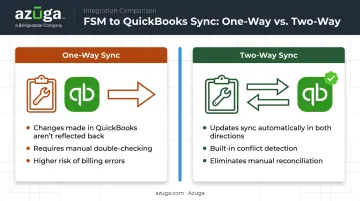
A one-way sync pushes data from your FSM tool into QuickBooks but doesn't pull changes back. Edit an invoice in QuickBooks, and your FSM platform never knows.
A two-way sync reflects changes made in either system. IBM's overview of data synchronization notes that true bidirectional sync requires conflict detection and resolution logic, which is more technically demanding to build than a simple export function.
Why does this matter to you? One-way sync means your office staff still double-checks entries in both systems. Two-way sync eliminates that redundant step.
Core Capabilities to Verify
Beyond sync direction, confirm the platform covers:
- Scheduling and dispatch with drag-and-drop job assignment
- Mobile app access so techs can capture signatures, photos, and payments in the field
- Comprehensive data sync covering customers, invoices, payments, sales tax, and timesheets, not just invoices
- QuickBooks version compatibility matching what you actually run (Online, Desktop, or Enterprise)
Fleet Tracking Add-Ons
If your team drives service vehicles, look beyond job data. Pairing your FSM platform with a GPS fleet tracking solution like Azuga adds real-time vehicle location, driver safety scoring, and fuel cost visibility alongside your QuickBooks-synced job and invoice records.
Azuga's platform includes API integration capabilities on its SafeFleet plan, letting fleet data connect into the broader software stack many trades already run.
Top Field Service Management Software With QuickBooks Integration
We evaluated each platform on four factors: depth of QuickBooks sync (one-way vs. two-way), which QuickBooks version it supports, scheduling and dispatch strength, and verified customer feedback.
Housecall Pro
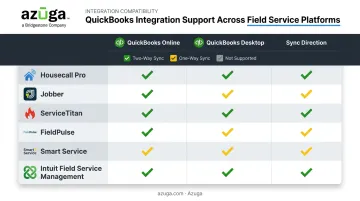
Housecall Pro is a mobile-first platform popular with HVAC, plumbing, and electrical contractors for its clean interface and automated customer reminders. It shines at payment processing and job-to-invoice speed, though its QuickBooks Online sync currently functions primarily one-way (Housecall Pro to QBO), and Desktop sync is one-way only.
| Category | Details |
|---|---|
| Pricing | Basic $59/mo, Essentials $149/mo, MAX $299/mo (annual billing) |
| QuickBooks Integration Type | Primarily one-way to QuickBooks Online; one-way only with QuickBooks Desktop |
| Best For | Small to mid-sized home service businesses prioritizing ease of use |
Jobber
Jobber built its reputation on quoting, scheduling, invoicing, and a client-facing portal that customers actually enjoy using. The interface is polished, but Jobber is explicit that it doesn't sync with QuickBooks Desktop at all.
| Category | Details |
|---|---|
| Pricing | Core $29/mo, Connect $99/mo, Grow $149/mo, Plus $399/mo (annual billing, 1-5 users depending on plan) |
| QuickBooks Integration Type | Automatic one-way sync with QuickBooks Online only |
| Best For | Startups and small teams with straightforward workflows |
ServiceTitan
ServiceTitan targets larger commercial field service operations that need heavy-duty reporting and job costing. It exports invoices, payments, and expenses to QuickBooks, and its Enterprise-tier inventory integration works with QuickBooks Advanced Inventory for material and equipment cost tracking.
| Category | Details |
|---|---|
| Pricing | Custom, priced per technician; contact vendor for a quote |
| QuickBooks Integration Type | One-way sync (ServiceTitan to QuickBooks) for both Online and Desktop/Enterprise |
| Best For | Larger, growth-focused businesses with multiple technicians and complex costing needs |
FieldPulse
FieldPulse covers everything from quoting to payroll for SMBs in HVAC, plumbing, and electrical trades. It markets genuine two-way sync with QuickBooks Online and Desktop, though the direction varies by record type: purchase orders can be set to one-way or two-way, while timesheets currently flow one-way into QuickBooks.
| Category | Details |
|---|---|
| Pricing | Custom, seat-based pricing; contact vendor for a quote |
| QuickBooks Integration Type | Two-way sync with QuickBooks Online and Desktop (varies by record type) |
| Best For | Growing field service teams needing deep QuickBooks sync in one workflow |
Smart Service
Smart Service Desktop was built specifically as a QuickBooks Desktop add-on for scheduling and dispatch in trades like HVAC and pest control. Its Desktop add-on offers real two-way sync, and the broader Smart Service Cloud product now also connects with QuickBooks Online.
| Category | Details |
|---|---|
| Pricing | Custom pricing; request a quote (annual subscriptions advertise a 20% discount) |
| QuickBooks Integration Type | Real-time two-way sync with QuickBooks Desktop; QuickBooks Online available via Smart Service Cloud |
| Best For | Small to mid-sized contractors already running QuickBooks Desktop |
Intuit Field Service Management (IFSM)
IFSM is Intuit's own dispatch and work-order tool, powered by Corrigo. Since Intuit owns both products, the connection to QuickBooks is native rather than bolted on. IFSM supports QuickBooks Online and all US Desktop editions, including Pro, Premier, and Enterprise, with one seat included in QuickBooks Desktop Enterprise subscriptions.
| Category | Details |
|---|---|
| Pricing | $15/user/mo (1-10 users), $13.33/user/mo (11-40 users), $12.08/user/mo (41-101 users) |
| QuickBooks Integration Type | Native two-way sync across QuickBooks Online and Desktop editions |
| Best For | Businesses already on QuickBooks Desktop Enterprise needing basic dispatch tools |
How We Chose the Best FSM Software With QuickBooks Integration
We prioritized four factors, in this order: depth of sync (two-way vs. one-way), QuickBooks version compatibility, ease of setup, and verified customer reviews over vendor marketing claims.
Here's a mistake we see constantly: businesses pick software based on how polished the interface looks. Then they discover post-purchase that the sync only flows one direction, or doesn't support their specific QuickBooks version at all. That's an expensive lesson.
These evaluation factors connect directly to business outcomes:
- Reduced admin time: two-way sync removes the need to manually cross-check both systems
- Fewer billing errors: comprehensive data sync (not just invoices) catches discrepancies before they reach customers
- Better cash flow visibility: real-time payment sync means your books reflect reality, not last week's data
Conclusion
There's no universal "best" FSM software with QuickBooks integration. The right answer depends on matching your QuickBooks version, required sync depth, and team size to your actual daily operations, not which platform has the most name recognition.
Before committing, run a free trial or demo and test the QuickBooks connection with your real data. Confirm whether the sync direction and version support match what your office team actually needs day to day.
If your business manages a fleet of service vehicles, consider extending that QuickBooks-connected workflow further. Pairing your FSM platform with Azuga's GPS fleet tracking adds vehicle location, driver safety scoring, and fuel cost data to the picture. This gives you a fuller view of both job profitability and fleet costs in one place.
Frequently Asked Questions
What field service management software is compatible with QuickBooks?
Housecall Pro, Jobber, ServiceTitan, FieldPulse, Smart Service, and Intuit Field Service Management all connect with QuickBooks in some form. Compatibility varies between QuickBooks Online and Desktop, so confirm your version before buying.
What is the best field service management software compatible with QuickBooks?
It depends on your business size and sync needs. FieldPulse and Smart Service currently offer the most genuine two-way sync capability, while Housecall Pro and Jobber suit smaller teams prioritizing ease of use.
Does field service software sync with both QuickBooks Desktop and QuickBooks Online?
Support varies widely by vendor. Jobber, for example, only connects with QuickBooks Online, while Smart Service Desktop is built specifically for QuickBooks Desktop. Always confirm version support before purchasing.
What's the difference between one-way and two-way QuickBooks sync?
One-way sync only pushes data from your FSM tool into QuickBooks; changes made in QuickBooks don't flow back. Two-way sync reflects updates made in either system automatically, reducing manual reconciliation.
How much does FSM software with QuickBooks integration typically cost?
Entry-level plans start around $29 to $59 per month for small teams, while enterprise platforms like ServiceTitan use custom per-technician pricing. Request a quote for accurate enterprise-level figures.
Can I add fleet tracking or GPS features to my FSM and QuickBooks setup?
Yes. Many teams pair their FSM and QuickBooks setup with a GPS fleet tracking platform like Azuga. This adds real-time location, safety scoring, and fuel cost data to your job and invoice records.